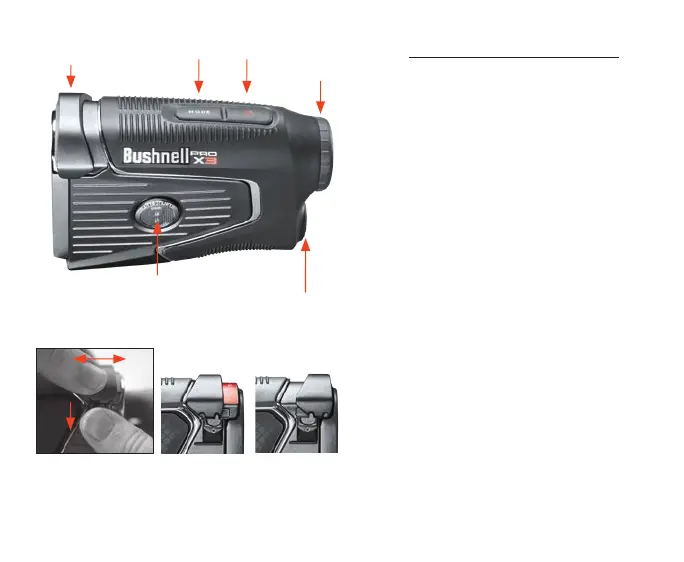
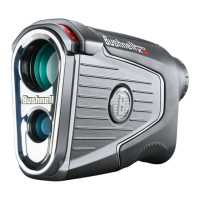
Battery
Compartment
Fire/Power Button
Dual Display Button
Basic Operation/Controls
1. Remove protective disc from battery
compartment.
2. Press Fire/Power button to activate display
and re laser.
3. Rotate the Diopter Dial, to adjust the
eyepiece focus.
4. Press and hold Mode button to enter
Settings. Press the Mode button to select and
modify: display brightness (red display only),
Yards/Meters, Bluetooth on/off, and Home
Elevation.
5. Press Fire/Power Button, while in Settings to
advance to the next screen.
6. While in Slope Mode, press and release the
Mode button to toggle between Play As and
Element Compensation Modes.
7. Press Dual Display button to switch between
red and black displays.
8. Slope Switch enables/disables slope mode.
Mode Button
For a full user manual, operating details,
product use questions and
warranty/repair information, please visit:
www.BushnellGolf.com/support
Diopter Dial
Slope Switch
Slope OffSlope On
To move the Slope Switch on or off, use right thumb to pull
down the side latch down. With other hand, pull back the
switch on both sides to enable Slope On or slide forward to
turn Slope off.



 To Next Page