21
The Settings Page
Although you’ll be spending most of
your time on the Play page, checking
the distance from where you’re standing
to each green, you must rst select a
course and tee box, so let’s take a look
at the Settings page where this is done.
From the Start screen, press DOWN
once to select (highlight) SETTINGS
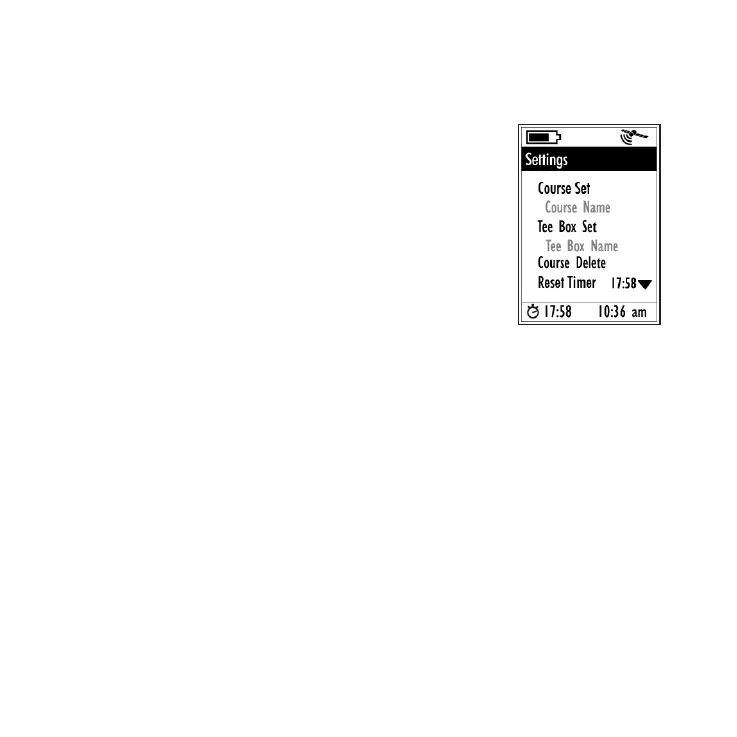
and press ENTER. You will see a list of
eight items (keep pressing DOWN to
scroll through the entire list):
1) Selecting A Golf Course
On the Settings page, with “Course Set” highlighted,
press ENTER to see the list of courses you previously
downloaded or transferred into the YP GPS. You can see
ve at a time out of the up to ten courses the YP GPS
can t in it’s memory. Press the DOWN or UP keys to
move through the list, highlighting course names. To
scroll to courses #6-10, just keep pressing DOWN after
course #5 at the bottom of the screen. When you’ve
selected the course you going to play, press ENTER.
The display will return to the Settings page. The name
of your currently selected course is now shown below
“Course Set” for quick reference.
Initial “Settings” page screen





 To Next Page