The BYGD Pure Sine Wave Inverter SW2000/SW3000 is a versatile power inverter designed to convert 12V DC battery power into 220V AC power, suitable for a wide range of applications. It also provides 5V and 9V DC power through USB-A and USB-C ports, including a fast-charging USB-C port. This inverter is ideal for emergency car starting equipment, various civil appliances, and digital devices.
Function Description:
The inverter takes 12V DC input from a battery and outputs 220V AC power through its AC sockets. It also features USB-A and USB-C ports for charging smaller digital devices like mobile phones, iPads, iPhones, laptops, and digital cameras. The device is equipped with advanced electronic technology and an automatic safety monitoring circuit to ensure reliable operation and protection for both the inverter and the connected battery.
Before using the inverter, it is crucial to read and understand all safety instructions.
- Children Safety: Keep children away from the product during operation. The inverter generates AC power similar to mains electricity, so electrical safety is paramount.
- High Temperature: When operating with high-power appliances, the inverter's casing may become hot. Exercise caution regarding high-temperature sources.
- Environment: Do not use the product in flammable or explosive environments.
- Electric Shock Risk: When inserting an appliance into the AC outlet, ensure your fingers do not touch the metal parts of the outlet to prevent electric shock.
- Charging Appliances: Do not plug in electrical appliances that are already charged when the inverter's AC socket is active, as this can damage the product.
- Ventilation: Do not cover the inverter''s shell; ensure adequate ventilation to prevent overheating.
- Foreign Objects: Do not insert foreign objects into the AC or DC output ports.
- Power Distribution: Do not connect the inverter to other AC power distribution lines.
- Temperature Extremes: Avoid prolonged use in ultra-high temperature environments.
- Moisture Exposure: Do not expose the product to water, rain, snow, or spray during use.
Security Features:
The inverter incorporates several protection functions:
- Automatic shutdown for overload protection.
- Under-voltage protection automatic shut-off.
- Overvoltage protection auto shut-off.
- Automatic shut-off for over-temperature protection.
- Leakage protection auto shut-off.
- Load short-circuit protection auto shut-off.
- Built-in fuses: SW2000 includes 30A12 fuses, and SW3000 includes 40A12 fuses.
- Fan Panel:
- Ground screw
- Black negative terminal
- Fan
- Red positive terminal
- Socket Panel:
5. German socket *2
6. Working indication green light
7. Lithium working indication blue light
8. Error indication red light
9. Battery mode switch
10. Power switch button
11. In-line connection port
12. USB-A, USB-C combination port
Important Technical Specifications:
AC Output:
- Model: SW2000 / SW3000
- AC Output Voltage: 220V/200V~250V AC
- AC Continuous Output Power: 2000W (SW2000) / 3000W (SW3000)
- Output Overload Protection Power: 2400W Max (SW2000) / 3200W Max (SW3000)
- AC Output Frequency: Typical values: 50 ±1Hz
- Output Waveform: Pure sine wave
- Fan Control: Temperature 50°C or load > 400W
USB-A, USB-C Output, Remote Control Function:
- USB-A, USB-C Port Output: 5V/3.1A, 9V/1.67A
- Remote Control Board with LCD Screen: Customer optional (not included by default)
- Battery Type: Lead acid / Lithium battery
- Operating Voltage: 11V-15VDC (Lead acid) / 10-16VDC (Lithium battery)
- Static Current: <2A
- Conversion Efficiency (maximum): >86%
- Undervoltage Shutdown Voltage Point: 10.0V±0.5VDC (Lead acid) / 9.0V±0.5VDC (Lithium battery)
- Undervoltage Recovery Voltage Point: 11.0V±0.5VDC (Lead acid) / 11.0V±0.5VDC (Lithium battery)
- Overvoltage Shutdown Voltage Point: 15.0V±0.5VDC (Lead acid) / 16.0V±0.5VDC (Lithium battery)
- Overvoltage Recovery Voltage Point: 14.0V±0.5VDC (Lead acid) / 15.0V±0.5VDC (Lithium battery)
LED Instructions:
- Normal Work: Green light on
- Over-voltage, under-voltage, over-temperature protection: Red light flashing
- Overload protection: Red light on long
Physical Properties:
- Operating Temperature Range: 0°C-50°C
- Dimensions: 435240115mm
- Weight: 5400g (SW2000) / 5500g (SW3000)
Usage Features:
Connection Instructions:
- Battery Connection: Connect the clip cable to a 12V DC battery. Ensure the battery type and voltage match the inverter's requirements. Connect the red clip to the positive terminal and the black clip to the negative terminal to avoid blowing the fuse due to reverse connection. Only 12V batteries are allowed; 6V batteries are not.
- Load Connection: Connect the desired load to the AC output socket or USB port.
- Power On: Press and hold the power switch button for 1 second to start the inverter.
- Power Off/Storage: When not in use, disconnect the clip cable from both ends of the battery to prevent static power loss.
Operation Guide:
- Starting Up: After a 1-second long press of the switch, the socket outputs 220VAC. Connect your load to the AC output socket or USB port.
- Overload Protection: If the load power exceeds the rated power, the inverter will automatically shut down due to overload protection. Reduce the load and restart the product.
- Under-voltage Protection: When the battery voltage drops to 10V, the under-voltage protection activates, and the product shuts down automatically. This protects the battery from damage and ensures sufficient power for car starting.
- Over-temperature Protection: If the operating temperature exceeds the safe limit due to poor ventilation or high external temperature, the over-temperature protection activates, and the product shuts down. It will automatically resume operation once the temperature returns to normal.
- Overvoltage Protection: If a faulty battery charging system causes the battery voltage to rise above 18.5V, the overvoltage protection activates, and the product shuts down automatically.
- Caution: Although the product has overvoltage protection, input voltages exceeding 17V may still cause damage.
Maintenance Features (Troubleshooting):
Problem: No output and abnormal power display light
- Possible Causes:
- Battery defects.
- Loose battery clips.
- Measures:
- Check the battery and replace it if necessary.
- Check the connections.
Problem: Output voltage is too low
- Possible Causes:
- A standard average AC voltmeter measuring the output voltage will show an error of 5 to 15V.
- Battery voltage is too low.
- Measures:
- The inverter outputs a "pure sine wave," requiring measurement with a voltmeter marked "true RMS" or an oscilloscope capable of measuring RMS values.
- Charge the battery.
Problem: Product does not work
- Possible Causes:
- Load power exceeds the continuous output power, triggering overload protection shutdown.
- Load power is lower than the rated power, or capacitive/inductive load has too high a power-on surge, causing overload protection shutdown.
- Product overheats due to poor ventilation, triggering over-temperature protection shutdown.
- Battery feed issue.
- Measures:
- Use a load no greater than the rated one.
- If the start-up surge of the load exceeds the inverter's starting capacity, choose a suitable 220V power supply.
- Unplug the inverter from the output socket, allow it to cool for 15 minutes, and remove any obstructions. Move the product to a cooler location. If continuous operation is necessary, reduce the load and restart.
- Recharge the battery.

 Need help?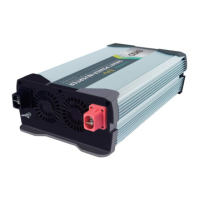

 To Next Page
 General