Page 10 CC Solar Observer
Getting Started - Powering Your Radio
,QVHUWLQJWKH%DWWHULHV
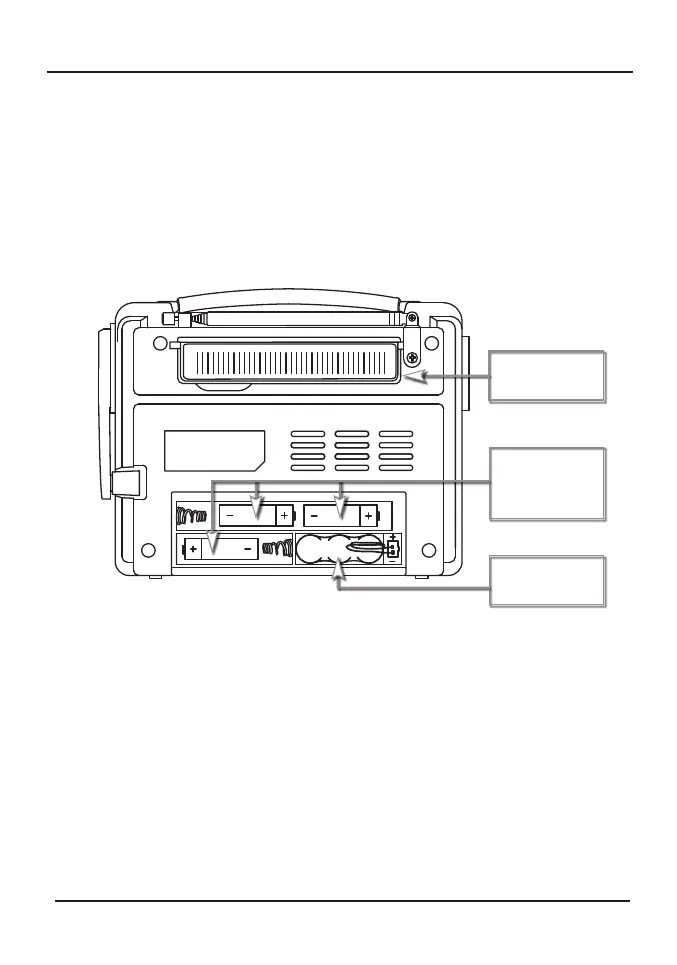
1. Position the radio face down on a soft surface to protect it.
2. Gently press and slide the battery compartment cover towards you. It will slide
GRZQVOLJKWO\DQGWKHQÀLSVXSRQLWVKLQJHV'RQRWIRUFH
3. Insert the 3 “AA” batteries into the compartment, as indicated in the picture
below. Be sure the negative (-) end is against the spring. Refer to the picture
below to ensure correct installation of your batteries.
3ODFHWKHEDWWHU\FRYHUGRZQÀDWDQGVOLGHEDFNXSWRWKHFORVHGSRVLWLRQ2Q
the front of the radio, slide the “Power Switch” to “Battery” to turn the radio on.
Fold out
Solar Panel.
Install 3 “AA”
batteries as
shown here.
Internal
Battery Pack.
3RZHUE\&KDUJLQJ$GDSWHU(Optional accessory not included) - Connect the AC
FKDUJLQJDGDSWHUEHWZHHQD9ROW+]ZDOORXWOHWDQGWKH³%$77(5<3$&.
CHARGING JACK” on the side of the radio. The green “DYNAMO” light will glow.
To fully charge the battery pack, plug the charging adapter in. We recommend
keeping it plugged in for no more than 12 hours.
Note: The AC charging adapter should only be used to charge the battery pack
and should not be used to power the radio on a constant basis. Leaving the
charging adapter plugged into the radio for long periods of time will shorten the
life of the internal battery pack (See Page 4).
Note: We do not recommend using the AC charging adapter while your cell phone
is connected to the radio. Many newer cell phones require more power than the
power adapter can supply. This can cause the cell phone to discharge and possibly
damage the power adapter.




 To Next Page