..then click
”Select”
Click on
your WiFi
network that
you want
to repeat..
2
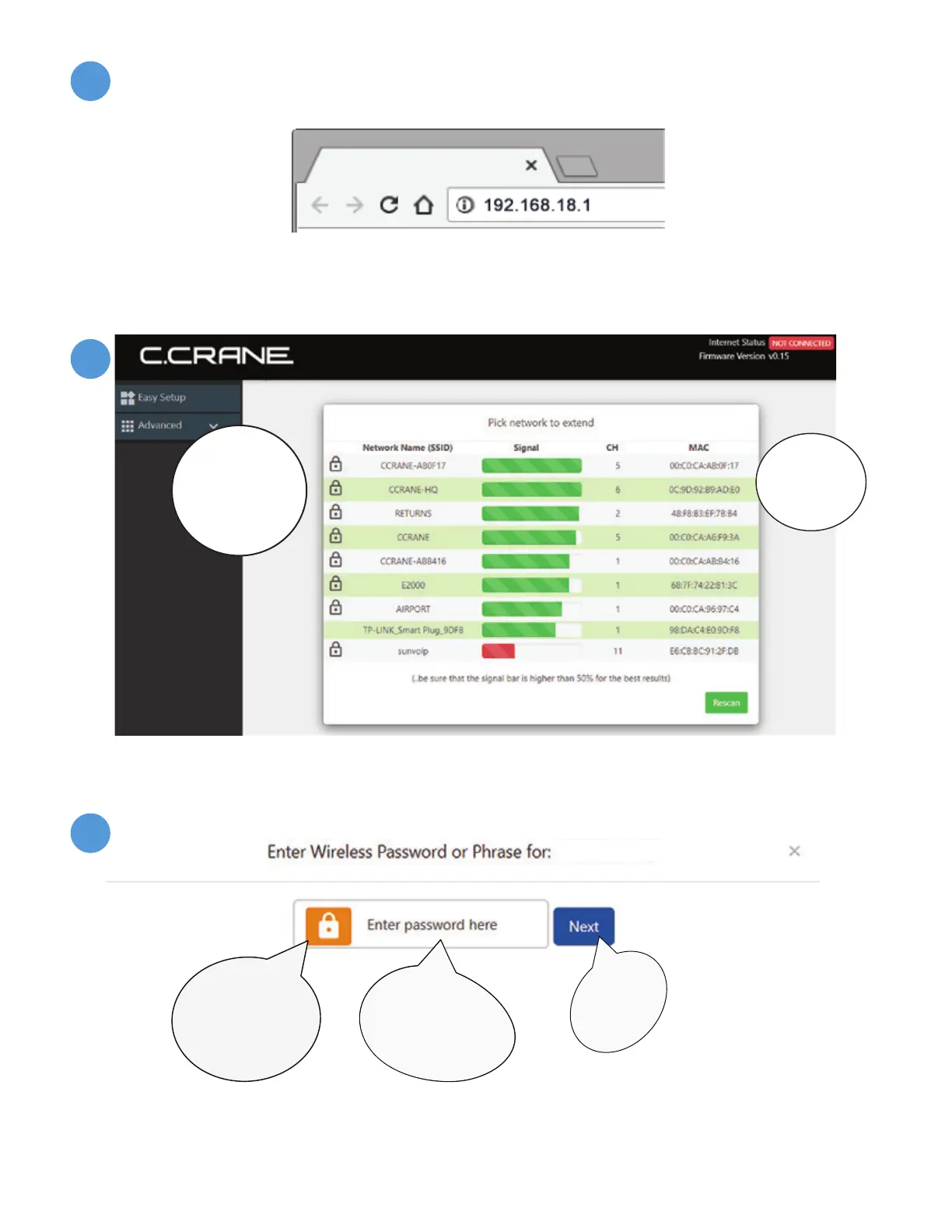
After confirming you have completed Step “B”, open the Internet Browser screen on your
device and enter 192.168.18.1 into the Address Bar. Press “Enter” on your keyboard.
NOTE: At this point you are connected to the CC Vector but your browser will likely
tell you that you are not connected to the internet. This is normal because the CC Vector
is not yet setup. Continue with the setup.
NOTE: For best performance, your signal should be higher than 50%. For a better signal,
try adjusting the orientation and placement of the USB antenna - then click “Rescan” to
see if the signal is higher.
NOTE: If network in Step “D” does not require a password, then you will not get this
screen. Proceed to Step “F”.
YOUR NETWORK PASSWORD
Enter Wireless
Password for
Network
in Step “D”
..then click
”Next”
Click to
unlock if
you wish to
view your
Password
C
D
E
Network names shown above will be different in
your location.
*
*


 To Next Page