EasyManua.ls Logo

C.E.C. ST630 - Page 5

Default Icon
21 pages
Print Icon
To Next Page IconTo Next Page
To Previous Page IconTo Previous Page
Loading...
Figure
7
4.
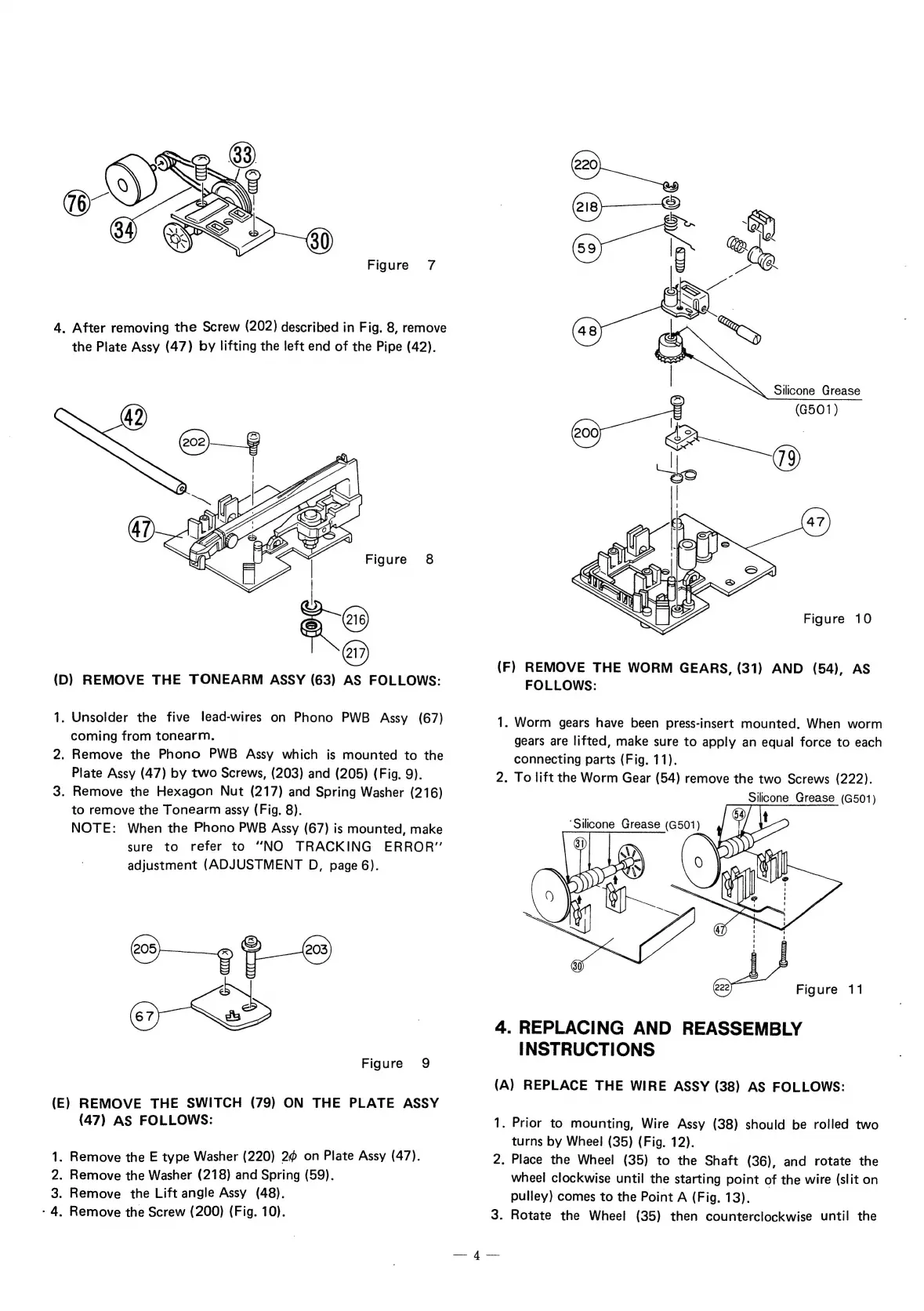
After
removing
the
Screw
(202)
described
in
Fig.
8,
remove
the
Plate
Assy
(47)
by
lifting
the
left
end
of
the
Pipe
(42).
(D)
REMOVE
THE
TONEARM
ASSY
(63)
AS
FOLLOWS:
1.
Unsolder
the
five
lead-wires
on
Phono
PWB
Assy
(67)
coming
from
tonearm.
2.
Remove
the
Phono
PWB
Assy
which
is
mounted
to
the
Plate
Assy
(47)
by
two
Screws,
(203)
and
(205)
(Fig.
9).
3.
Remove
the
Hexagon
Nut
(217)
and
Spring
Washer
(216)
to
remove
the
Tonearm
assy
(Fig.
8).
NOTE:
When
the
Phono
PWB
Assy
(67)
is
mounted,
make
sure
to
refer
to
“NO
TRACKING
ERROR”
adjustment
(ADJUSTMENT
D,
page
6).
Ss)
]
é)
rr
(@)
Figure
9
(E)
REMOVE
THE
SWITCH
(79)
ON
THE
PLATE
ASSY
(47)
AS
FOLLOWS:
1.
Remove
the
E
type
Washer
(220)
2
on
Plate
Assy
(47).
2.
Remove
the
Washer
(218)
and
Spring
(59).
3.
Remove
the
Lift
angle
Assy
(48).
-
4,
Remove
the
Screw
(200)
(Fig.
10).
Silicone
Grease
(G501)
Figure
10
(F)
REMOVE
THE
WORM
GEARS,
(31)
AND
(54),
AS
1.
FOLLOWS:
Worm
gears
have
been
press-insert
mounted.
When
worm
gears
are
lifted,
make
sure
to
apply
an
equal
force
to
each
connecting
parts
(Fig.
11).
2.
To
lift
the
Worm
Gear
(54)
remove
the
two
Screws
(222).
Silicone
Grease
(G501)
Figure
11
4.
REPLACING
AND
REASSEMBLY
INSTRUCTIONS
(A)
REPLACE
THE
WIRE
ASSY
(38)
AS
FOLLOWS:
1.
2.
Prior
to
mounting,
Wire
Assy
(38)
should
be
rolled
two
turns
by
Wheel
(35)
(Fig.
12).
Place
the
Wheel
(35)
to
the
Shaft
(36),
and
rotate
the
wheel
clockwise
until
the
starting
point
of
the
wire
(slit
on
pulley)
comes
to
the
Point
A
(Fig.
13).
.
Rotate
the
Wheel
(35)
then
counterclockwise
until
the