EasyManua.ls Logo

C.E.C. ST630 - Page 6

Default Icon
21 pages
Print Icon
To Next Page IconTo Next Page
To Previous Page IconTo Previous Page
Loading...
point
A
comes
to
the
point
B.
This
position
will
correspond
to
the
most
left
possible
location
of
Plate
Assy
(47).
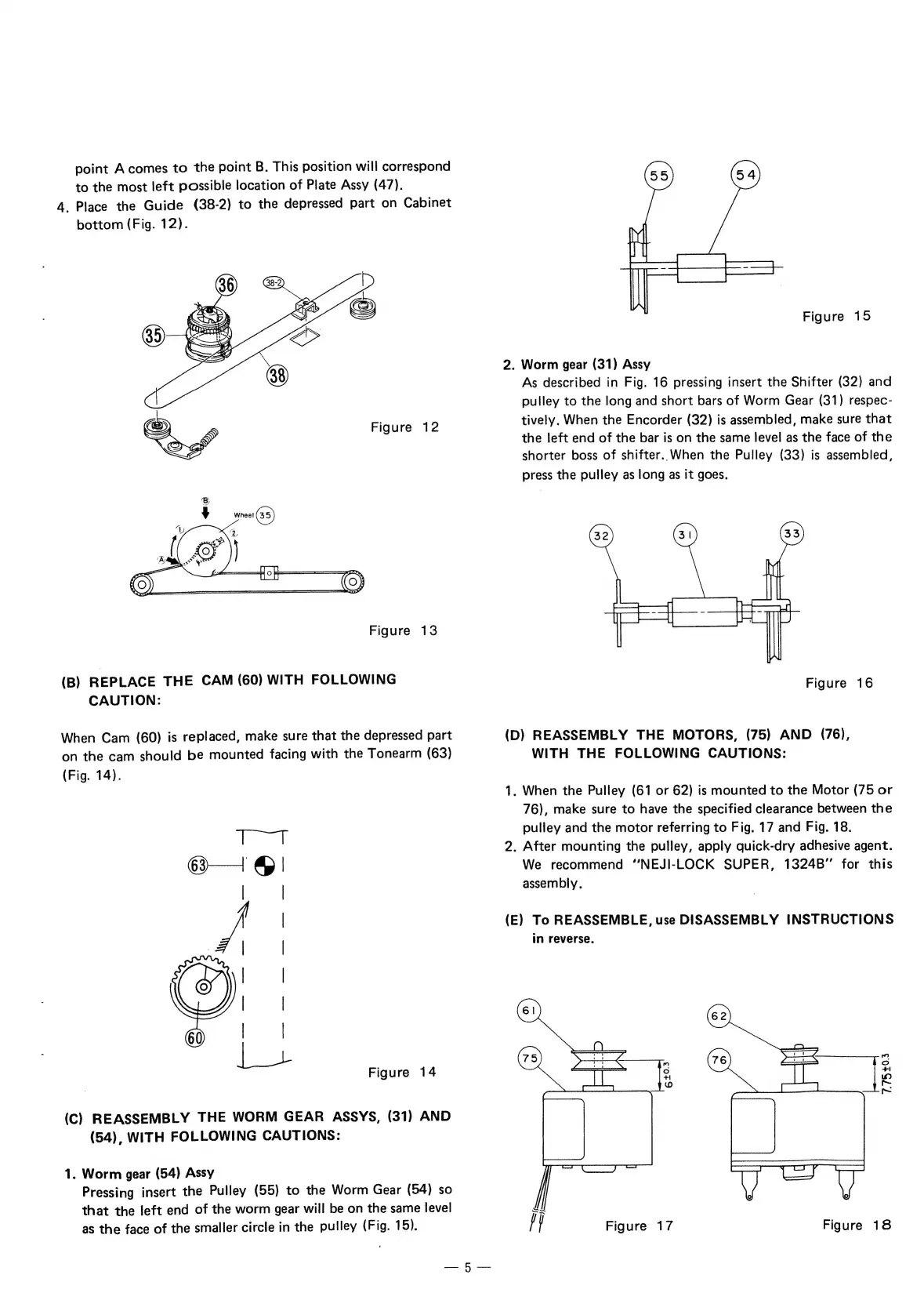
4.
Place
the
Guide
(38-2)
to
the
depressed
part
on
Cabinet
bottom
(Fig.
12).
Figure
12
Figure
13
(B)
REPLACE
THE
CAM
(60)
WITH
FOLLOWING
CAUTION:
When
Cam
(60)
is
replaced,
make
sure
that
the
depressed
part
on
the
cam
should
be
mounted
facing
with
the
Tonearm
(63)
(Fig.
14).
Figure
14
(C)
REASSEMBLY
THE
WORM
GEAR
ASSYS,
(31)
AND
(54),
WITH
FOLLOWING
CAUTIONS:
1.
Worm
gear
(54)
Assy
Pressing
insert
the
Pulley
(55)
to
the
Worm
Gear
(54)
so
that
the
left
end
of
the
worm
gear
will
be
on
the
same
level
as
the
face
of
the
smaller
circle
in
the
pulley
(Fig.
15).
Figure
15
2.
Worm
gear
(31)
Assy
As
described
in
Fig.
16
pressing
insert
the
Shifter
(32)
and
pulley
to
the
long
and
short
bars
of
Worm
Gear
(31)
respec-
tively.
When
the
Encorder
(32)
is
assembled,
make
sure
that
the
left
end
of
the
bar
is
on
the
same
level
as
the
face
of
the
shorter
boss
of
shifter.
When
the
Pulley
(33)
is
assembled,
press
the
pulley
as
long
as
it
goes.
Figure
16
(D)
REASSEMBLY
THE
MOTORS,
(75)
AND
(76),
WITH
THE
FOLLOWING
CAUTIONS:
1.
When
the
Pulley
(61
or
62)
is
mounted
to
the
Motor
(75
or
76),
make
sure
to
have
the
specified
clearance
between
the
pulley
and
the
motor
referring
to
Fig.
17
and
Fig.
18.
2.
After
mounting
the
pulley,
apply
quick-dry
adhesive
agent.
We
recommend
“NEJI-LOCK
SUPER,
1324B”
for
this
assembly.
(E)
To
REASSEMBLE,
use
DISASSEMBLY
INSTRUCTIONS
in
reverse.
3
=
Ee
~
fy
Figure
17
Figure
18