EasyManua.ls Logo

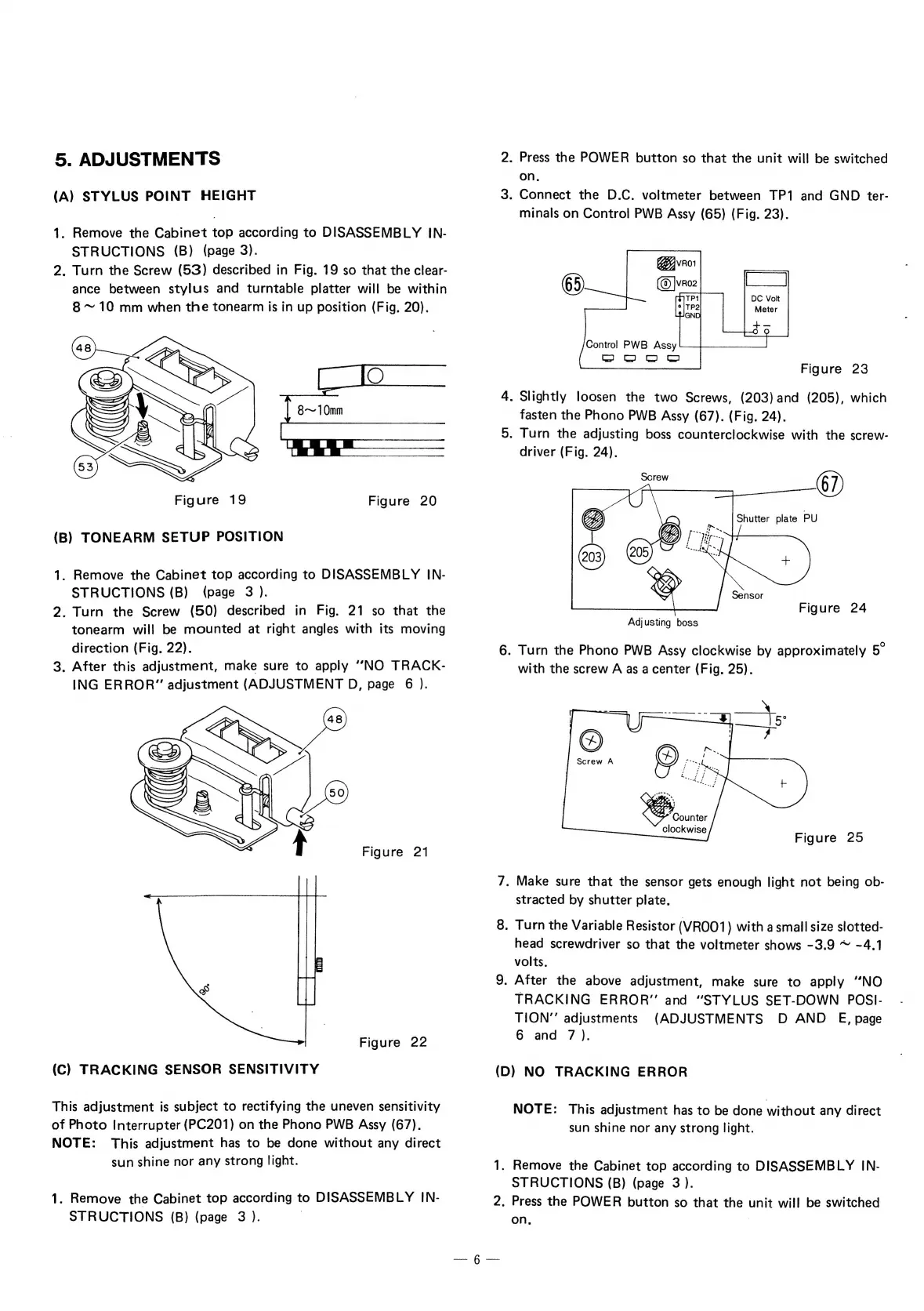
C.E.C. ST630 - Setup Position

Default Icon
21 pages
Print Icon
To Next Page IconTo Next Page
To Previous Page IconTo Previous Page
Loading...
5.
ADJUSTMENTS
(A)
STYLUS
POINT
HEIGHT
1.
Remove
the
Cabinet
top
according
to
DISASSEMBLY
IN-
STRUCTIONS
(B)
(page
3).
2.
Turn
the
Screw
(53)
described
in
Fig.
19
so
that
the
clear-
ance
between
stylus
and
turntable
platter
will
be
within
8
~
10
mm
when
the
tonearm
is
in
up
position
(Fig,
20).
8~
10mm
Figure
19
Figure
20
(B)
TONEARM
SETUP
POSITION
1.
Remove
the
Cabinet
top
according
to
DISASSEMBLY
IN-
STRUCTIONS
(B)
(page
3
).
2.
Turn
the
Screw
(50)
described
in
Fig.
21
so
that
the
tonearm
will
be
mounted
at
right
angles
with
its
moving
direction
(Fig.
22).
3.
After
this
adjustment,
make
sure
to
apply
"NO
TRACK-
ING
ERROR”
adjustment
(ADJUSTMENT
D,
page
6
).
Figure
21
Figure
22
(C)
TRACKING
SENSOR
SENSITIVITY
This
adjustment
is
subject
to
rectifying
the
uneven
sensitivity
of
Photo
Interrupter
(PC201)
on
the
Phono
PWB
Assy
(67).
NOTE:
This
adjustment
has
to
be
done
without
any
direct
sun
shine
nor
any
strong
light.
1.
Remove
the
Cabinet
top
according
to
DISASSEMBLY
IN-
STRUCTIONS
(B)
(page
3
).
|
2.
Press
the
POWER
button
so
that
the
unit
will
be
switched
on.
3.
Connect
the
D.C.
voltmeter
between
TP1
and
GND
ter-
minals
on
Control
PWB
Assy
(65)
(Fig.
23).
[
DC
Volt
Meter
nary
Control
PWB
Assy
SH]
©
f
Figure
23
4.
Slightly
loosen
the
two
Screws,
(203)
and
(205),
which
fasten
the
Phono
PWB
Assy
(67).
(Fig.
24).
5.
Turn
the
adjusting
boss
counterclockwise
with
the
screw-
driver
(Fig.
24).
fo
Shutter
plate
PU
Figure
24
Adjusting
boss
6.
Turn
the
Phono
PWB
Assy
clockwise
by
approximately
with
the
screw
A
as
a
center
(Fig.
25).
Figure
25
7.
Make
sure
that
the
sensor
gets
enough
light
not
being
ob-
stracted
by
shutter
plate.
8.
Turn
the
Variable
Resistor
(VROO1)
with
a
small
size
slotted-
head
screwdriver
so
that
the
voltmeter
shows
-3.9
~
-4.1
volts.
9.
After
the
above
adjustment,
make
sure
to
apply
‘’NO
TRACKING
ERROR”
and
“STYLUS
SET-DOWN
POSI-
TION’’
adjustments
(ADJUSTMENTS
D
AND
€E,
page
6
and
7).
(D)
NO
TRACKING
ERROR
NOTE:
This
adjustment
has
to
be
done
without
any
direct
sun
shine
nor
any
strong
light.
1.
Remove
the
Cabinet
top
according
to
DISASSEMBLY
IN-
STRUCTIONS
(B)
(page
3
).
2.
Press
the
POWER
button
so
that
the
unit
will
be
switched
on.
|
§