EasyManua.ls Logo

C2Dx STIC User Manual

C2Dx STIC
2 pages
To Next Page IconTo Next Page
Page #1 background imageLoading...
Page #1 background image
Follow sterile procedures.
1. Turn unit on. “__ __” is displayed for five seconds and then
disappears. The device is now ready for use. If “__ __” is
displayed continuously, see Troubleshooting.
2. Remove contents of disposable pouch.
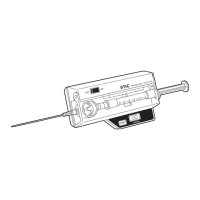
3. Place needle firmly on tapered chamber stem.
4. Remove cap on pre-filled syringe and screw the syringe onto
remaining chamber stem. Be careful not to contaminate the
fluid pathway.
5. Open cover of monitor and inspect transducer port for damage
or contamination. If damaged, do not use and return to C2DX.
Remove all contamination with a soft damp cloth. Place
chamber in well (black surface down) and gently push until
disposable seats.
6. Snap cover closed. DO NOT FORCE. Make sure latch has
snapped.
NOTE: If the cover will not close, rotate the syrings so that a straight
side of the flange rests against the base of the monitor. This will
reduce the height of the flange to allow the cover to close.
QUICK PRESSURE MONITOR SET INSTRUCTIONS
7. Hold the needle approximately 45° up from horizontal. Slowly
force fluid through the disposable to purge it of air.
CAUTION: DO NOT allow saline to roll down into the transducer
well.
8. Approximate the intended angle of the insertion of the needle
into the skin. To insure accuracy the display must read -8 to
+9mm/Hg. Press the “ZERO” button. The display will read “00”
after approximately 2 seconds.
NOTE: Display must read “00” before continuing. If it does not,
please see troubleshooting.
9. Insert needle into body. Slowly inject less than 3/10 cc of saline
into the compartment to equillibrate with interstitial fluids.
Wait for the display to reach equillibrium.
Read pressure.
For additional measurements, repeat steps 8-11. Make sure unit
is reset to zero.
WARNING: Device must be at correct angle of
insertion before the “ZERO” button is pressed
to insure accuracy.
WARNING: DO NOT use pressure readings when
display indicates low batter. Replace battery
and repeat steps to obtain pressure reading.
STIC Intra-Compartmental Pressure
Monitor System Instruction Guide
555 East Eliza Street
Schoolcraft, MI 49087
P: 888.902.2239
F: 269.204.2480
c2dxinc.com
Question and Answer IconNeed help?

Do you have a question about the C2Dx STIC and is the answer not in the manual?

C2Dx STIC Specifications

General IconGeneral
BrandC2Dx
ModelSTIC
CategoryMedical Equipment
LanguageEnglish

Summary

Quick Pressure Monitor Set Instructions

Sterile Procedure and Initial Device Activation

Follow sterile procedures, turn on the unit, prepare the syringe, and attach it to the monitor.

Transducer Port Inspection and Cover Closure

Inspect the transducer port for damage, clean if necessary, and close the monitor cover properly.

Air Purging and Device Zeroing

Purge air from the disposable, ensure the device is at the correct angle, and press "ZERO" for calibration.

Pressure Measurement and Equilibration

Insert the needle, inject saline to equilibrate, wait for stability, and record the pressure reading.

Repeat Measurement and Battery Warning

Repeat measurement steps, ensuring the unit is reset to zero; avoid readings with low battery.

Indwelling Slit Catheter Set Instructions

Catheter Procedure Duration and Initial Steps

Adhere to the 24-hour duration limit for the catheter procedure; follow initial steps from Quick Pressure Monitor.

Catheter Attachment and Preparation

Attach the slit catheter to the chamber stem, ensuring a snug fit; remove the needle guard from the break-away needle.

Catheter Insertion and Break-away Needle Removal

Insert the catheter, push it into the compartment, and remove the break-away needle carefully.

Catheter Positioning and Zeroing

Align the catheter tip height with the diaphragm, ensure correct insertion angle, and press "ZERO".

Pressure Measurement and Patient Safety

Inject saline, wait for equilibrium, record pressure, and securely tape the monitor to the patient.

Related product manuals