This document describes a 7"/10.1" HD Digital LCD Color Monitor, designed for various applications, including use with cameras and other video input devices. The monitor features a capacitive touch-screen and can also be operated via a remote control.
Function Description:
The monitor serves as a display unit for up to four cameras, supporting PAL, NTSC, HDA, HDT, and HDC formats (720p/1080p). It offers multiple image display modes, including single, dual, triplex, quad, trefoil, Y-split, and H-split. Additionally, it supports various video inputs: one HDMI input for connection to PCs or smart electronic devices (optional), one VGA video input with up to 1080p resolution, and one CVBS video input for DVD players. The monitor includes five trigger inputs with selectable priority and delay, allowing for automatic switching to a specific camera when a trigger signal is detected. It also features auto scan functionality with selectable channels and scan times. For user convenience, it has a parking line display, a 1.5W speaker, and supports backlight adjustment in three manual levels or automatically. The monitor's OSD (On-Screen Display) supports nine languages: English, German, Japanese, Russian, Chinese, Italian, Spanish, French, and Dutch.
Important Technical Specifications:
- Display Size: 7" or 10.1"
- Display Type: HD Digital LCD Color Monitor with LVDS interface
- Input Resolution Support: Up to 1920x1080
- Camera Input Support: 4 channels (PAL / NTSC / HDA / HDT / HDC - 720p/1080p)
- Video Inputs:
- 1 x HDMI (optional)
- 1 x VGA (up to 1080p)
- 1 x CVBS
- Trigger Inputs: 5, with selectable priority (1-5) and delay (1-60s)
- Speaker: 1.5W
- Backlight Adjustment: 3 manual levels, plus automatic
- OSD Languages: English, German, Japanese, Russian, Chinese, Italian, Spanish, French, Dutch
- Working Voltage: 10-32V DC
- Protection: Short circuit protection, short circuit alarm function
- Operating Temperature: -20°C to +70°C
- Storage Temperature: -30°C to +80°C
- Humidity: Rh90%
- Compliance: CE/FCC standards
Usage Features:
- Operation: The monitor can be operated via its capacitive touch-screen or the included IR remote control.
- Menu Navigation: The remote control provides buttons for mute/unmute, power on/standby, menu access, volume control, cursor movement (up/down), confirmation, TV system switching (NTSC/PAL/720p/1080i), language setup, and system reset.
- Touch-Screen Gestures:
- Touching anywhere in a white-lined section of the desktop calls up the home menu.
- Sliding left/right on the screen cycles through image display modes (LEFT -> RIGHT -> FRONT -> BACK -> DUAL -> TRIPLE -> TREFOIL -> Y-SPLIT -> H SPLIT -> QUAD -> LEFT).
- Sliding up/down on the screen conveniently enters/exits standby mode.
- Touching a camera channel in multi-split screen mode zooms to a single full screen; touching again returns to multi-split screen.
- Home Menu: Icons allow access to various settings, or touching outside the white-lined area exits the menu.
- Volume Control: A slider on the volume bar adjusts the volume, and a speaker icon toggles mute/unmute.
- Mode Selection: Icons allow switching between camera channels.
- Settings:
- Camera Settings: Allows setting camera names (up to 8 digits), adjusting brightness, contrast, and color, and horizontally/vertically flipping images.
- Parking Line: Enables/disables parking lines and allows calibration for Line 1 and Line 2 by dragging a cursor.
- Language: Selects the OSD language.
- Trigger: Configures trigger delay (1-60s) and priority (1-5) for each camera. Trigger function takes priority over auto scan. When a trigger signal is detected, the monitor automatically switches to the working camera and returns to the previous signal source after the trigger ends. Supports standby trigger.
- Auto Scan: Sets auto scan delay range (1-60s) for individual cameras and quad view.
- Power On Display: Configures which camera signal source is displayed upon power-on, or boots into standby mode.
- Standard: Sets the TV system (NTSC/PAL/720p/1080i) and refresh rates (50Hz/60Hz) for split-screen display modes.
- Menu Lock: Can be enabled/disabled to disable touch control. It can also be toggled by pressing the physical power button for 3 seconds when the menu is off.
Maintenance Features:
- Cleaning: Disconnect all cables before cleaning. Use a mild household detergent and a slightly damp, soft cloth. Avoid strong solvents like thinner or benzine.
- Safety:
- Do not expose the monitor to extreme heat, cold, or excessive moisture, dust, or smoke.
- Avoid dropping or striking the device.
- Do not use in enclosed spaces or areas with excessive vibration.
- Do not puncture, scratch, or use abrasive cleaning materials.
- Ensure at least 2 inches of space around the monitor for air circulation.
- The monitor is not waterproof.
- High voltage is present inside; only professionals should open the case.
- Ensure all cables are connected properly with correct polarity to prevent damage.
- Remove power cable connections when not in use.
- Troubleshooting: If any problem occurs, turn off the display immediately and contact the company or authorized dealer. Do not attempt to repair the device yourself, as disassembly or modification may cause damage and invalidate the warranty.
- LCD Screen: Occasionally, a few highlights or dark spots may appear on the LCD screen. This is a common phenomenon in active matrix display technology and does not indicate defects or faults.

 Need help?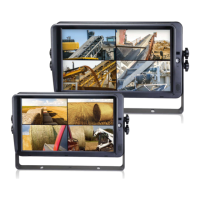

 To Next Page
 General