
 Need help?
Do you have a question about the Cabletime Mediastar 798 and is the answer not in the manual?
Physical mounting of the encoder blade into a chassis or rack.
Setting the unit's IP address via the front panel display and buttons.
Connecting the encoder to the network using a CAT5 cable.
Accessing the encoder's web configuration interface via a browser.
Configuring network gateway, DNS server, and NTP time server.
Setting video/audio encoding parameters, bit rates, and resolution.
Adding the encoder as a source in Media Manager software.
How the encoder streams HDCP protected vs. unprotected HDMI input.
Viewing product capabilities, current operational status, serial number, and unit name.
Configuring network connection, addressing, hostname, and gateway settings.
Setting video/audio encoding parameters, bit rates, and output resolution.
Details on connected HDCP Pro clients and locality time checks.
Setting a password for configuration and managing access.
Dimensions, weight, operating temperature, and humidity range.
Power consumption, LAN interface details, and supported network protocols.
HDMI input capabilities, video/audio encoding standards, and bit rates.
Output stream format, HDMI monitor port, USB, and RS232 port specifications.
Front panel controls, web config, software upgradability, and approvals.
Declares conformity to EU directives like EMC, Low Voltage, and RoHS.
Lists specific safety, emissions, and CB scheme certifications.
Details FCC compliance for Class A digital devices and operating conditions.
Instructions for responsible disposal of the product and electronic accessories.
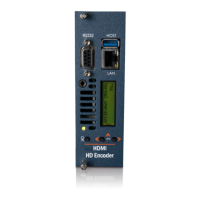
The MediaStar 798 HDMI HD Encoder is a device designed for converting HDMI video and audio signals into a 'live' multicast IPTV stream. It supports H.264 video and AAC audio encoding, making it suitable for distributing high-definition content over an IP network.
The primary function of the 798 HDMI Encoder is to take an HDMI input (from sources like satellite set-top boxes or PCs) and encode it into an H.264 video and AAC audio stream. This stream is then transmitted across an IP network as a UDP multicast or unicast MPEG2 transport stream. This allows IP set-top devices, screens, and software applications (such as the MediaStar Portal Player) to receive and display the 'live' TV pictures.
A key feature of the 798 HDMI Encoder is its ability to handle HDCP (High-bandwidth Digital Content Protection) protected content. A 'standard' 798 encoder can be used for HDMI sources without HDCP encryption. However, for HDCP-protected HDMI sources, a 798-HDCP variant encoder is required. The 798-HDCP encoder distributes the stream with HDCP encryption and implements additional security and locality checks as required by the HDCP Professional (HDCP Pro) standard. This ensures that HDCP-protected content can be streamed to an unlimited number of screens using HDCP Pro-enabled 782 Media Players or MediaStar Portal Player software. The 798 HDCP Pro encoder will only work with HDCP Pro-enabled 782 units and MediaStar Portal Player software, as it exchanges encrypted security credentials with these client devices.
The encoder also includes a built-in IR blaster. This allows the 798 encoder to control the HDMI source device connected to it. The 782 media player at the user's display captures IR keypresses and transmits them across the network to the 798 encoder, which then replicates the IR keypress locally, enabling the source device to respond and update its HDMI output accordingly.
For local monitoring, the 798 encoder 'blade' features an HDMI output port, allowing the HDMI input to be viewed directly.
 General
| Brand | Cabletime |
|---|---|
| Model | Mediastar 798 |
| Category | Media Converter |
| Language | English |

 To Next Page