Need help?
Do you have a question about the CAD Audio U7 and is the answer not in the manual?
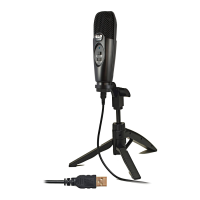
Plug the U7 into a USB port and allow the system to recognize it.
Access Control Panel, Sounds, Speech, and Audio Devices to select the U7.
Fine-tune microphone sensitivity via advanced volume controls and software settings.
Launch recording software and position the microphone for optimal audio capture.
Plug the U7 into a USB port and allow the system to recognize it.
Access System Preferences, Sound, and select the C-Media USB Audio Device.
Set the input volume in System Preferences and audio software to avoid distortion.
Launch recording software and position the microphone for optimal audio capture.
 General
| Type | Condenser |
|---|---|
| Polar Pattern | Cardioid |
| Frequency Response | 20Hz - 20kHz |
| Connector | USB |
| Sample Rate | 48 kHz |
| Bit Depth | 16-bit |
| Connectivity | USB |
| Headphone Jack | Yes |
| Cable Length | 6 ft |
| Color | Black |
| Sensitivity | -38dB ± 2dB (0dB=1V/Pa at 1kHz) |


 To Next Page