Connections and setup 2-5
Revision S2005-6 S-Type
51618 5HSODFLQJ#D#SRZHU#VXSSO\#XQLW
If replacing a power supply unit is required, please note the following:
■
■■
■
The work should only be carried out by a suitably qualified electrician.
■
■■
■
Make sure that the power supply system’s power switches are in the OFF posi-
tion and the unit is disconnected from the mains.
■
■■
■
Observe the correct polarity when connecting the new PSU.
■
■■
■
Note that a console must never have one voltage without the other, for example
+18V must never be fed into the console without -18V.
When switching the power supply back ON after replacement has taken place, make
sure that both LEDs on the front of the PSU-system come on. If only one LED comes
on, let go of the ON push-button immediately. Failure to do so may lead to fire hazard
and major damage to the console.
517 &R QQHFWLQJ#WK H#FRQVROH#IUDPHV
51714 )UDPH#WR#IUDPH#EXV#FDEOHV
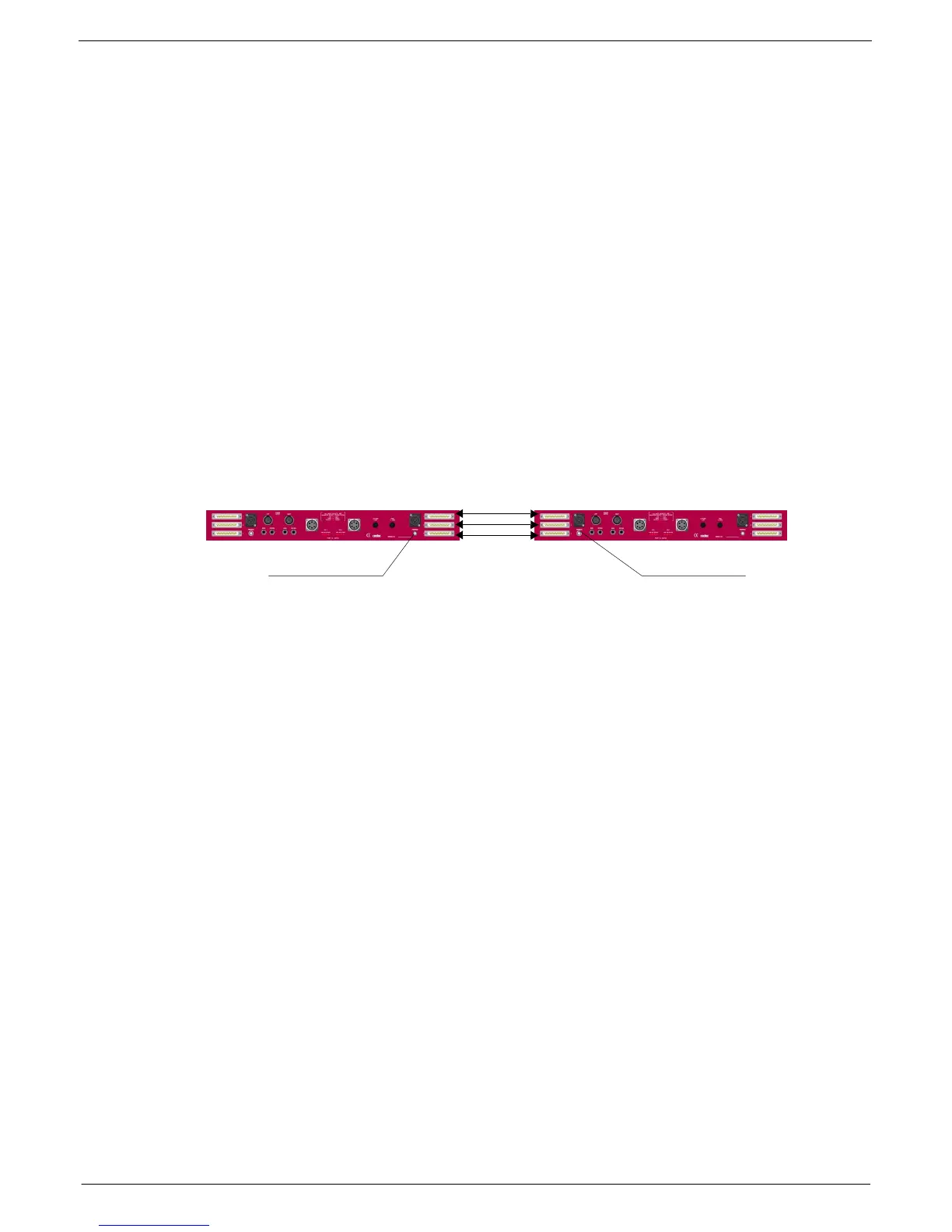
When linking frames, plug the frame bus cable as shown in the diagram below:
Also, see Appendices.
51715 )UDPH#JURXQG#FRQQHFWLRQ
Connect the frame-to-frame grounding cable. See figure 2-6 above for the location of
the frame 0V terminals.
FIG 2-6. Audio Bus connections.
Frame 0V terminal
Frame to frame bus
connections
Frame 0V terminal


 To Next Page
 Loading...