J Reviewed with Customer (Please Check Box)
Refer to Owner Manual for further information.
3
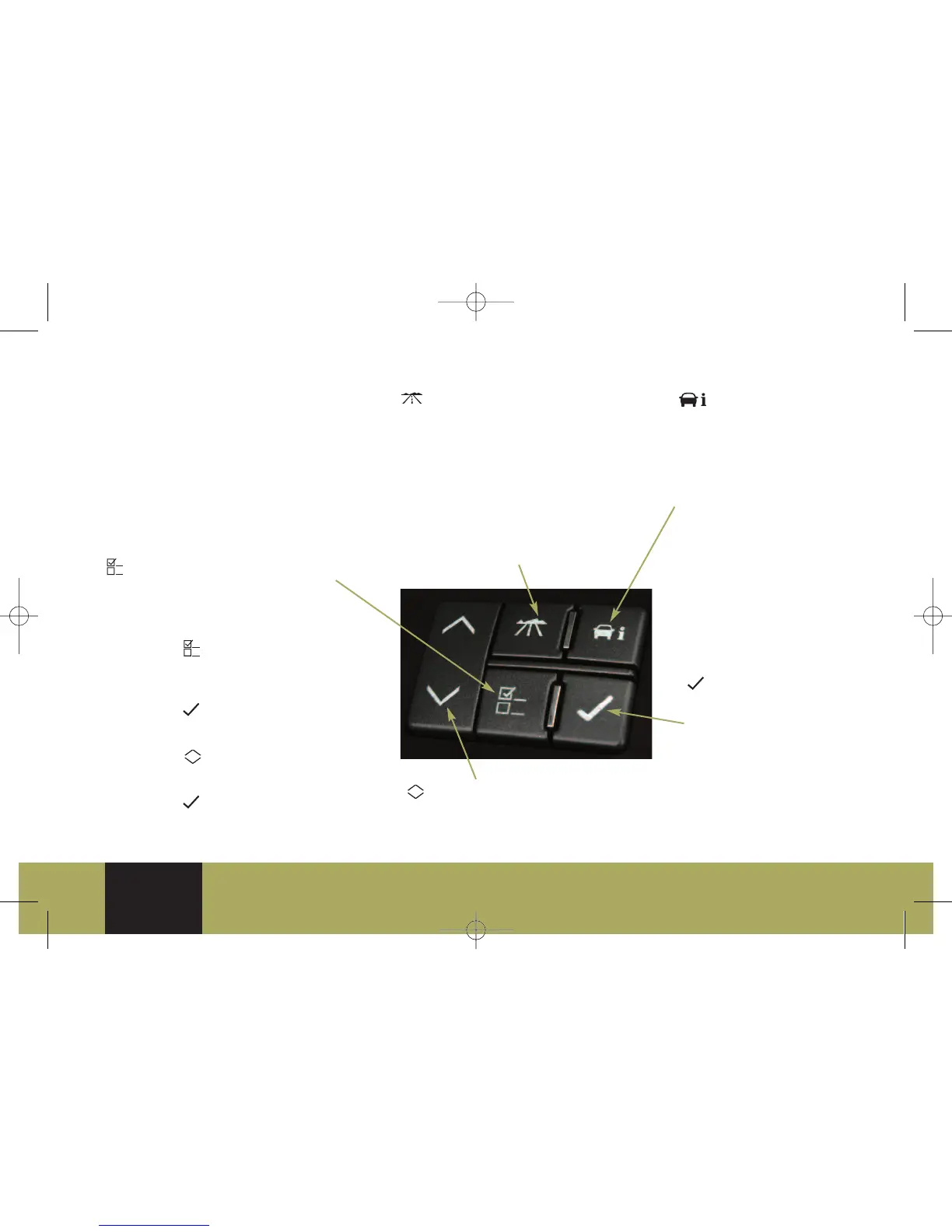
DRIVER INFORMATION CENTER
Your vehicle’s Driver Information Center
(DIC) provides vehicle information,
vehicle feature customization and
vehicle warning messages. The DIC
messages will be shown on your
instrument cluster display. The DIC
buttons are located on the left side
of the instrument panel. To operate the
DIC, the ignition switch must be in the
Run position.
(Trip/Fuel): Press this button to
scroll through the following trip and
fuel information:
• Odometer
• Trip A or Trip B
• Fuel Range (until empty)
• Average Fuel Economy
• Timer
• Instantaneous Fuel Economy
• Average Speed
• Speedometer
(Customization): Press this button
to scroll through the customization
settings.
To customize features:
1. Place the vehicle in Park (P).
2. Press the (Customization) button
to enter the feature settings menu.
Repeated presses scroll through the
available features.
3. Press the (Set/Reset) button to
access the settings for the feature
being displayed.
4. Press the (Menu Up/Down) button
to scroll through the available settings
for each feature.
5. Press the (Set/Reset) button to
choose the setting being displayed and
move to the next feature.
(Vehicle Information):
Press this button to scroll
through the following
vehicle information:
• Oil Life Remaining
• Units (English/Metric)
• Parking Assist
• Tire Pressure
• Battery Voltage
• Calibrate Compass
• Change Compass Zone
• Relearn Remote Key
(Set/Reset): Press
and hold this button to
reset DIC information
while it is displayed or
to acknowledge a
warning message. This
button is also used for
Customization; press to
select feature settings.
(Menu Up/Down): Press
this button to scroll up or
down the menu items.
Safety &
Security
Comfort/
Convenience
Seats & Mirrors
Powertrain &
Maintenance
Audio/
Personalization/
Communication
Owner
Privileges™
Driver
Information
70520_08a_CTS_QRG_062207.qxp:CTS 2007 A 6/22/07 4:16 PM Page 5



 To Next Page
 Loading...












