8
CADILLAC USER EXPERIENCE FEATURES
Read your Owner's Manual for important information about using the infotainment system while driving.
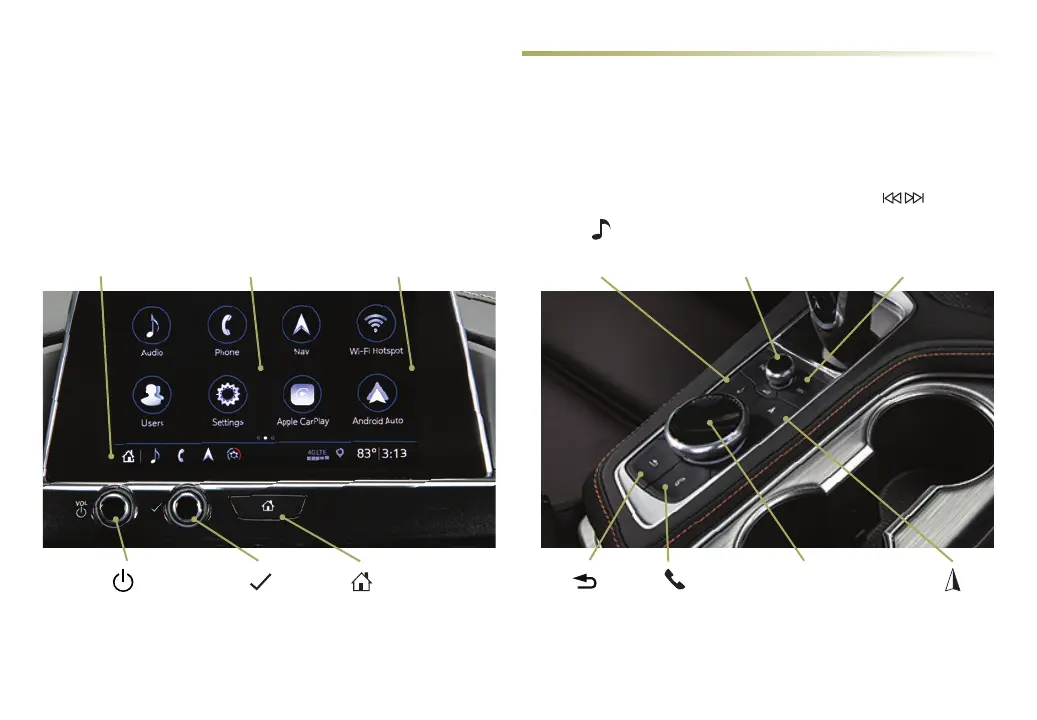
Your CT4 oers a variety of entertainment, communication and vehicle system options. Touch an application icon on the touchscreen, use
the Tune/Menu control, or use the rotary controller and buons
♦
to access an item. You can use simple gestures on the touchscreen, such as
tap, drag, pinch and spread, to interact with the infotainment system. Link a compatible smartphone or portable audio player/iPod
®
to the
infotainment system using a Bluetooth or USB connection. For assistance, call 1-855-428-3669 or visit my.cadillac.com/how-to-support.
Tune/Menu
Control
♦
Power/Volume/
Mute–Unmute
Speakers
♦
Home
Page
Additional Pages:
Swipe to display the
overview page or
additional pages of
apps (if available)
Applications Tray:
Shortcuts to
commonly
used apps
Applications
♦
:
Touch a screen icon
to access an app
Power/Volume:
Rotate to adjust
volume/Press to mute
audio/Press and hold to
turn system on–o
♦
Press to seek the
previous or next
radio station or
track
♦
Return to
previous
menu
♦
Controller:
Rotate to move on the
screen/Press to select
an item
♦
Phone
menu
♦
or
Home page
♦
Navigation
menu
♦
or
Phone menu
♦
Audio
menu
♦
Note: Infotainment controls and configuration may vary depending on vehicle content.



 To Next Page
 Loading...