14 31-7000112 Rev. 2
1
6
5
ADAPTING BLOWER FOR
RECIRCULATION
(continued)
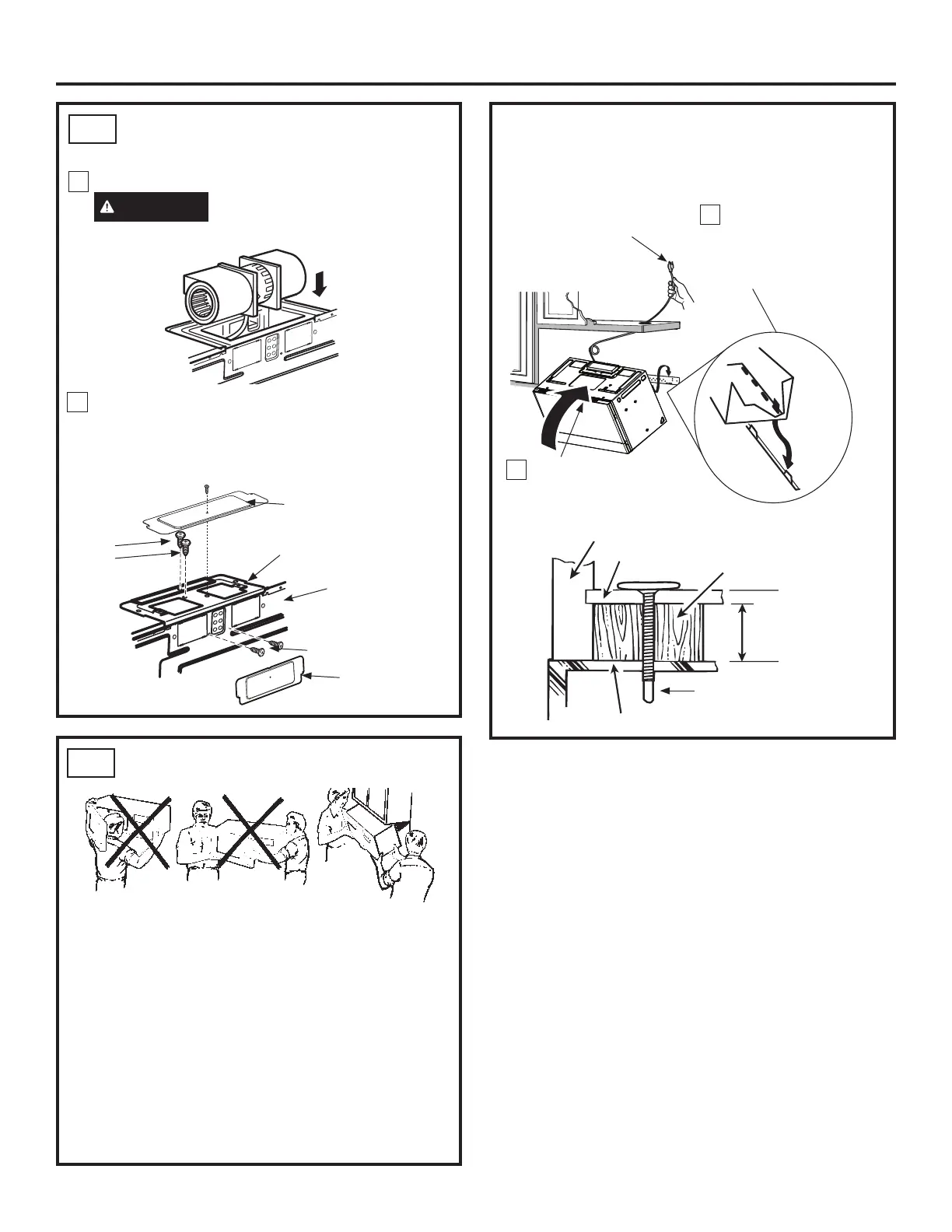
A4.
Replace blower motor screws removed in Step 2.
Slide cover plate into position on the back of the
unit. Replace blower plate and screws removed in
Step 1. Attach second cover plate on blower plate
(including one screw).
2
Rotate front of oven
up against cabinet
bottom.
MOUNT THE OVEN
A5.
FOR EASIER INSTALLATION AND PERSONAL
SAFETY, WE RECOMMEND THAT TWO PEOPLE
INSTALL THIS OVEN.
IMPORTANT: Do not grip or use handle
during installation.
NOTE: If your cabinet is metal, use the nylon
grommet around the power cord hole to prevent
cutting of the cord.
NOTE: We recommend using filler blocks if the
cabinet front hangs below the cabinet bottom shelf.
IMPORTANT: If filler blocks are not used,
case damage may occur from over
tightening screws.
NOTE: When mounting
the oven, thread power
cord through hole in
bottom of top cabinet.
Keep it tight throughout
Steps 1–3. Do not pinch
cord or lift oven by pulling
cord.
Lift oven, tilt it
forward and hook
slots at back bottom
edge onto two lower
tabs of mounting plate.
Cabinet Front
Cabinet Bottom Shelf
Filler Block
Oven Top
Equivalent to
Depth of Cabinet
Recess
Self-Aligning Screw
Blower Plate
Back of
Oven
Blower
Plate
Screws
Blower Motor Screws
Cover Plate
Cover Plate
Installation Instructions
Place the blower unit back into the opening.
CAUTION
Do not pull or stretch the
blower unit wiring. Make sure the wires are
not pinched.


 To Next Page