EasyManua.ls Logo

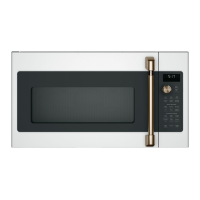
Cafe CVM517P - User Manual

Cafe CVM517P
64 pages
Print Icon
To Next Page IconTo Next Page
Loading...
49-2000082 09-18 GEA
Write the model and serial numbers here:
Model # _______________________________
Serial # _______________________________
You’ll find them on a label located behind the left
burner knob or on the bottom of the rangetop.
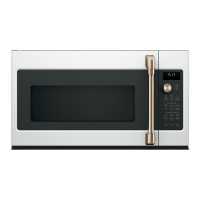
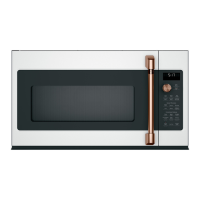
Convection / Microwave Oven
Model: CVM517P
Contents
Safety Information ...............................3
Using the Oven
Features ......................................7
Controls ......................................8
Cooking Options ................................9
Microwave Time and Auto Features ...............11
Power Level ..................................13
Microwave terms ..............................14
Microwave Sensor Features .....................14
Baking and Roasting Features ....................18
Fast Cook Feature .............................19
Cookware Tips ................................20
Best Method of Cooking Chart ....................21
Other Features ................................22
Care and Cleaning
Inside .......................................25
Outside ......................................25
Replacing the LED Lamp ........................26
Exhaust Feature ...............................27
Troubleshooting ...............................28
Optional Kits ..................................30
Limited Warranty ...............................31
Consumer Support .............................32
Español
Para consultar una version en español de este manual de instrucciones,
visite nuestro sitio de internet cafeappliances.com.
Owner's Manual

Other manuals for Cafe CVM517P

Questions and Answers

  • A
    Allison MartinAug 20, 2025
    How to unlock the control if 'CONTROL LOCKED' appears on Cafe CVM517P display?
    • L
      Laura DunnAug 20, 2025
      If 'CONTROL LOCKED' appears on the display of your Cafe Microwave Oven, the control has been locked. To unlock it, press and hold the Mute On/Off button for about 3 seconds.
  • C
    Cindy PadillaAug 22, 2025
    Why does 'CONTROL LOCKED' appear on my Cafe CVM517P Microwave Oven display?
    • W
      Wayne AndersonAug 22, 2025
      The 'CONTROL LOCKED' message appears because the control has been locked. To unlock it, press and hold the Mute On/Off button for about 3 seconds.
  • K
    kyle20Aug 25, 2025
    Why Cafe CVM517P Microwave Oven won't start?
    • J
      John HamptonAug 25, 2025
      If your Cafe Microwave Oven won't start, several factors could be at play. First, check your home's fuse box or circuit breaker and replace the fuse or reset the breaker if necessary. A power surge might be the culprit; try unplugging the oven and plugging it back in. Ensure the oven's plug is fully inserted into the wall outlet. Lastly, make sure the door is securely closed.
  • D
    Dr. John JimenezAug 26, 2025
    What to do if the control panel is lighted, yet Cafe CVM517P Microwave Oven will not start?
    • B
      Benjamin MooreAug 26, 2025
      If the control panel of your Cafe Microwave Oven is lit but the oven won't start, the door might not be securely closed; open it and close it firmly. Ensure you press the Start/Pause button after making your cooking selection. If another selection is already active, press Cancel/Off to clear it. If you pressed Cook Time, make sure to enter the cooking time. If you accidentally pressed Cancel/Off, reset the cooking program and press Start/Pause. When using Auto Defrost or Fast Defrost, ensure you've entered the food weight. Finally, if using Auto Cook, confirm you've selected a food type.
  • M
    Melissa JohnsonAug 27, 2025
    What does 'OVEN TOO HOT FOR SENSOR COOKING' mean on Cafe CVM517P?
    • I
      iedwardsAug 28, 2025
      The 'OVEN TOO HOT FOR SENSOR COOKING' message on your Cafe Microwave Oven indicates that one of the sensor cooking buttons was pressed when the oven's internal temperature exceeded 200°F. These features won't work when the oven is hot. The oven will automatically switch to cooking by time, following the display's instructions. Alternatively, the sensor features will resume normal function once the oven cools down.
  • T
    Tina KelleyAug 29, 2025
    What does 'SENSOR ERROR' mean on the Cafe CVM517P display?
    • J
      Justin AvilaAug 30, 2025
      If 'SENSOR ERROR' appears on the display of your Cafe Microwave Oven when using a sensor feature, it means the door was opened before steam could be detected. Avoid opening the door until steam is sensed and the time counts down on the display. Alternatively, steam may not have been detected in the maximum amount of time. Use Cook Time to heat for a longer duration.
  • E
    erica27Sep 1, 2025
    Why food browns on top much faster than on the bottom in Cafe CVM517P?
    • D
      Debra MillerSep 1, 2025
      If food browns on top much faster than on the bottom in your Cafe Microwave Oven, it might be because the rack has been placed in the 'high' position. Always use the rack in its 'low' position.
  • A
    Adam PriceSep 2, 2025
    What to do if my Cafe CVM517P will not start?
    • J
      Jennifer AdamsSep 3, 2025
      If your Cafe Microwave Oven won't start, check the following: a fuse in your home may be blown (replace it) or the circuit breaker tripped (reset it). There may have been a power surge (unplug the microwave, then plug it back in). The plug may not be fully inserted into the wall outlet (ensure the 3-prong plug is fully inserted). Finally, the door may not be securely closed (open and close it securely).
  • H
    hansenloriSep 5, 2025
    What to do if control panel is lighted, yet Cafe CVM517P Microwave Oven will not start?
    • L
      Lee MendezSep 5, 2025
      If the control panel is lit but your Cafe Microwave Oven won't start, make sure the door is securely closed by opening and closing it. Also, ensure you've pressed the Start/Pause button after making your cooking selection. Check if another selection is already in the oven; if so, press Cancel/Off to clear it. If you pressed Cook Time, verify you entered a cooking time. If you accidentally pressed Cancel/Off, reset the cooking program and press Start/Pause. If using Auto Defrost or Fast Defrost, confirm you entered the food weight. When using Auto Cook, ensure you've entered a food type.
  • P
    Philip GrantSep 7, 2025
    What to do if 'OVEN TOO HOT FOR SENSOR COOKING-- -USING ALTERNATE METHOD' appears on Cafe Microwave Oven display?
    • D
      dylan32Sep 7, 2025
      This message indicates that one of the sensor cooking buttons was pressed when the temperature inside the Cafe Microwave Oven was above 200°F. These features won't work when the oven is hot. The oven will automatically switch to cooking by time (follow the display instructions), or the sensor features will function normally once the oven cools down.

Summary

Safety Information

General Safety Precautions

Essential safety rules for using the appliance to prevent injury or damage.

Microwave Energy Exposure and Grounding

Guidelines to avoid microwave energy exposure and ensure proper electrical grounding.

Using the Oven: Features and Controls

Oven Features and Components

Identifies and describes the parts of the microwave oven.

Oven Controls and Cooking Modes

Explains the control panel and available cooking functions like microwave, convection, and sensor.

Using the Oven: Time, Defrost, and Power

Time, Defrost, and Power Settings

Guides on setting cook times, defrosting, and adjusting power levels.

Using the Oven: Baking, Roasting, and Fast Cook

Baking, Roasting, and Fast Cook Features

Instructions for convection cooking, roasting, and combined fast cook modes.

Cooking Guidance and Other Features

Cookware Tips and Cooking Methods

Recommendations for cookware selection and guidance on choosing the best cooking method for foods.

Other Oven Functions

Explanation of timer, steam clean, turntable operation, and other user-configurable features.

Advanced Settings and Connectivity

Customization and Chef Connect

Adjusting oven settings like clock and display speed, and pairing with a Café range via Bluetooth.

Care and Cleaning

Cleaning and Maintenance

Procedures for cleaning oven interior, exterior surfaces, and exhaust system filters.

LED Lamp Replacement

Step-by-step guide for replacing the cooktop light.

Troubleshooting and Support

Problem Solving and Normal Operations

Solutions for common oven issues and explanations of normal operational characteristics and sounds.

FCC Interference Statement

Regulatory information regarding radio frequency interference.

Optional Kits and Accessories

Filler and Filter Kits

Information on optional kits for installation and air recirculation.

Limited Warranty

Café Microwave Oven Warranty Terms

Details of the one-year and five-year limited warranty coverage.

Consumer Support

Getting Assistance and Service

Contact information, website resources, and scheduling service.

Cafe CVM517P Specifications

General IconGeneral
Capacity1.7 cu. ft.
Power1000 Watts
Control TypeElectronic Touch
ColorStainless Steel
TurntableYes
Sensor CookingYes
Convection CookingNo
Interior LightYes
TypeCountertop

Related product manuals