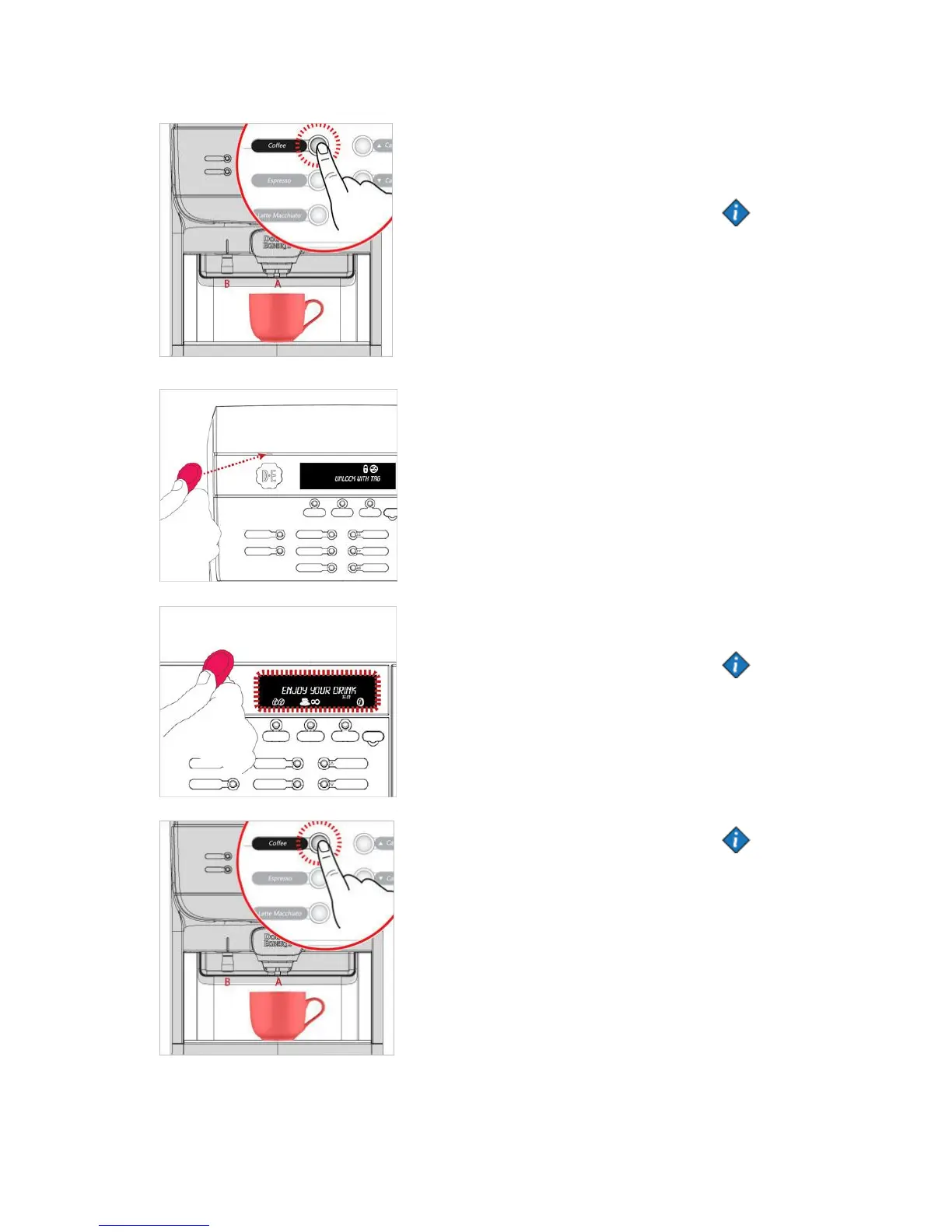
5. Place a cup under the
outlets A or B and then select
the drink you want to
dispense.
If the machine is using "Multi-
vending" any remaining credit
will be remembered and
shown after the drink is
finished.
Example: If you insert 1 EUR
and the drink cost 0.5 EUR.
After the drink is finished the
display will show that you still
have 0.5 EUR in credit.
Note: Pre-selections
(strength / volume) can be
made any time before you
select a drink.
1. Machine will be locked and
display will indicate "UNLOCK
WITH TAG"
2. Place the "TAG" in the area
above the logo.
3. Hold the TAG in this area
for 2-3 seconds. When it
unlocks the machine will make
a beep, beep sound and the
display will change to "ENJOY
YOUR DRINK"
Note: After the
machine unlocks it's
possible to make pre
selections (strength /
volume).
4. Place a cup under the
outlets A or B and then select
the drink you want to
dispense.
Note: There is two
different modes when
using RFID-tag.
TOGGLE: This means that
you have to lock the
machine with your tag
after the drink is finished.
TIMEOUT: This means that
the machine will
automatically lock itself
after X seconds.


 To Next Page