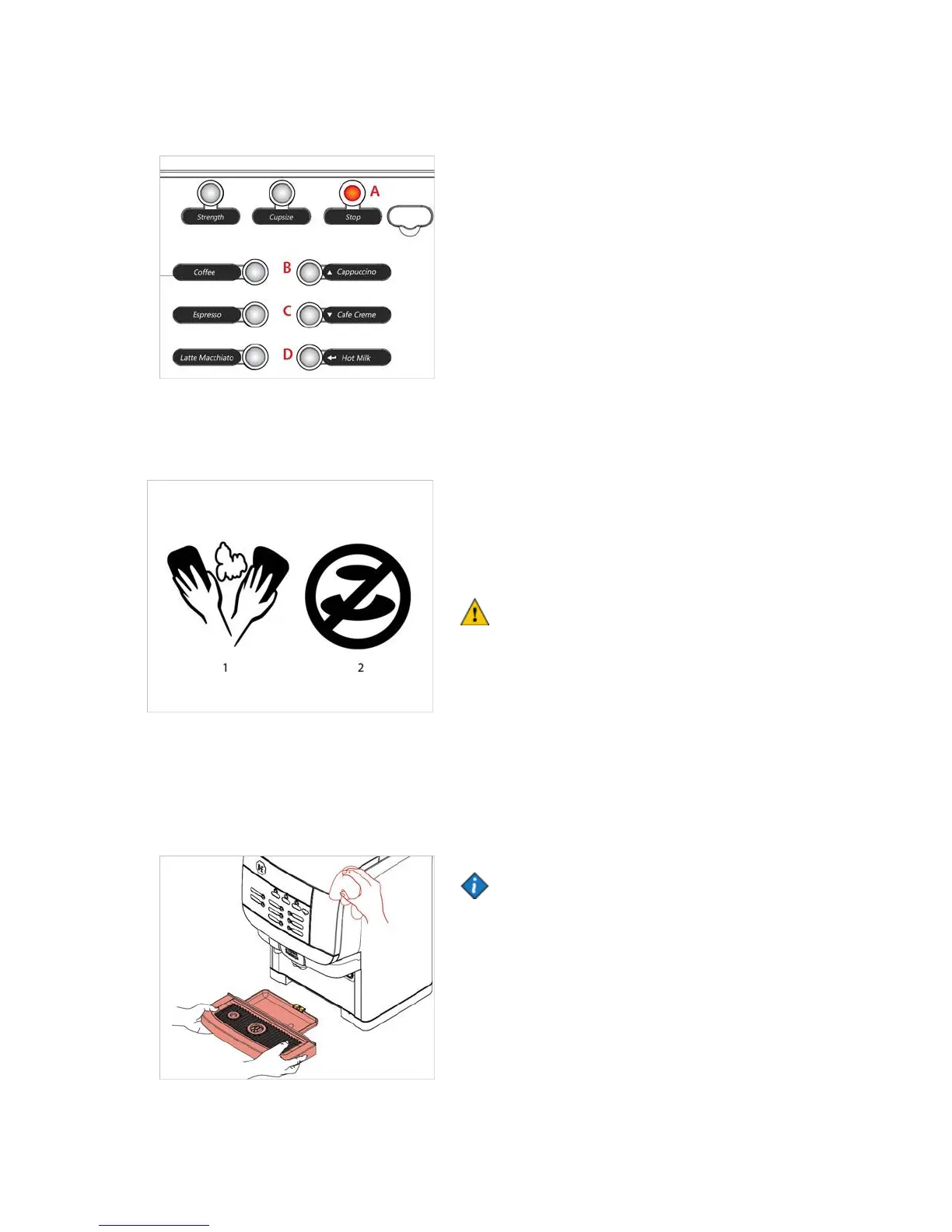
In operator and cleaning mode, 4 UI buttons are used to
enter cleaning mode and navigate the menus.
A STOP = back
B Drink button top right = UP
C Drink button middle right = DOWN
D Drink button bottom right = ENTER
Cleaning procedures
There are two different cleaning programs:
• “Flushing” the drink outlets
• “Cleaning” the cooling compartment and the drink
outlets.
You can select the weekdays for “Flushing” and
“Cleaning” programs in the operator menu CLEANING
DAYS.
Caution:
It is recommended to carry out the procedure
“Cleaning & Flushing” once a week.
When to clean the dispenser
Run the cleaning program when the cleaning icon
appears in the display (See fig.1).
If the dispenser is not cleaned and/or flushed within 24
hours, the drink delivery will be blocked and the delivery
blocked icon appears in the display (See fig.2).
Start and finalize the cleaning program to resume
delivery.
Note:
It is advised to clean the exterior of the dispenser
daily.To prevent accidental dispensing of drinks if you
wish to clean the areas around the buttons. You may
lock the drink dispensing by opening the door an press
the “Standby” button.
1. Remove the drip tray and empty it if needed, clean
the drip tray with a cloth or brush under running water.
2. Clean the exterior of the dispenser with a damp, clean
cloth.


 To Next Page