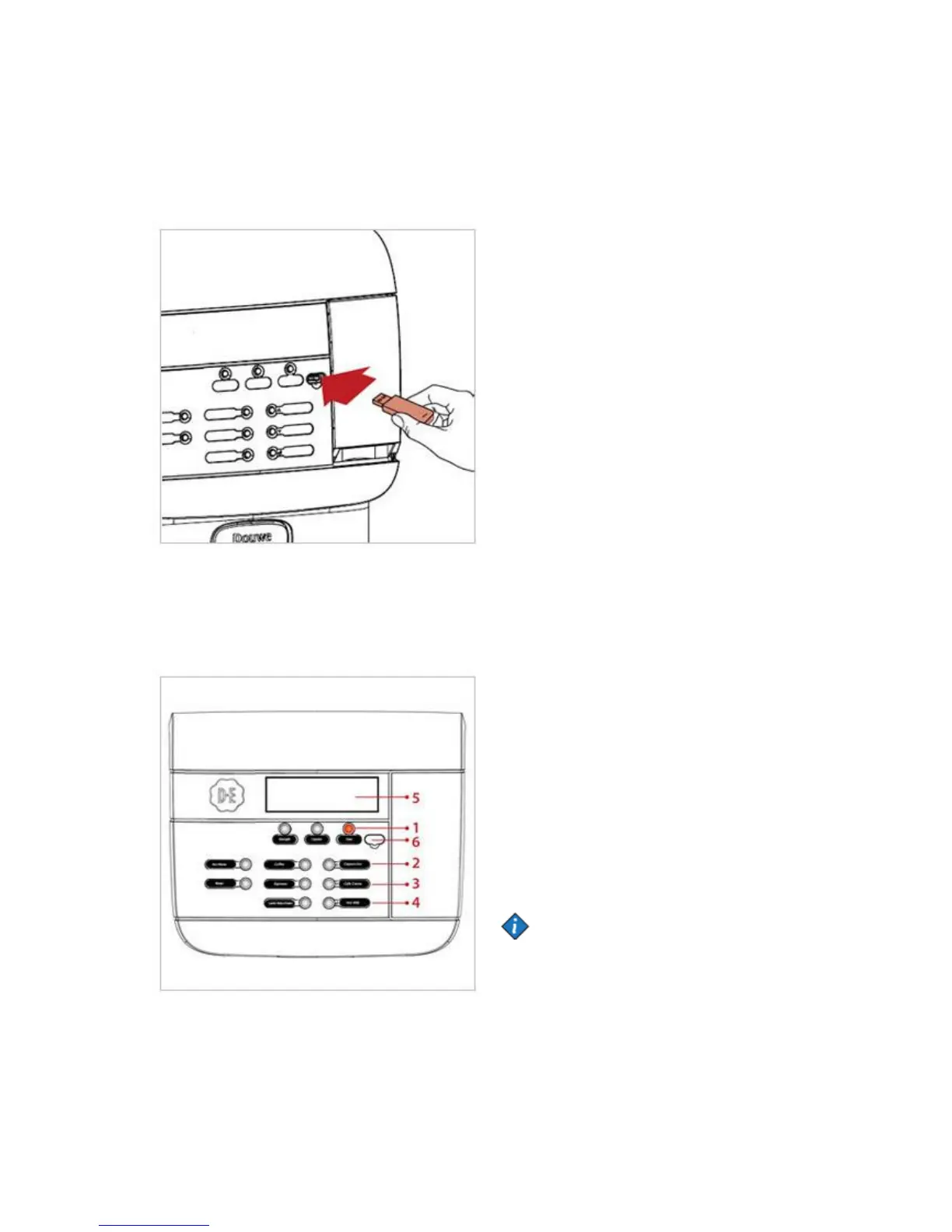
Starting the operator mode
Remove the cover and insert the supplied
operator USB key. This immediately starts the
operator mode. The first menu item (COUNTERS)
is displayed.
The following menus are available:
• COUNTERS - read counters
• VOLUME - change cup volume
• STRENGTH - change drink strength
• DATE / TIME - set date and time
• CLEANING DAYS - set weekdays for cleaning
and flushing
• ECO SETTINGS - energy saving mode settings
• TELEPHONE # - enable/disable and set
telephone numbers for service and operator.
• PAYMENT - Set drink prices and read-out of
turnover etc...
• RFID - Enable different RFID modes or disable
it.
• WATER FILTER - Reset the counter and
reminder message when changing water filter is
due.
Please note that menu items might be disabled
by the service technician. Contact your Cafitesse
systems supplier if you want this altered.
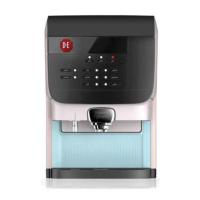
Operator mode controls
1. STOP/BACK - go to previous menu
2. Scroll up or increase value
3. Scroll down or decrease value
4. Enter button
5. Display
6. Port for USB key
Note:
Dispenser programming is not available in all
markets. Some menus may be
disabled depending on machine configuration.


 To Next Page