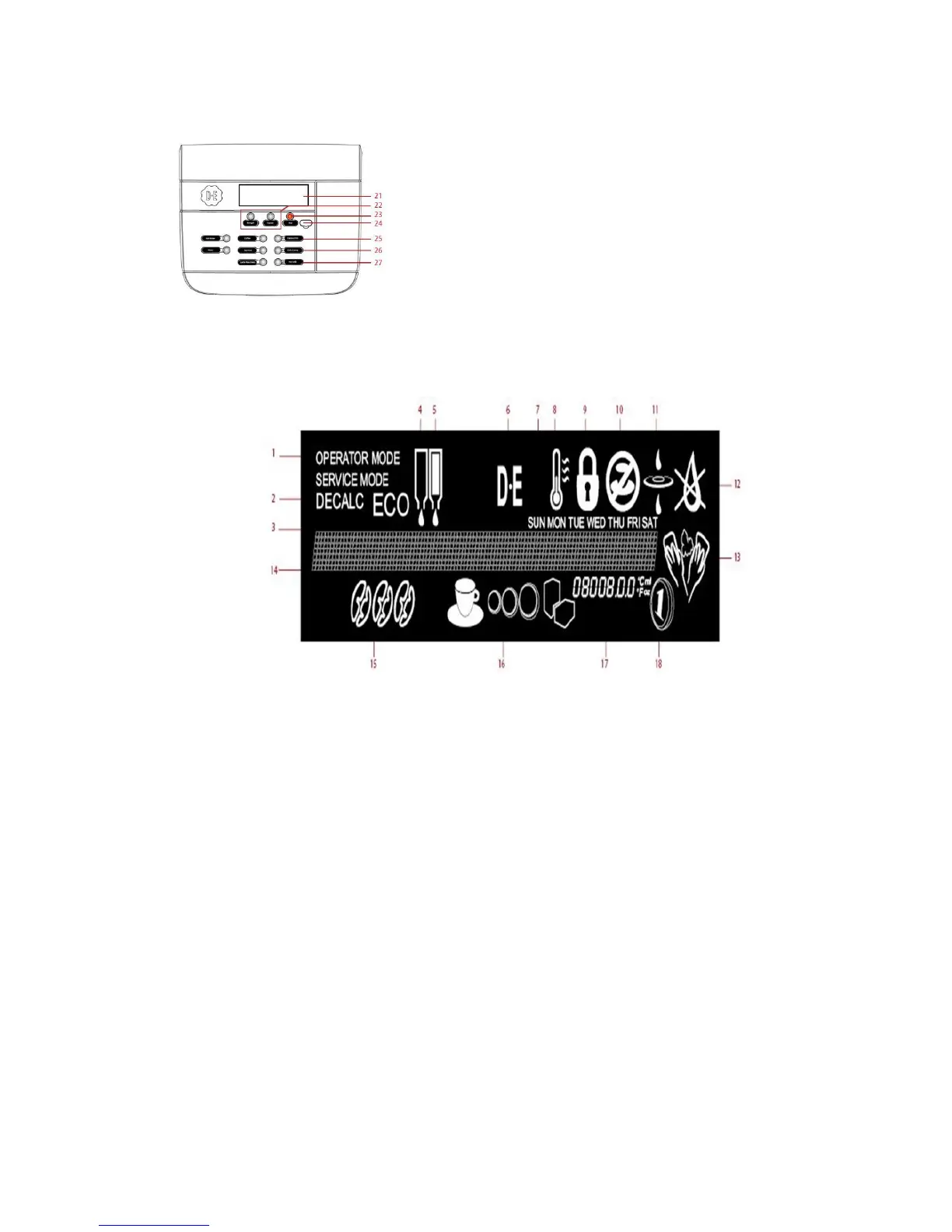
22. Pre-selection buttons
23. STOP (Back) button
24. Port for USB key
25. Operator Mode: (up)
26. Operator Mode: (down)
27. Operator Mode: (enter)
29. The ECO mode is active
30. Product pack left is empty
31. Product pack right is empty
32. Logo
33. Current day
34. Low temperature, boiler is heating up
35. LOCK
the dispenser is locked and cannot dispense drinks
36. DELIVERY BLOCKED
the dispenser cannot deliver the selected drink
37. FILTER, replace water filter
38. The internal water tank is empty, refill the tank
40. MESSAGE-linemessages are displayed to guide you through
the cleaning, programming steps, or in case of errors
41. Strenght, mild, normal or strong drinks
42. The pre selection buttons can be lit in different combinations
and have different functions depending on machine configuration.
If A+B is lit, volume, small, normal or large drink
If B+C is lit, add extra sugar (3 steps)
If only B is lit, add extra instant milk/topping (3 steps)
43. INFO-field display of cooling compartment temperature,
time, etc.
44. Payment is enabled
45. CLEANING / FLUSHING, the dispenser needs to be cleaned
or flushed.


 To Next Page