
 Need help?
Do you have a question about the Cairox S-TOUCH and is the answer not in the manual?
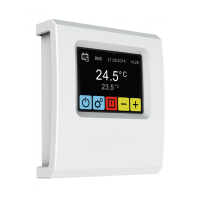
The CAIROX S-TOUCH is an intelligent controller with a touch screen designed for managing SOLANO air curtains and SOLANO COMBI air curtain-fan heater combo units. It serves as a central interface for monitoring and adjusting various operational parameters, ensuring optimal performance and energy efficiency. Each unit controlled by the S-TOUCH requires its own individual address within the S-ECM control module, facilitating precise and independent management.
The S-TOUCH controller integrates a built-in sensor for measuring ambient air temperature, crucial for maintaining desired room conditions. For accurate readings, it should be installed at a height of approximately 1.5 meters above the ground in an area with good air circulation, away from heat sources, lighting, air inlets, windows, and door openings. Alternatively, if the temperature sensor is configured as "installed in unit" within the S-TOUCH menu, the controller can be mounted in a technical room or another area outside the main space.
The device offers comprehensive control over air curtain operations, including air flow settings (3-steps), operating modes, and delay times for fan and valve switch-off. For SOLANO COMBI units, it provides separate air flow settings for both the air curtain and fan heater parts. The operating modes allow for flexible control based on door sensors and thermostats, with options for equivalent priority (K1) or door sensor priority (K2). In heating mode, the valve opens when the measured temperature falls below the desired setpoint, while in ventilation mode, the valve remains closed, and the fan operates continuously at a selected step.
A key feature is the calendar function, enabling users to program up to 20 on/off events for each day. For every event, a specific temperature (between 5°C and 45°C) can be set. Events can be configured individually or copied from one day to another, streamlining the scheduling process. The calendar's activation status is clearly indicated on the main screen, showing whether the system is ON, OFF, or operating with forced settings due to ad hoc adjustments. Ad hoc settings remain active until the start of the next scheduled event, after which the units revert to the programmed calendar settings.
The S-TOUCH also supports integration with a Building Management System (BMS), allowing for broader system oversight and control. It provides options for setting a unique unit address (ID) and adjusting the data transmission speed (BAUD) for BMS communication.
The S-TOUCH features a user-friendly touch screen interface with intuitive navigation. The main screen displays essential information such as the current temperature, desired temperature, date, and time, along with indicators for BMS mode, settings lock, and calendar activity.
Upon initial setup, users are guided through a first-run process that includes language selection, date and time setting, and device discovery. The controller automatically searches for connected units, and users can verify if all units have been found. If not, troubleshooting steps are provided, such as checking communication signal connections, power supply, address settings, and the dip-switch position on the last unit in the network. Individual addresses for each S-ECM module can be set directly from the controller.
The main menu, accessible via a long press on the settings icon, provides access to general settings, including time and date adjustments, calendar programming, language selection, and system information. A password (default: 2014) is required to enter the main menu, ensuring secure access to critical configurations.
Users can easily adjust the desired temperature using the on-screen controls. The "Leading sensor" setting allows selection between the controller's built-in sensor or a local sensor, with an option for temperature correction. When a local sensor is chosen, each unit's operation is regulated independently.
The controller includes a "Control lock" feature, allowing users to set a 4-digit password to prevent unauthorized changes. After a period of inactivity on the main screen, the controller automatically locks, enhancing security.
The S-TOUCH incorporates several features aimed at ensuring the longevity and reliable operation of the connected units. An "Antifreeze" protection mode is available for units with heat exchangers. When the room temperature drops below a predefined threshold, the fans stop, and the valve opens to 100%, preventing the heat exchanger from freezing.
The "Readings" section provides real-time data, including the temperature in the room and the status of the ON/OFF valve. For units with external PT-1000 temperature sensors connected to the S-ECM control module, these readings can also be displayed.
The "Alarms" section provides critical information regarding system issues. It lists various alarms such as "Real time clock error," "Internal temperature sensor error," "Temperature sensor T1/T2/T3/T4/T5," "Antifreeze water exchanger ON," "S-ECM group error," and "Connect error." Each alarm is accompanied by a brief description and potential troubleshooting steps, such as checking sensor connections, verifying addresses, or ensuring proper power supply. For SOLANO COMBI units, a specific alarm for "COMBI heater not connected" is provided, indicating communication issues between the S-ECM of the fan heater part and the S-ECM of the air curtain part.
The "System information" menu displays details about the controller's software and hardware versions, which can be useful for diagnostics and support. A "Reset" function is available to restore the device to its default factory settings, providing a clean slate for re-configuration if needed.
 General
| Category | Controller |
|---|---|
| RAM | 1GB |
| Storage | 8GB |
| Operating System | Android |
| Connectivity | Wi-Fi, Bluetooth |
| Ports | USB |

 To Next Page