5
CAIROX
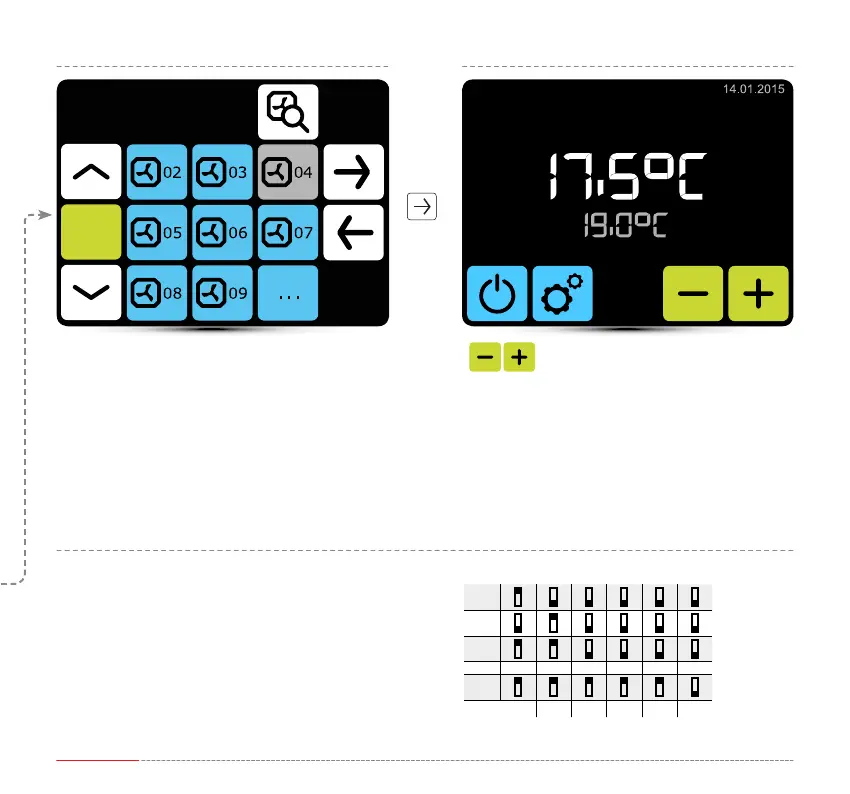
Verify if all units have been
found. If not, check:
• correct connection of communication signal A-A, B-B,
• power supply of the unit,
• correct setting of addresses, each unit must have
dierent address,
• if in the last unit dip-switch SW2 is set in T120 position.
Setting of desired temperature.
12:55PM
Devices
SOLAN
Set individual addrress in S-ECM module for each unit.
DRV address
1
2
3
...
31
1 2 4 8 16 Y1


 To Next Page