14 Installation, registration and basic setup
Basic audio setup
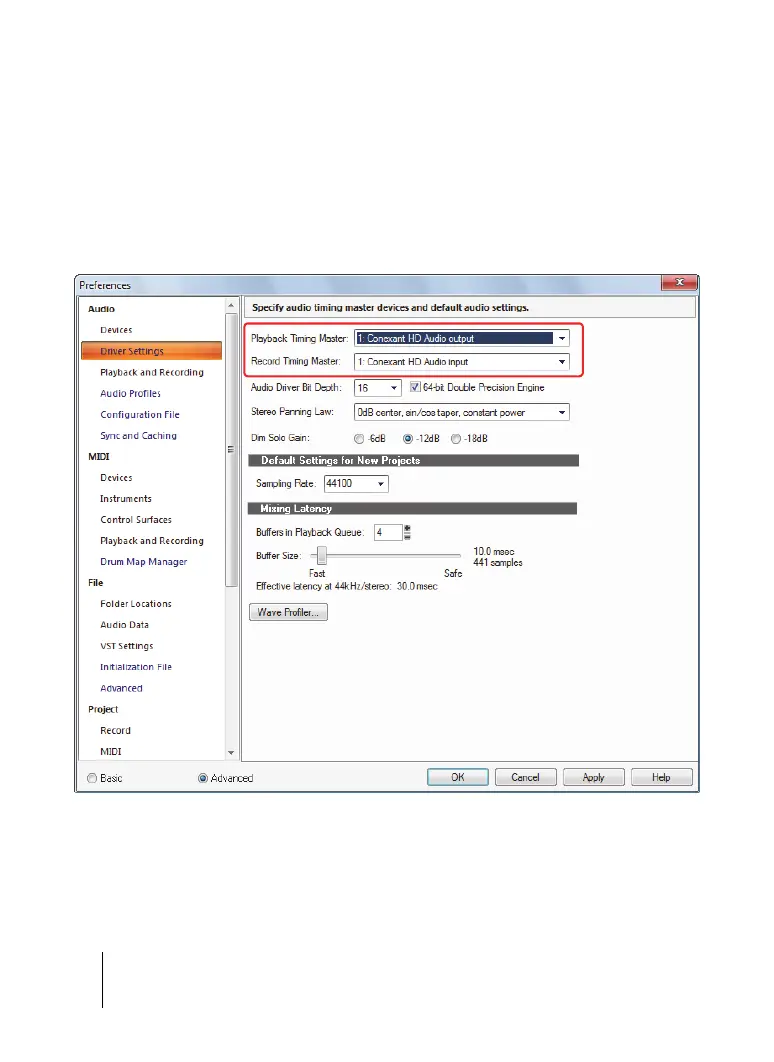
6. Go to Edit > Preferences > Audio - Driver Settings to select the playback and recording
timing master devices.
7. In the Playback Timing Master list, select the audio output device that you want SONAR
to treat as the default or main output device. This should be the output that your
headphones or speakers are connected to.
8. In the Record Timing Master list, select the input on your sound card that you plan to plug
devices into, such as a microphone, guitar, keyboard or other input device.
Figure 3. The Audio - Driver Settings section.
For more information and the recommended settings for specific models of sound cards, visit
the SONAR support site at http://www.cakewalk.com/Support/product.aspx/SONAR-X3.



 To Next Page