The remainder of the Modem Settings should match the T-96SR system. Dynamic Carrier Detect acts the same as the
T-96SR. The Carrier Sense level is set by selecting the “On” level. This is the RSSI (Receive Signal Strength Indication) or
signal strength required to open the squelch setting in the receiver. The Carrier Sense “Off” level is set automatically to
5 dBm below the “On” level.
The COM port settings must match the RTU/PLC equipment used in the system. Typically these settings will be the
same as the RF Link Settings but can be set differently. When used in an existing T-96SR system, these will be the same
as the RF Link Settings.
- Select the correct Baud rate, Parity bit, and Stop bit values.
- Transmit control mode can be either RTS/CTS handshaking mode or DOX (Data Operated Transmit) mode.
- The Guardian also offers the choice of RS422 and RS485 serial connections.
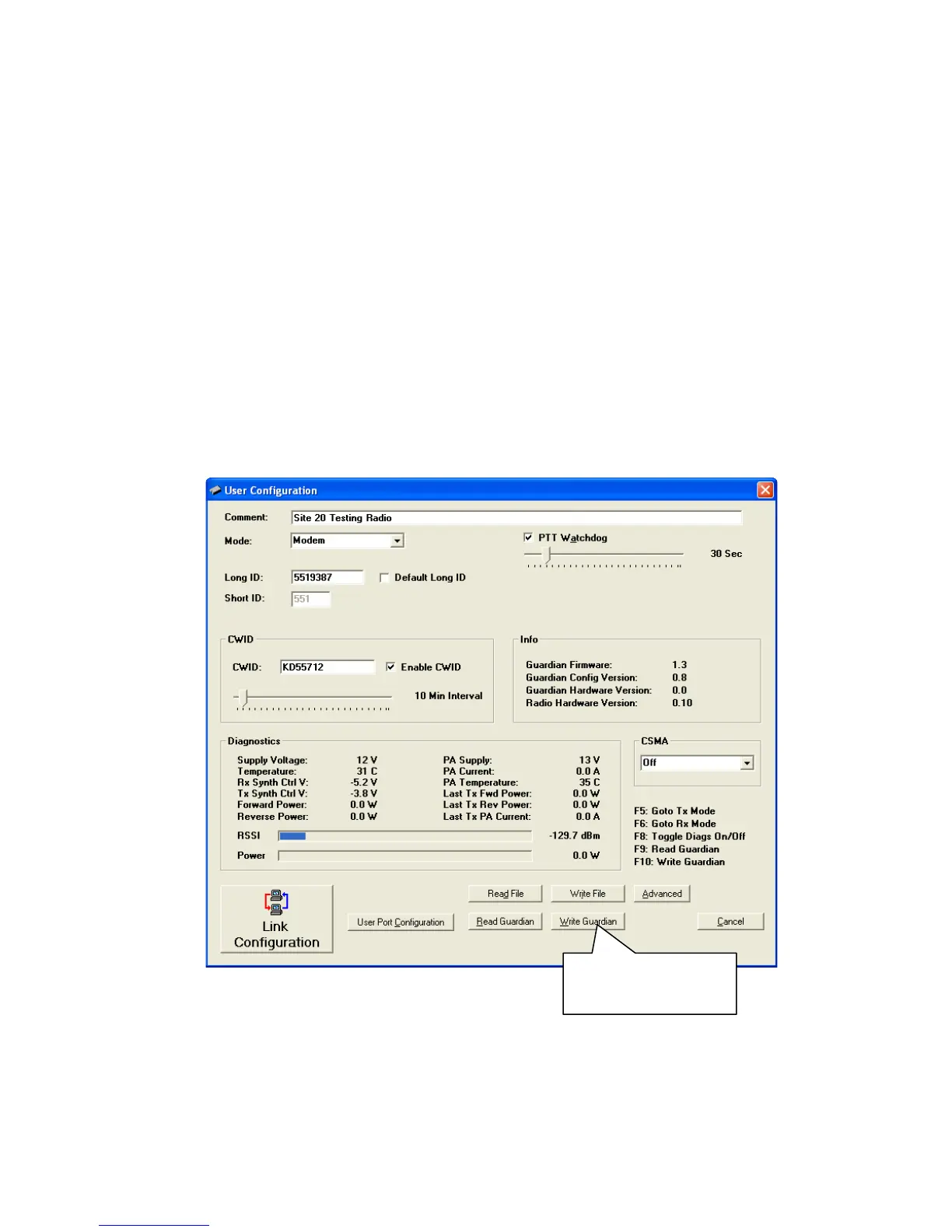
Important: When all parameters are selected and verified to be correct, click Save Changes at the bottom of the Link
Configuration window to save the changes. The Link Configuration window will close. There are two options for
programming the Guardian: click the Write Guardian button or press the [F10] key on the computer keyboard. See the
following figure.
Figure 65 User Configuration window
program radio or,
alternatively, press [F10].
Guardian™ Serial Modem or Analog Radio for Licensed Spectrum PN 001-5006-000 Rev. 3 | Page 87


 To Next Page