Need help?
Do you have a question about the Callaway GPSy Watch and is the answer not in the manual?
Details the technical specifications of the Callaway GPSy Watch, including product, courses, battery, weight, and display.
Step-by-step guide on how to charge the Callaway GPSy Watch using the charging dock and USB cable.
Explains the 'Press' and 'Hold' actions for device buttons, crucial for navigation and operation.
Diagram illustrating the Callaway GPSy Watch with labels for key buttons and charging ports.
Details the information displayed in Play Mode, including distances to green and time.
Explains the Hazard Mode display, showing distances to doglegs, water, and bunkers.
Instructions for viewing and setting the time and date on the Callaway GPSy Watch.
Steps to select a golf course after establishing a satellite connection.
How to switch between Hazard, Scorecard, and Shot Distance screens in Play Mode.
Details on viewing hazard information, including limitations and navigation.
Guide to measuring shot distance, including activation, tracking, and resetting the feature.
Instructions for using the scorecard feature to log strokes, putts, and Greens in Regulation.
Details on how the device automatically or manually advances to the next hole.
Procedure to end a golf round and return to the main menu.
How to use the Odometer feature to track travel distance on the golf course.
Guide on how to access and navigate the device's settings menu.
Instructions for setting and managing alarms, including time and day selection.
Steps to set the date and time, including auto-sync and manual configuration.
How to change the unit of measurement between Yards and Meters.
Guide to selecting the display language for the device.
Instructions for adjusting the backlight duration for better visibility.
How to enable or disable audible sounds and alerts on the device.
Option to enable or disable Daylight Saving Time adjustments.
Enables or disables the scorecard feature within the device settings.
Enables or disables the shot distance measurement feature.
Accesses general information about the device model.
Details the product's warranty period, customer service contact, and return instructions.
Important safety information and precautions for using the device correctly and safely.
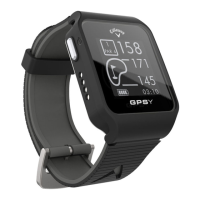
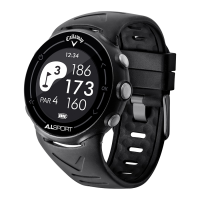
The Callaway GPSy Watch is a golf performance device designed to provide precise distances on the course in a sporty and fashionable design. It aims to help golfers hit more greens and minimize penalty strokes by offering accurate distance information.
The primary function of the Callaway GPSy Watch is to provide golfers with precise distances to various points on a golf course. This includes distances to the front, center, and back of the green, as well as distances to hazards and doglegs. The watch operates in two main modes: Play Mode and Hazard Mode.
In Play Mode, the watch displays key information for the current hole, including the hole number, par, and distances to the front, center, and back of the green. It also features a battery icon and the current time. This mode allows golfers to quickly assess their position relative to the green.
Hazard Mode provides detailed information about various hazards on the course. It displays distances to the front and back of doglegs, distances to layup or carry water hazards, and distances to layup or carry bunkers. The watch can display up to three hazards at a time, and if a hole has more, users can scroll through them. Hazards that are behind the golfer will not be displayed.
The watch also includes a Shot Distance feature, which, when enabled in settings, allows golfers to measure the distance of their shots. After starting the measurement, a "0" will appear, indicating it's ready to track. As the golfer travels to their ball, the distance will be calculated. Once they arrive, the displayed distance represents the length of their previous shot. This feature can be reset as needed.
A Scorecard function is available, which must also be enabled in the settings. This allows users to track their score for each hole, including total strokes, putts, and Greens in Regulation (GIR). Golfers can input these values using the watch's buttons.
The Auto-Hole Advance feature automatically advances the device to the next hole when traveling from the green to the next tee box. For manual advancement or to return to a previous hole, specific button presses are available.
The Odometer function, accessible from the Main Menu, allows the watch to calculate the distance a user travels. It starts calculating once activated and can be reset to zero.
The watch also functions as a Time Mode device, displaying either an analog or digital clock. It shows the current time and date, and the backlight can be toggled on or off.
Operating the Callaway GPSy Watch involves a combination of button presses and holds. The watch has five main buttons: [POWER], [UP], [OK], [DOWN], and Charging Ports (which are not used for interaction).
Charging: To charge the watch, first power it off by holding the [POWER] button until the screen goes blank. Then, connect the Charger Pins on the charger to the Charging Ports on the watch by placing the watch in the Charging Dock. Plug the USB cord into a USB port. The watch will power on, and the Battery Icon bars will pulsate to indicate charging. Once charging is complete (typically 2-3 hours), the Battery Icon bars will stop pulsating.
Starting a Round of Golf: From the Time Screen, HOLD the [OK] button to access the Main Menu. PRESS [OK] to select "Play Golf." The device will then begin searching for a satellite signal. Once connected, a list of nearby golf courses will appear. Use the [UP/DOWN] buttons to scroll to the desired course, then PRESS [OK] to select it.
Navigating Play Mode: Once a course is selected, the watch enters Play Mode. PRESS [OK] to toggle between Hazard, Scorecard, and Shot Distance Screens. To exit Play Mode at any time, HOLD [OK].
Accessing Hazard View: From Play Mode, PRESS [OK] to access the Hazard Screen. If no hazards are present, the screen will be blank. Use [UP/DOWN] to scroll through multiple hazards.
Using Shot Distance: If enabled in Settings, PRESS [OK] to access the Shot Distance screen. PRESS [DOWN] to start measuring. The distance will calculate as you move. PRESS [DOWN] again to reset. To exit, PRESS [OK].
Using Scorecard: If enabled in Settings, PRESS [OK] to access the Scorecard. Use [UP/DOWN] to adjust the total strokes for the hole. HOLD [DOWN] to scroll to Putts, then use [UP/DOWN] to adjust. HOLD [DOWN] again to scroll to GIR, then use [UP/DOWN] to select Y/N. To exit, PRESS [OK].
Ending a Round: When finished with a round, HOLD [OK] to return to the Main Menu.
The Callaway GPSy Watch includes several settings that allow users to customize its operation and maintain its functionality. These settings are accessed from the Main Menu.
Settings Menu: From the Time Screen, HOLD [OK] to access the Main Menu. Use [UP/DOWN] to scroll to "Settings," then PRESS [OK] to enter the Settings Menu. Use [UP/DOWN] to scroll through the various settings. PRESS [OK] to select a desired setting. To return to the Main Menu, HOLD [OK]. To return to the Time Screen, HOLD [OK] again.
Alarm: The watch allows setting up to three alarms (Alarm 0, Alarm 1, Alarm 2). From the Settings Menu, select "ALARM." Use [UP/DOWN] to choose an alarm. PRESS [UP/DOWN] to enable/disable it. Scroll down to set the hour and minutes using [UP/DOWN], then PRESS [OK]. Scroll through days of the week, using [UP/DOWN] to enable/disable the alarm for specific days (enabled days are indicated by a circle). HOLD [OK] to save and return to the Settings Menu.
Date/Time: This setting allows users to configure the watch's date and time. From the Settings Menu, select "DATE/TIME." Users can choose between "Auto" or "Manual" settings.
Unit: This setting allows users to choose their preferred unit of measure. From the Settings Menu, select "UNIT." Use [UP/DOWN] to toggle between "Yards" or "Meters." PRESS [OK] to save and return to the Settings Menu.
Language: The watch supports multiple languages, including English, Español, Français, and Deutsch. From the Settings Menu, select "LANGUAGE." Use [UP/DOWN] to scroll through the available languages. PRESS [OK] to select the desired language and return to the Settings Menu.
Backlight: This setting controls how long the backlight stays on. From the Settings Menu, select "BACKLIGHT." Use [UP/DOWN] to scroll through options like 5s, 10s, 30s, or off. PRESS [OK] to save and return to the Settings Menu.
Sound: This setting allows users to toggle the device's sound on or off. From the Settings Menu, select "SOUND." Use [UP/DOWN] to toggle "On/Off." PRESS [OK] to save and return to the Settings Menu.
Daylight Savings Time (DST): This setting allows users to toggle DST on or off. From the Settings Menu, select "DAYLIGHT SAVINGS TIME." Use [UP/DOWN] to toggle "On/Off." PRESS [OK] to save and return to the Settings Menu.
Scorecard (Enable/Disable): This setting controls whether the Scorecard feature is active. From the Settings Menu, select "SCORECARD." Use [UP/DOWN] to toggle "On/Off." PRESS [OK] to save and return to the Settings Menu.
Shot Distance (Enable/Disable): This setting controls whether the Shot Distance feature is active. From the Settings Menu, select "SHOT DISTANCE." Use [UP/DOWN] to toggle "On/Off." PRESS [OK] to save and return to the Settings Menu.
Model Info: This option provides information about the device model. From the Settings Menu, select "MODEL INFO." PRESS [OK] to return to the Settings Menu.
General Cautions: The device is designed for leisure and recreation, not industrial or special measurement. It is an auxiliary device, and IZZO Golf will not accept liability for mistaken operation or use for measurement. Users should not attempt to disassemble or repair the device. Avoid storing the device in direct sunlight or extremely high temperatures. The Global Positioning System (GPS) is managed by the U.S. Department of Defense, which can affect its function or precision without prior notification.
 General
| Battery Life (GPS Mode) | Up to 10 hours |
|---|---|
| GPS | Yes |
| Auto Course Recognition | Yes |
| Scorekeeping | Yes |
| Strap Material | Silicone |
| Water Resistance | 5 ATM |
| Preloaded Courses | 30, 000+ |
| Distance Measurements | Front, center, back of the green; layup and carry distances |
| Compatibility | iOS and Android |

 To Next Page