14 HYDRA2 Operator Manual
Introduction - Hydra2 Networking
ROUTER CORES
Standalone router racks, called Router
Cores, that have no DSP and no control
surface attached, can be used to increase
the capacity of I/O connections by
providing an extra 16 or 32 router ports
with each additional rack.
Router Cores can be used as a central
point for shared I/O resources and
console router connections. Dedicating a
standalone router as the Master Router in
a network and locating it in an equipment
room, powered on 24/7, ensures that
the network is always active and that any
console that is powered on has access
to all their own I/O as well as all I/O
connected to the Router Core.
Audio I/O
Router
Core
Console
Core
Audio I/O Audio I/OAudio I/O Audio I/OAudio I/O
Audio I/O
Audio I/O
Audio I/O
Audio I/O
Audio I/O
Audio I/O
Control Room 1 Control Room 2 Control Room 3
Studio A Studio B Studio C
Audio I/O Audio I/O
Equipment
Room
Console
Core
Console
Core
Having a central point for console
connections on a large network with a
lot of shared I/O makes router to router
bandwidth easier to manage.
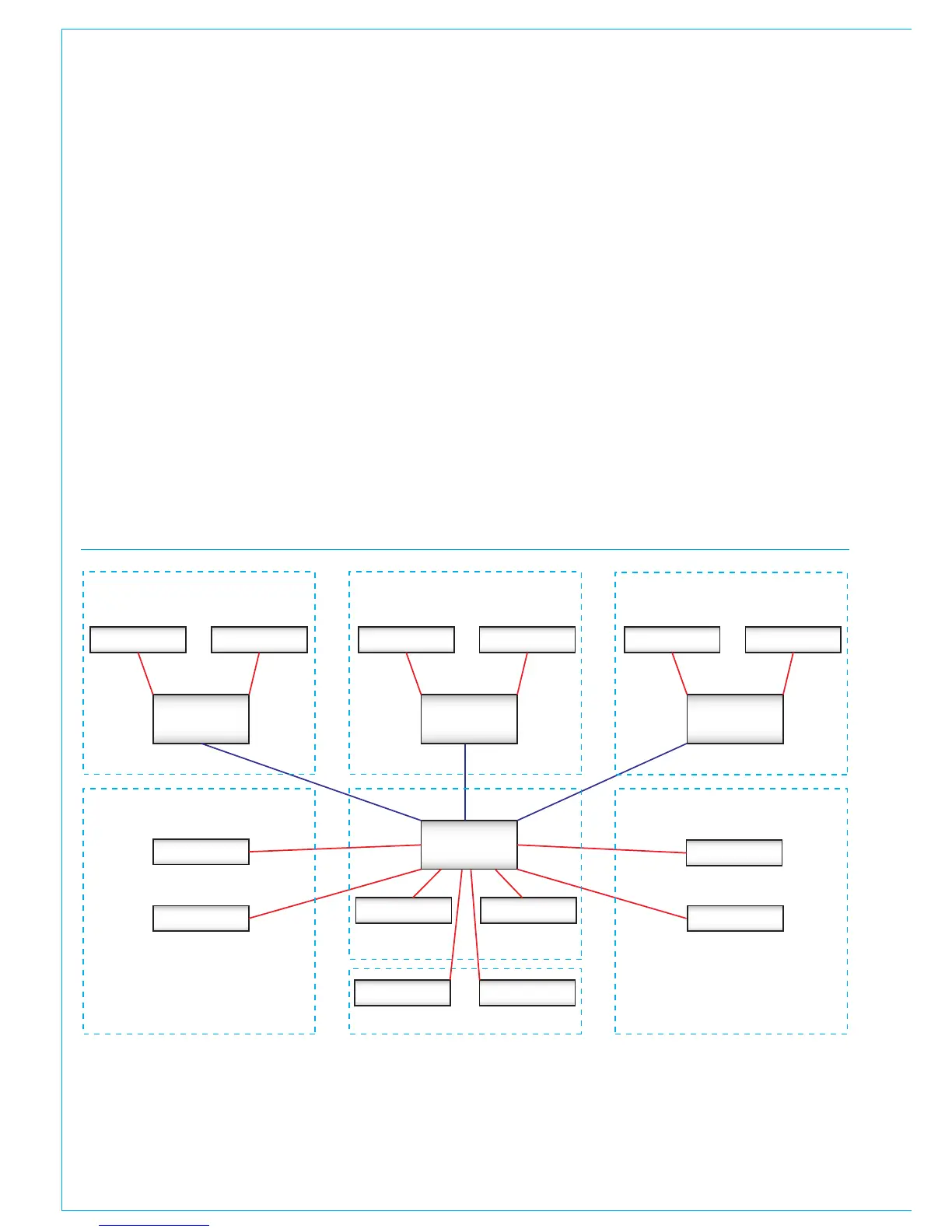
The consoles / control rooms shown
below in Figure 1 have access to the
studio floor and equipment room I/O
without it being routed via other console
cores.
FIGURE1 - NETWORK WITH STANDALONE MASTER ROUTER


 To Next Page