1
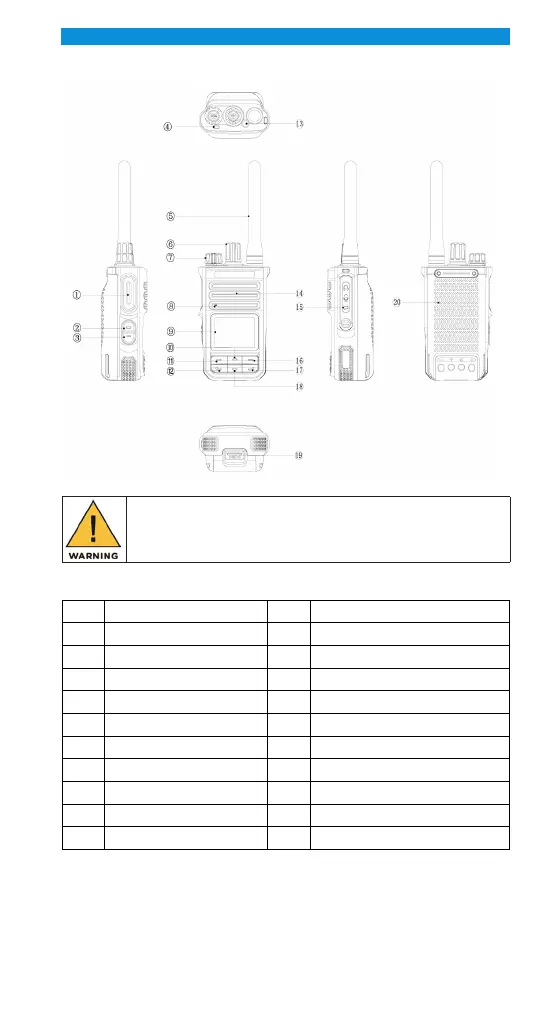
GET TO KNOW YOUR RADIO
Components
NOTE:
Before using the radio, read all the instructions contained in the manual and,
with special care, those relative to safety.
COMPONENT DESCRIPTIONS
No. Name No. Name
1 PTT key 11 OK/Menu key
2 Side key 1 12 Call/Answer key
3 Side key 2 13 Top key
4 LED indicator 14 Speaker
5 Antenna 15 Accessory interface
6 Channel selection rotary knob 16 Back/Group call management key
7 Power /Volume rotary knob 17 Hook key
8 Microphone 18 Down key
9 LCD 19 Battery button
10 Up key 20 Battery
PROGRAMMABLE KEYS
To facilitate operations, your radio provides three programmable keys (Side key 1,
Side key 2, and the Top key), and each programmable key can be assigned with
one of the following functions by the product distributor through setting shown as
the following table.


 To Next Page