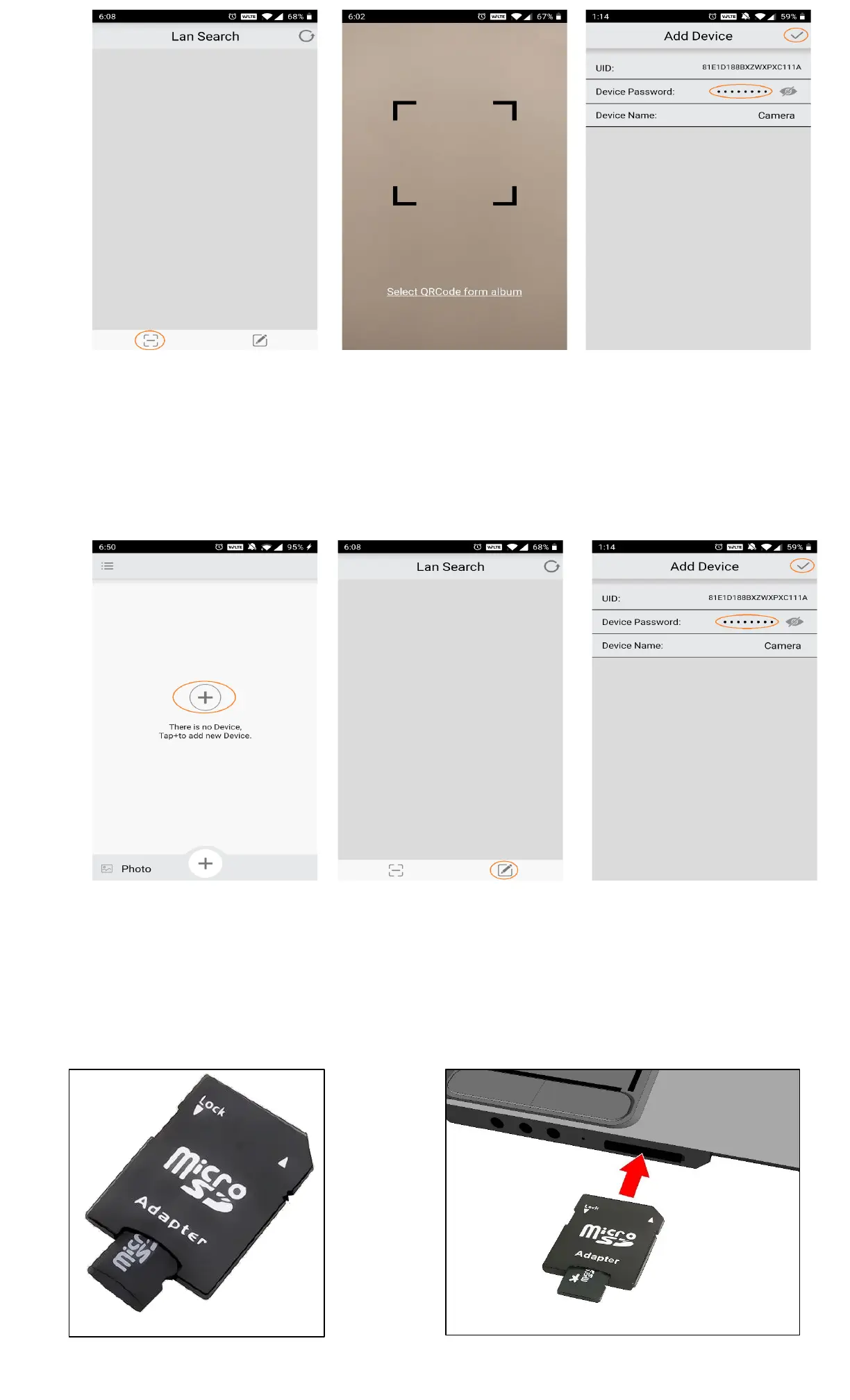
P7.2.3 – Select Scan Button
P7.2.4 – Scan QR Code Window
P7.2.5 – Input the Device Password
Method 3 - Manual Input Camera
▪ On the new device, open the iCookyCam app
▪ Select the “+” sign to add a new camera then select “Been connected to the router” (P7.3.1)
▪ In the Lan Search window, select the manual add button in the lower right corner (P7.3.2)
▪ Enter the correct device UID and password in the Add Device window to add the camera (P7.3.3)
P7.3.2 – Click Manual Addition
Button
P7.3.3 – Input UID & Password
8. Format Micro SD Card
▪ Insert the micro SD card into a micro SD card adapter (P8.1)
▪ Insert the micro SD card adapter into a computer that has a SD card adapter slot (P8.2)
P8.1 – Insert micro SD Card into SD Card Adapter
P8.2 – Insert SD Card Adapter into Computer


 To Next Page
 Loading...