p. 3 - Manual FB00881-EN v. 1- 09/2017- © Came S.p.A. - The contents of this manual may be changed, at any time, and without notice.
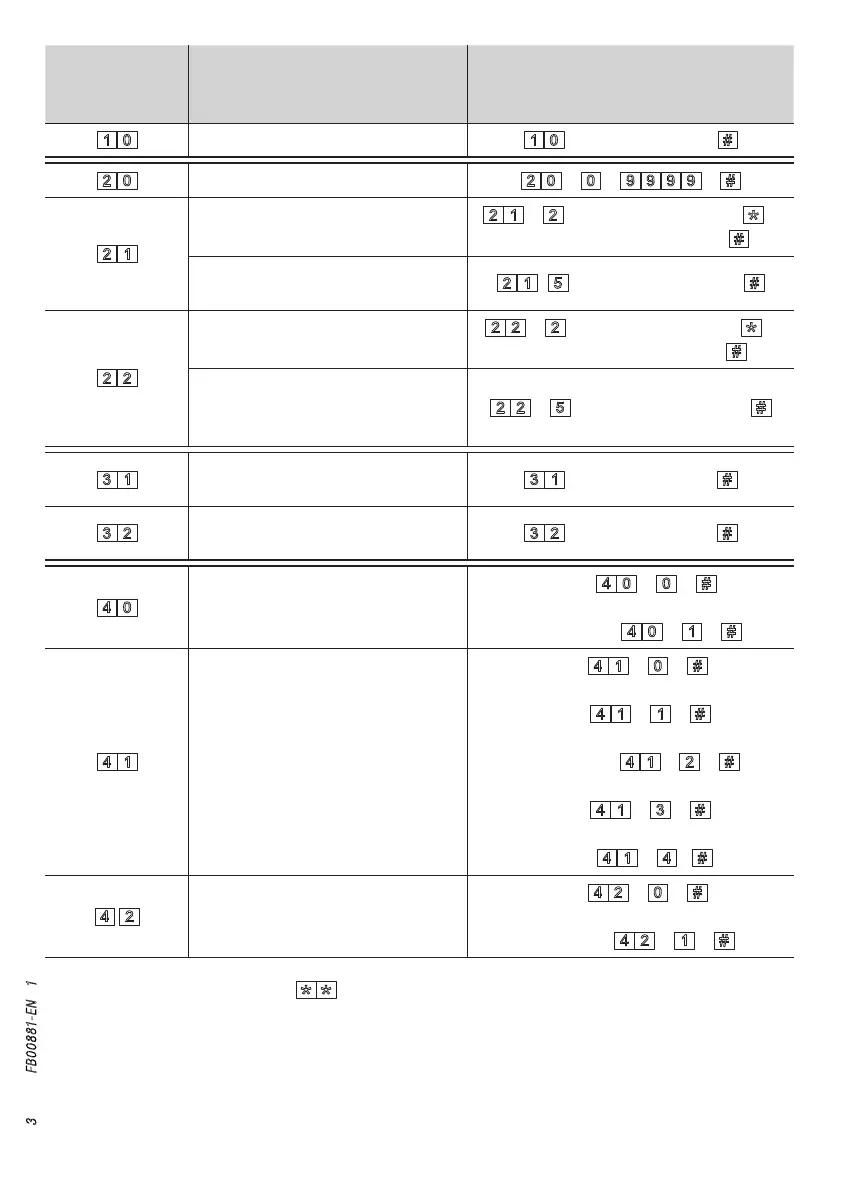
Code for
programming
device
Function Sequence
Changing Master code
+ new Master code +
Deleting the codes list
+ + +
Associating user ID and user code
to relay-switch 1
+ + user ID (max 4 digits) + +
user code (from 4 to 8 digits) +
Removing all user codes
associated to relay-switch 1
+ + user ID (max 4 digits)+
Associating user ID and user code
to relay-switch 2
+ + user ID (max 4 digits)+ +
user code (from 4 to 8 digits) +
Removing all user codes
associated to the user ID of re-
lay-switch 2
+ + user ID (max 4 digits) +
Setting the relay-switch 1 time
(default 1 s - max 3,600 s)
+ 'time in seconds' +
Setting the relay-switch 2 time
(default 1 s - max 3,600 s)
+ 'time in seconds' +
Setting the LED color
WHITE:
+ +
BLUE (default): + +
Setting the brightness of
the LEDs
OFF:
+ +
25%: + +
50% (default): + +
75%: + +
100%: + +
Setting the tone
OFF:
+ +
ON (default): + +
To exit programming, press the button . The red light alert will turn o.


 To Next Page
 Loading...