$%*1'
&1212
1 2 3 4 2 CX CY
S1 GND S1 GND
24V 0V
10 11
CANCELLI AUTOMATICI
R700
C
A
M
E
ACCESS CONTROL
C
A
M
E
ACCESS CONTROL
ENGLISH
p.
16 - Manual code:
119G 3 565 E N ver.
2.0 09/2012 © CAME Cancelli Automatici S.p.A. - The data and information in this manual may be changed at any time and without prior warning.
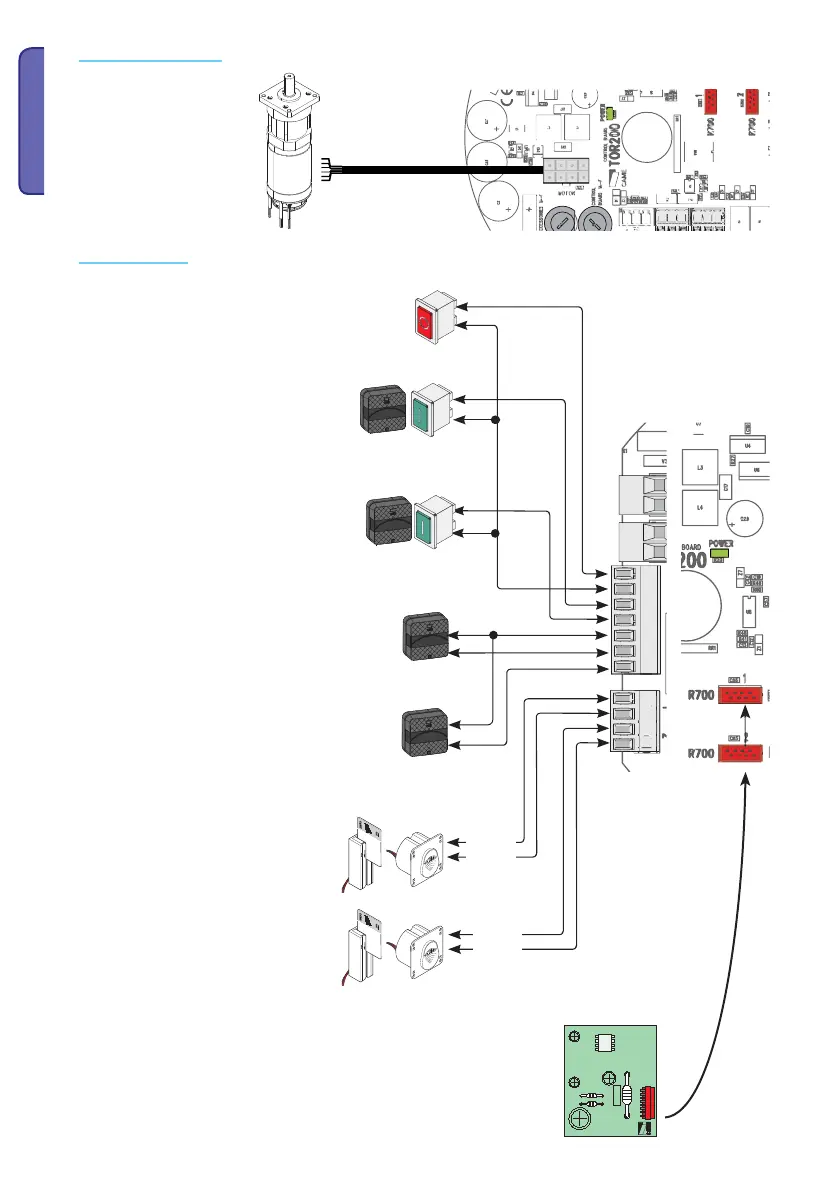
24 V DC gearmotor with
encoder
Gearmotor with encoder
Command devices
Stop button (N.C. contact.). Turnstile stop button that
excludes the automatic closing cycle, to resume movement
use the command device.
N.B.: if contact is unused, select 0 (Deactivated) from
the F 1 function.
Opening device (N.O. contact)
Closing device (N.O. contact)
Note: if feature F 54 is set on 2, the device
commands the opening wing-barrier on the side
opposite that of contact 2-3.
N.B.: plug in the (R700) coding card for the (TSP00) sensor or
the (LT001) card reader to be recognised.
Reopening when closing (N.C.) Contact
Input for safety devices like photocells, compliant
with law EN 12978. During the wing-barrier opening,
opening the contact will invert the movement. The
wing-barrier will open completely.
(N.O.) Contact of the fi rst command device
SENSOR 1 (Transponder or card reader with
R700 board)
(N.O.) contact of the second command device
SENSOR 2 (Transponder or card reader with
R700 board)
Red
Black
(N.C.) contact reopen while closing
Input for safety devices like photocells, compliant
with law EN 12978. During the wing-barrier opening,
opening the contact will invert the movement. The
wing-barrier will open completely.
Red
Black



 To Next Page