
 Need help?
Do you have a question about the CAMPAGNOLO ErgoBrain and is the answer not in the manual?
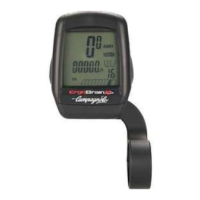
Overview of the Campagnolo ErgoBrain bicycle computer's features and purpose.
Essential safety precautions for using the ErgoBrain device.
Key points for proper maintenance, unit care, and handling.
Highlights the ErgoBrain's self-learning, ease of use, and compatibility.
Diagram and labels identifying the main parts of the ErgoBrain unit and sensors.
Erases all data and initializes the unit to its default state.
Choose between KMH and MPH for displaying speed measurements.
Enter the correct circumference for wheel A and wheel B.
Enable or disable the cadence sensor function.
Input chainring and sprocket teeth counts for accurate gear data.
Calibrates the shift timing for the front derailleur.
Explains how to use the unit's buttons and understand the displays.
Automatic measurement based on pedaling activity and stops.
Manual start/stop measurement using the S/S button for timing events.
Instructions for setting the device's current time.
Unit enters sleep state after inactivity to conserve battery power.
Indicates if current speed is higher or lower than average speed.
Check and switch between wheel A and wheel B circumferences.
Procedure to update sprocket data when the cog set is changed.
Notes on detaching the unit from the bracket and entering sleep state.
Step-by-step instructions for replacing the unit's CR2032 battery.
Solutions for common issues like dark screens, slow response, or no display.
 General
| Wireless | Yes |
|---|---|
| Altimeter | Yes |
| Display Type | LCD |
| Type | Cycling Computer |
| Functions | Speed, distance, time, altitude, temperature |
| Mounting | Handlebar |
| Compatibility | Campagnolo components |
| Water Resistance | Yes |



 To Next Page
