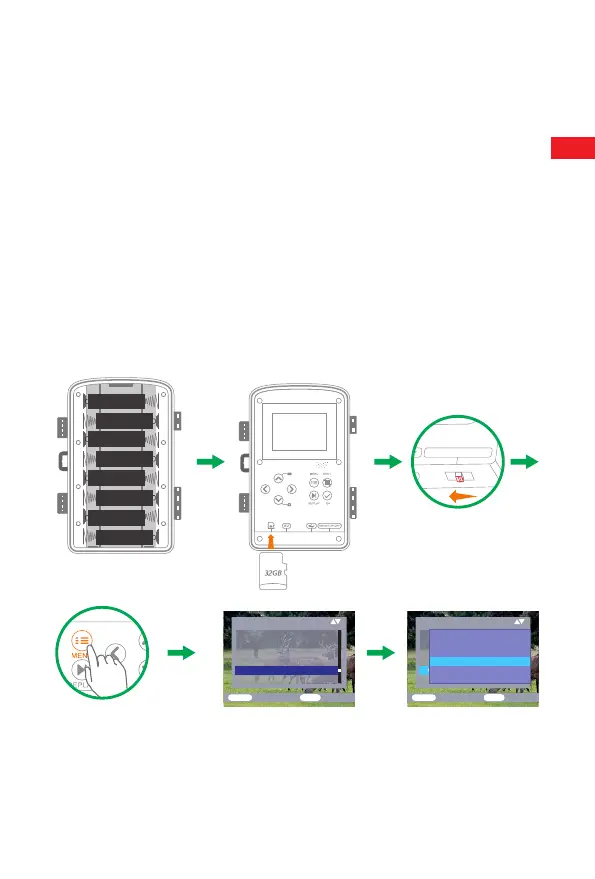
2.Instead of type LR6 (AA) batteries with the same specification (with
2000 mAh or higher) may be used. We recommend NiMh batteries
with low self discharge (not supplied).
3.The camera must be inserted 4 or 8 x 1. 5 V AA batteries . Do not use
new and old batteries together. DC interface need 6V/1.5A adapter
with 3.5 mm (outer diameter) plug head.
4.I n s e r t CLASS6 o r higher c lass mi c r o SD card (CLASS10 recommend).
Prior to insert into memory card, ensure that the lateral write protection
on the memory card has not been locked.
5.Switch on the camera. 3 switches: power off (OFF),setup menu
/SETUP mode (SETUP)and live mode (ON).
6.New memory card is recommended to be formatted when using (as
below described).
7.Please note that the camera will power off when power is very low.
AALR6
AALR6
AALR6
AALR6
AALR6
AALR6
AALR6
AALR6
Settings
Time&d ate
Photo stamp
Password protection
Beep sound
Format memory card
Serial N O
ME NU
Back
OK
Select
Settings
Time&date
Photo stamp
Password protection
Beep sound
Format memory card
Serial N O
ME NU
Back
OK
Select
Notification:All data
will be deleted
Yes
No
Operation (See Figures Below)
Open t h e lo c k i n g brackets a n d the p r otective c o v e r of t h e battery
compartment - i n s e r t ba t t e r i e s -insert m e m o r y ca r ds w i t c h to
SETUPenter s y s t e m menu b y p r e s s i n g MENU b u t t o n -choose t o fo r m a t
memory c a r dc h o ose to reset t o facto r y .
E N
5


 To Next Page