EasyManua.ls Logo

CAMPARK V30 - Mode Interfaces and Controls; Video Mode Interface Elements; Playback and Navigation Controls; Setup Menu Access Points

CAMPARK V30
28 pages
Print Icon
To Next Page IconTo Next Page
To Previous Page IconTo Previous Page
Loading...
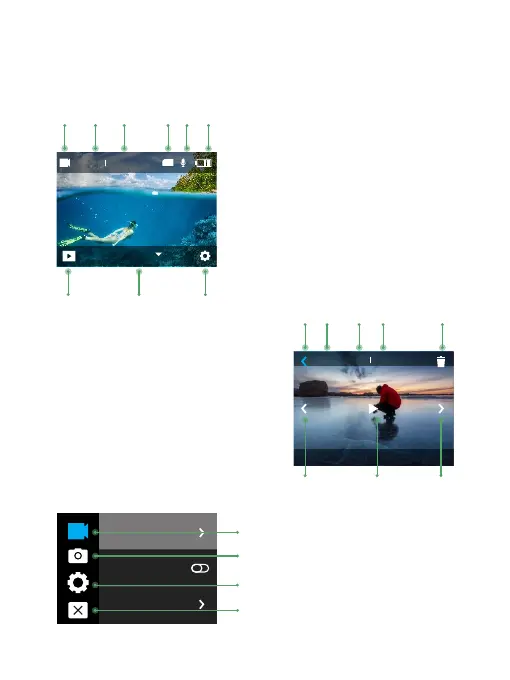
Button Function and Interfaces:
Video Mode :
00:03 :25 00:03 :25
TF
Video
4K30FPS
2
1
3
5
6
4
1. Video Mode Icon
2. Recording Time
3. Rem aining Recording Time
4. Memory Card Status
5. Audio Recording Status
7. Playback
6. Power Status
8. Mode Selection
9. Set ting Menu
Resolution
Image Stabilization
Video Encode
00:03 :25 00:03 :25
50%
X1
8 97
10
11
12
13
14
15
16
17
10. Return
11. Volume
12. Video Play Time
13. Video Remaining Time
14. Delete
15. Previous
16. Play / Pause
17. Next
18
19
20
18. Video Setup
19. Photo Setup
20. General Setup
21. Exit
5
21

Related product manuals