9
10
Cleaning the Grille, Case and Remote Controller
A cloth dampened with cold water may be used
on the indoor unit if it is very dirty. Then wipe it
with a dry cloth.
Do not use a chemically treated cloth or duster to
clean the unit.
Do not use benzine, thinner, polishing powder, or
similar solvents for cleaning. These may cause
the plastic surface to crack or deform.
Never use water hotter than 40 C to clean the front
panel, it could cause deformation of discoloration.
CAUTIONS
CARE AND MAINTENANCE
Care and maintenance
Turn the system off before cleaning. To clean, wipe with
a soft, dry cloth. Do not use bleach or abrasives.
NOTE: Supply power must be disconnectd before
cleaning the indoor unit.
Filter Handle
A clogged air filter reduces the cooling efficiency of
this unit. Please clean the filter once every 2 weeks.
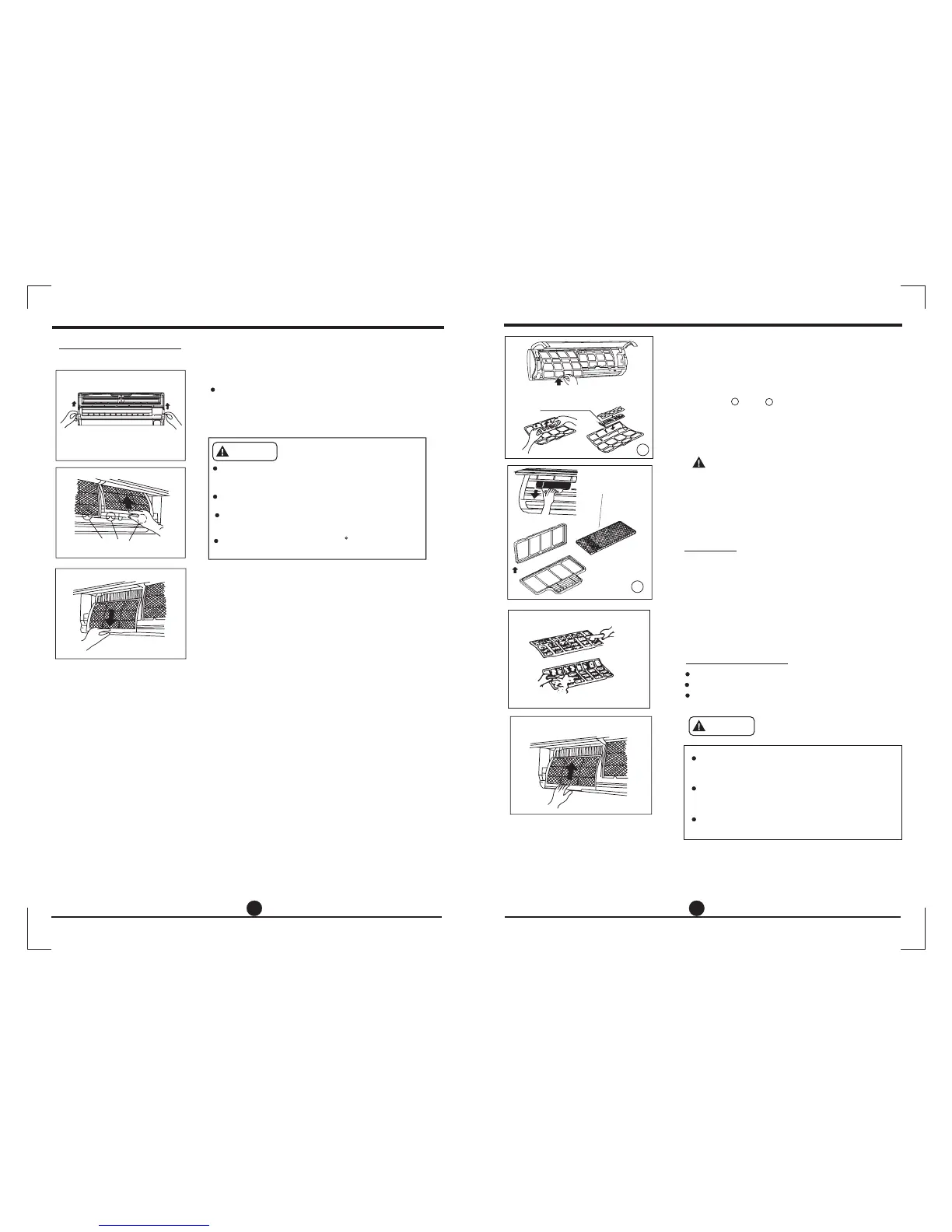
1. Lift the indoor unit panel up to an angle until it
stops with a clicking sound.
2. Take hold of the handle of the air filter and lift it
up slightly to take it out from the filter holder,
then pull it downwards.
Cleaning the air filter
3. Remove the AIR FILTER from the indoor unit.
Clean the AIR FILTER once two weeks.
Clean the AIR FILTER with a vacuum cleaner
or water, then dry it up in cool place.
.
.
CARE AND MAINTENANCE
Maintenance
Checks before operation
If you plan to idle the unit for a long time, perform the
following:
(1) Operate the fan for about half a day to dry the
inside of the unit.
(2) Stop the air conditioner and disconnect power.
(3) The outdoor unit requires periodic maintenance
and cleaning. Do not attempt to do this yourself.
Contact your dealer or servicer.
Remove the batteries from the remote controller.
Check that the wiring is not broken off or disconnected.
Check that the air filter is installed.
Check if the air outlet or inlet is blocked after the
air conditioner has not been used for a long time.
Do not touch the metal parts of the unit when
removing the filter. Injuries can occur when
handling sharp metal edges.
Do not use water to clean inside the air conditioner.
Exposure to water can destroy the insulation,
leading to possible electric shock.
When cleaning the unit, first make sure that the
power and circuit breaker are turned off.
Caution
Air freshening filter
Air freshening filter
1
2
4. Remove the
Silver Ion filter /
Bio filter /Vitamin C filter/3M air purifier filter) from
its support frame.(The removing and installation
method are slightly difference, see the pictures
marked and on the left.
Clean the air freshening filter at least once a
month, and replace it every 4-5 months.
Clean it with vacuum cleaner, then dry it in cool
place.
5. Install the air freshening filter back into position.
6. Insert the upper portion of air filter back into the
unit, taking care that the left and right edges line
up correctly and place filter into position.
Air Freshening Filter(Optional filter
included: Plasma Dust Collector/
.
.
1
2
Do not touch the Plasma Dust Collector
Filter within 10 minutes after opening the
front panel, it may cause an electric shock.



 To Next Page