EasyManua.ls Logo

CAMSCAN CS-IPSD6000B - Connectors (Indoor Only)

Default Icon
27 pages
Print Icon
To Next Page IconTo Next Page
To Previous Page IconTo Previous Page
Loading...
6
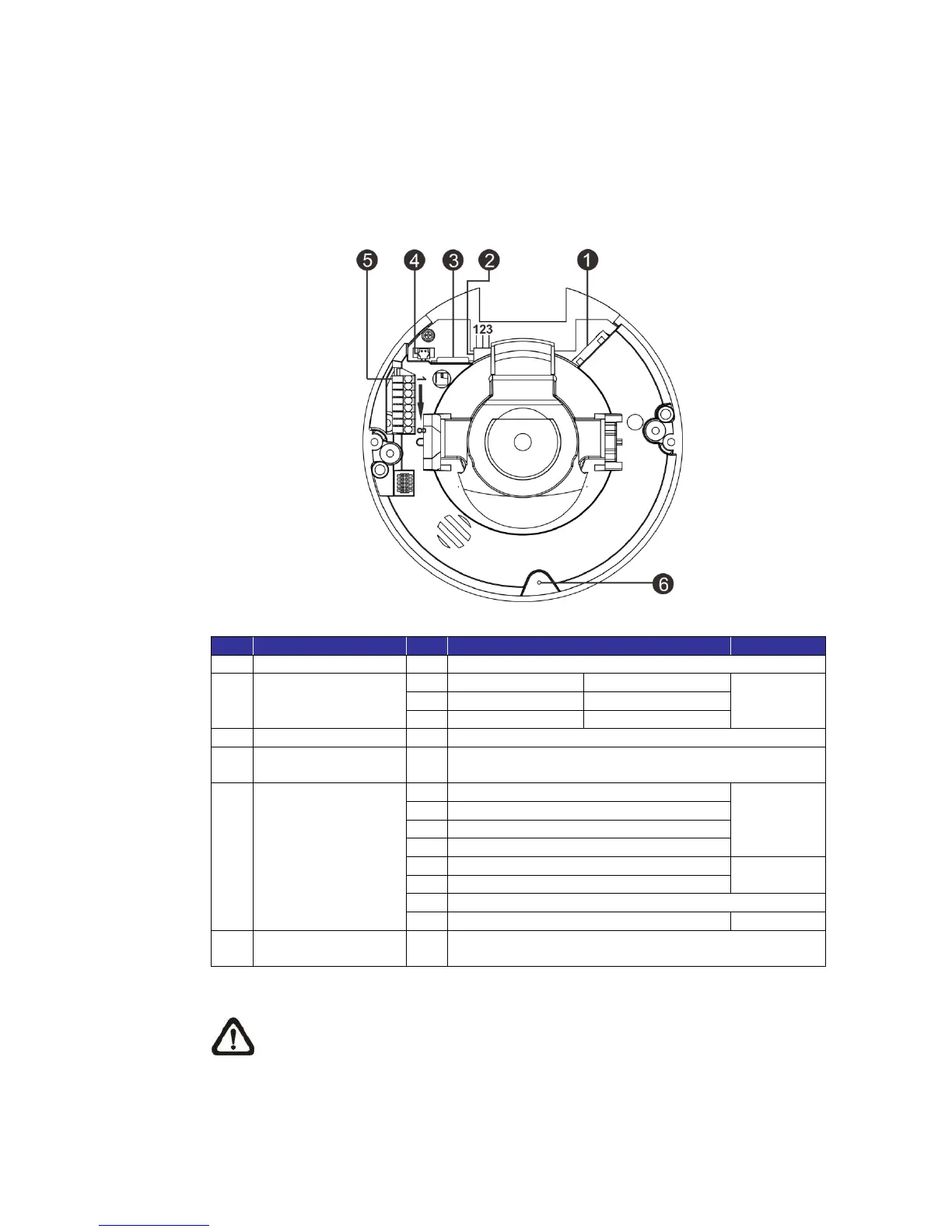
1.4 Connectors (Indoor Only)
The diagram below shows the default button, microSD card slot and various
connectors of the IP Camera. Definition for each connector will be given as
follows.
No.
Connector
Pin
Remarks
1
RJ-45
-
10/100 Mbps Ethernet / PoE
2
Power
(AC 24V / DC 12V)
1
AC 24V Power-1
DC 12V Power
Power
connection
2
AC 24V GND
DC 12V Reserved
3
AC 24V Power-2
DC 12V GND
3
microSD Card Slot
-
For video recordings storage
4
Video
(BNC Connector)*
-
For analog videos output
5
Alarm & Audio I/O
1
Alarm
connection
2
3
4
5
Line Out
6
7
GND
8
Line In
6
Default Button
-
Press the button with a proper tool for at least 20
seconds to restore the system.
(*) Optional
NOTE: Insert the microSD card into the microSD card slot before
powering on the camera. If the camera is already powered on, reboot
the camera after the microSD card is inserted.