9
CH heat output setting :
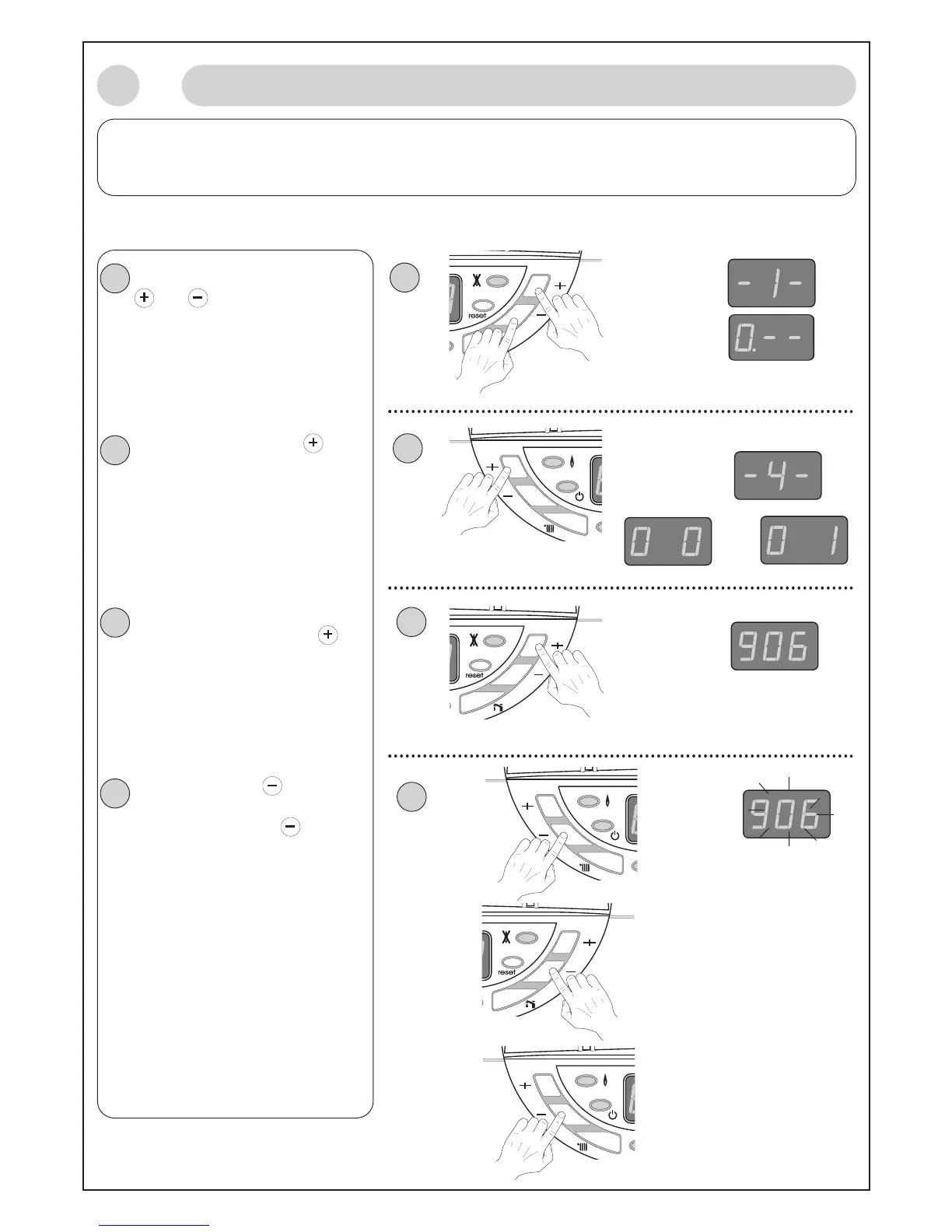
If you would like to change the setting of C/H heat output, please proceed as follow :
(
note : the factory setting is 18 kW and the following explanation refer to menu 4 section 9)
-
Switch to installer mode, press key
and on the Right side for 5
s
econds.
The display shows :
-1- then 0
•
-- if there is no default in the
default register.
- press 3 times on menu key (on
the Left side ) to gain access to menu
-
4-,
The display shows :
-4- then the value set for section 0 ( 00
or 01 respectively Action on burner only
or pump and burner)
- change for section 9 (Adjustment of
CH heat output). Press on key on
Right side 9 times.
The display shows :
(906 which corresponds to the 18 kW
which is the factory setting)
9 = section 9 06 = 18 kW
- press on setting key (on the Left
side) once, the 2nd and 3rd digits fl
ash
together. Then press the
key on
the DHW or CH side to change the
C/H heat output steps between 00
and 10.
Press on setting key to confirm the
value. The display stops fl
ashing.
Setting procedure is finished.
To exit from setting mode, leave the
boiler for approx. 1 minute then the
computer will switch back to user mode.
After programming please close the
door
P (fig. 18)
1
Display
2
x 3
1
2
or
3
3
x 9
4
4
5 ”
9
Adjustments and Settings (continued)



 To Next Page