D
ISPLAY
A
CTION
C
ONFIGURATION
wait 5 ”
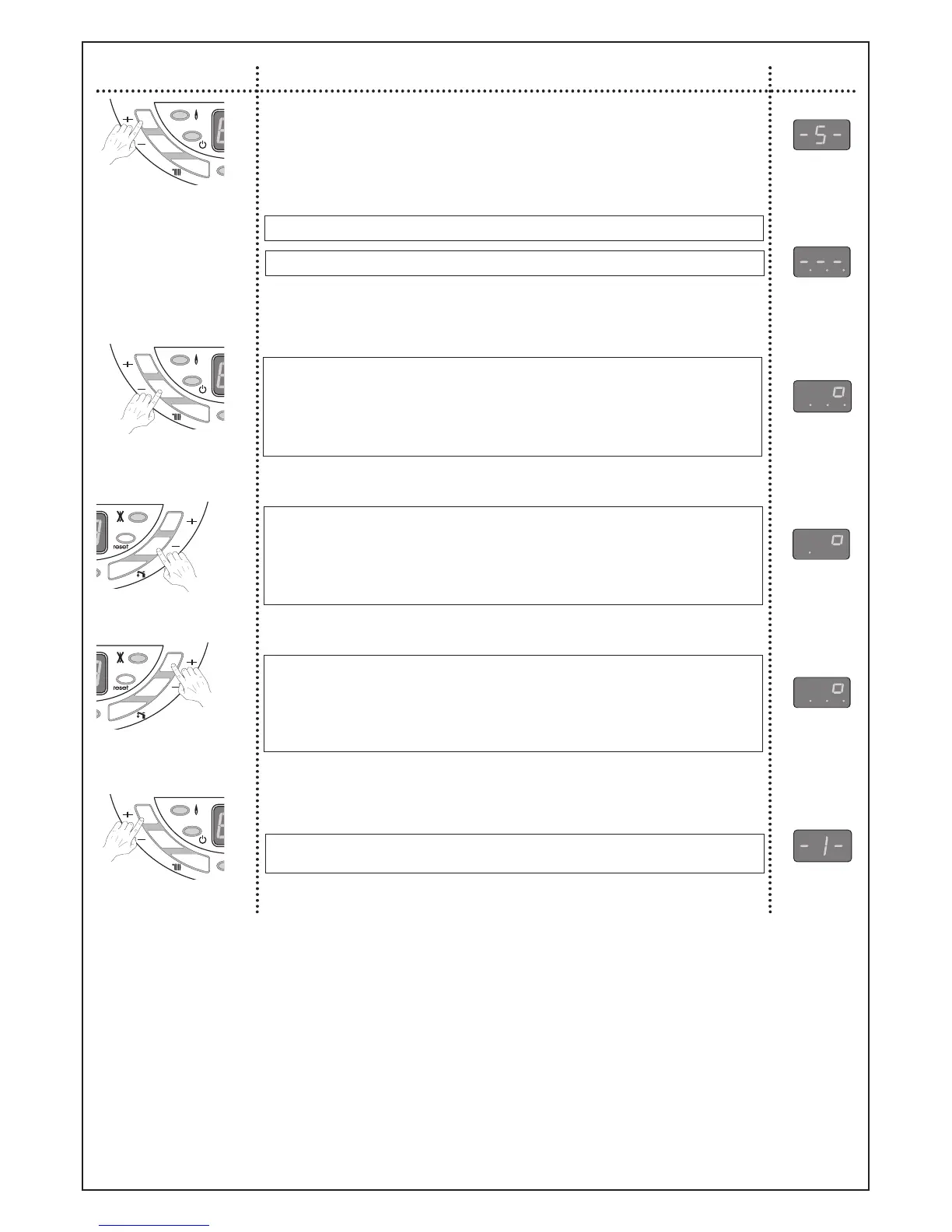
Combustion rate control mode OFF
Switching on the combustion rate
control mode. Central heating output
reach the maximum power set in
menu 4 section 9.
Central heating temperature is dis-
played in celsius degrees.
The 3 dots indicate that the combus-
tion rate control is ON at maximum
output.
Switching the combustion rate
down to minimum power.
Central heating temperature is dis-
played in celsius degrees.
The dot indicates that the combus-
tion rate control is ON at minimum
output.
Switching on the combustion rate to
maximum output set in menu 4 sec-
tion 9.
Central heating temperature is dis-
played in celsius degrees.
The 3 dots indicate that the combus-
tion rate control is ON at maximum
output.
Switching off the combustion rate
control mode.
press once
press once
press once
press once
press once
E
ffect Display
Locking conditions of the combustion rate control mode :
- boiler in stand by mode
- room thermostat is not calling for heat
- room thermostat is calling for heat but the maximum temperature is reached
- boiler in lockout mode
- after a reset or if the main supply fails
- end of the mode if operator leave menu 5
- after 15 minutes if there is no actions on keyboard
Nota :
As soon as the combustion rate control mode is on, Central Heating key is inactive.



 To Next Page