EN 08
Step 7
• When the WiFi LED starts blinking, you can
proceed with pairing within 5 minutes.
WIRELESS PARAMETERS
Standard
Bluetooth v4.2, BR/EDR, BLE
IEEE 802.11 b/g/n
Frequency Band(s) [MHz]
2402-2480
2401-2483
Maximum Power [mW]
10
100
Technology
Bluetooth
Wi-Fi
How to activate wireless network port:
• If the WiFi led blinks it means that the WiFi module is On.
• If the oven is not enrolled WiFi is Off.
PRODUCT INFORMATION FOR NETWORKED EQUIPMENT
• Power consumption of the product in networked standby if all wired
network ports are connected and all wireless network ports are activated:
2,0 W
• If already enrolled: turn the knob to WiFi On.
How to deactivate wireless network port:
• If the WiFi led is Off it means that the WiFi module is Off.
• If the oven is enrolled: turn the knob to WiFi reset position and then to
Off position within 30 sec.
• If not enrolled: follow procedure for enrolling.
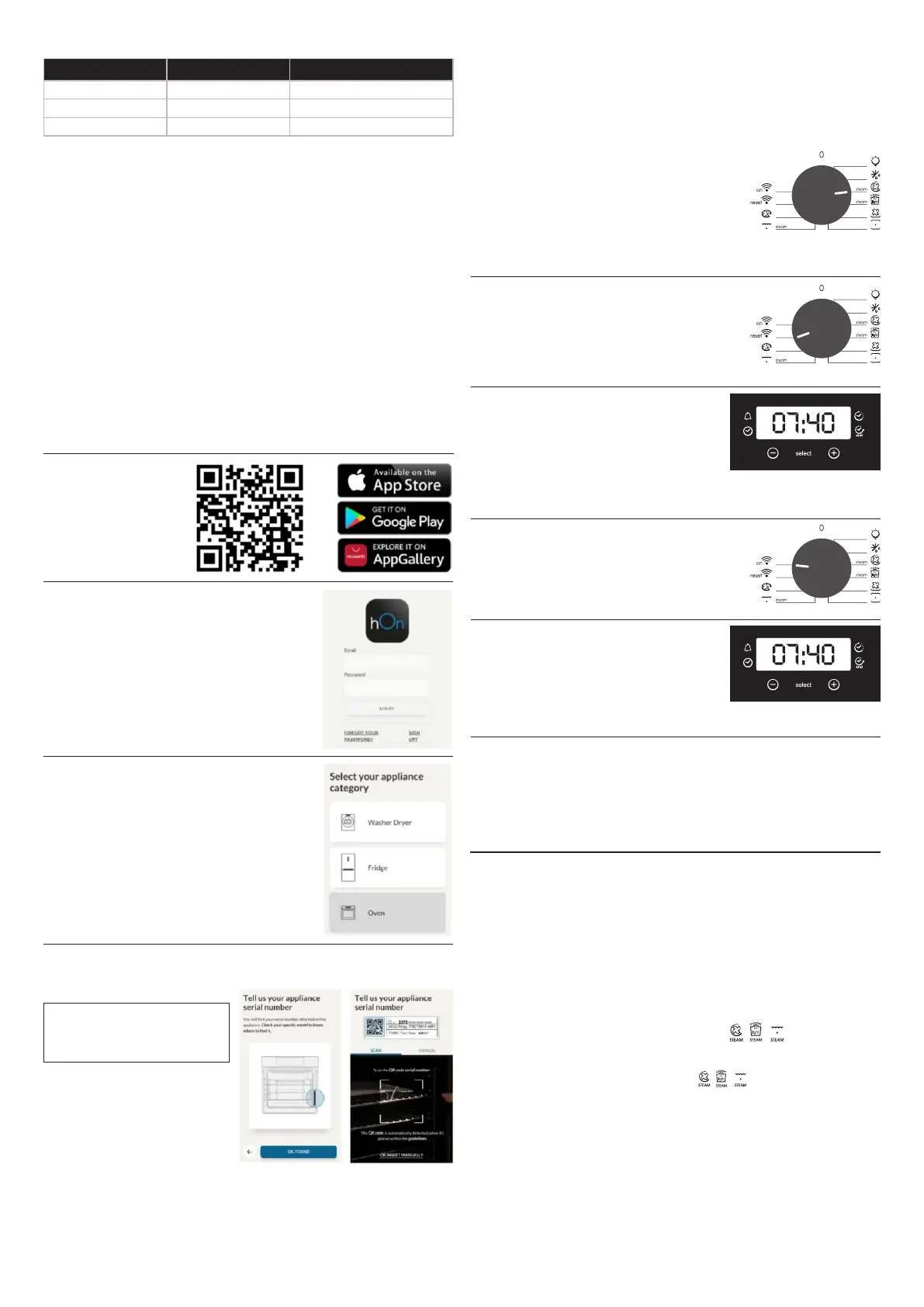
Oven enrollment on app
Step 1
• Download hOn app.
ON THE SMARTPHONE
Step 2
• Log in or sign up.
• Add new appliance
Step 3
Step 4
• Scan the QR code or insert the serial number.
Write here your serial number for future reference.
(No "light" or "0").
ON THE APPLIANCE
• Turn the cooking functions knob on a program
Step 5
Step 6
• Turn the functions knob to the WI-FI RESET
program and wait 30 seconds.
Remote control mode
• Turn the knob to the WI-FI program.
Step 1
Step 2
• The WiFi LED switches on.
www.candy-group.com
Hereby, Candy Hoover Group Srl declares that the radio equipment is in
compliance with Directive 2014/53/EU. The full text of the EU declaration of
conformity is available at the following internet address:
3.2 Using The Steam Function
Released steam can cause burns:
CAUTION: Do not refill the cavity bottom with water during cooking or when the
oven is hot.
8. Remove water from the cavity bottom. Clean the drip tray after every cooking
cycle. Clean the drip tray after every cooking cycle. Please see chapter 4.1 for
cleaning instrucitons.
WARNING: Risk of burn and damage to the appliance.
5. Turn the knob for the temperature to select a temperature.
6. Wait five minutes for preheating. Then press the steam oven button. The
steam oven button works with the function.
Steam function lets you have better hummidity during cooking cycle. We
recommend alternating steam cooking with traditional cooking. We
recommend alternating steam cooking with traditional cooking.
1. Open the oven door
7. To turn the appliance off switch the function and temperature knob to zero
positions.
4. Set the function you prefer to cook with steam.
3. Put food in the appliance and close the oven door.
lOpen the oven door carrefully to avoid injury after using a cooking function
with steam.
2. Fill the cavity bottom using max. 150 ml water. Fill the cavity bottom with
water only when the oven is cold.


 To Next Page