19
This
appliance is equipped with Smart
Touch technology that allows you to
interact, via the App, with smartphones
based on Android operating system and
equipped with NFC (Near Field
Communication) function.
Dow
nload on your smartphone the
Candy simply-Fi App.
FUNCT
IONS
The mai
n functions available using the App
are:
Voi
ce Assistant – A guide to help you
choose the ideal cycle with only three
voice inputs (clothes/fabrics, color, stain
level).
Cycl
es – To download and launch new
washing programmes.
Sm
art Care – Smart Check-up and Auto-
Clean cycles and a troubleshooting guide.
My S
tatistics – Washing statistics and
tips for a more efficient use of your
machine.
HOW
TO USE SMART TOUCH
FI
RST TIME - Machine registration
Ent
er the "Settings" menu of your
Android smartphone and activate the
NFC function inside the "Wireless &
Networks" menu.
Turn t
he knob to the Smart Touch
position to enable the sensor on the
dashboard.
Open
the App, create the user profile and
register the appliance following the
instructions on the phone display or the
"Quick Guide" attached on the machine.
SM
ART TOUCH
Th
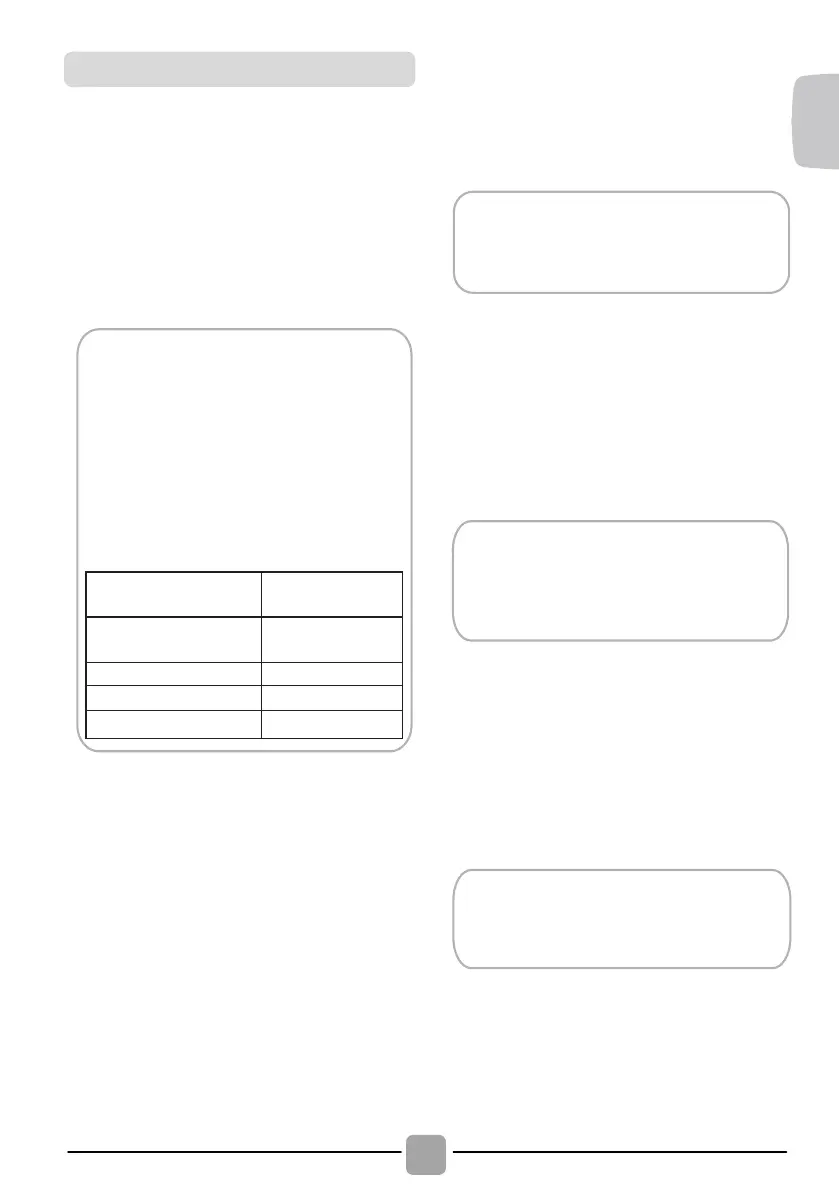
e Candy simply-Fi App is available
for devices running both Android and
iOS, both for tablets and for
smartphones. However, you can
interact with the machine and take
advantage of the potential offered
by Smart Touch only with Android
smartphones equipped with NFC
technology, according to following
functional scheme:
Andr
oid smartphone
wi
th NFC technology
Int
eraction with the
machine + contents
An
droid smartphone
wi
thout NFC technology
Co
ntents only
Android Tablet
Contents only
A
ppl
e iPhone Contents only
Appl
e iPad Contents only
The m
anagement and the control of the
machine via App is only possible "by
proximity": it is therefore not possible to
perform remote operations (e.g.:
fro
m
another room
; out
side of the house).
Ge
t all the details of the Smart Touch
functions, browsing the App in DEMO
mode or go to:
www.candysmarttouch.com
Dependi
ng on the smartphone model
and its Android OS version, the
process of the NFC activation may be
different. Refer to the smartphone
manual for more details.
Mor
e information, F.A.Q. and the
video for an easy registration are
available on:
www.candysmarttouch.com/how-to
60$577
28&+
7KLV
DSSOLDQFHLVHTXLSSHGZLWK6PDUW7RXFK
WHFKQRORJ\WKDWDOORZV\RXWRLQWHUDFWYLDWKH
$SS ZLWK VPDUWSKRQHV EDVHG RQ $QGURLG
RSHUDWLQJ V\VWHP DQG HTXLSSHG ZLWK 1)&
1HDU)LHOG&RPPXQLFDWLRQIXQFWLRQ
Ⴠ'RZQORDGRQ\RXUVPDUWSKRQHWKH&DQG\
VLPSO\)L$SS
7KH
&DQG\VLPSO\)L$SSLVDYDLODEOH
IRU GHYLFHV UXQQLQJ ERWK $QGURLG
DQG L26 ERWK IRU WDEOHWV DQG IRU
VPDUWSKRQHV +RZHYHU \RX FDQ
LQWHUDFW ZLWK WKH PDFKLQH DQG WDNH
DGYDQWDJHRIWKHSRWHQWLDORIIHUHGE\
6PDUW 7RXFK RQO\ ZLWK $QGURLG
VPDUWSKRQHV HTXLSSHG ZLWK 1)&
WHFKQRORJ\ DFFRUGLQJ WR IROORZLQJ
IXQFWLRQDOVFKHPH
$QGURLGVPDUWSKRQH
ZLWK1)&WHFKQRORJ\
,QWHUDFWLRQZLWKWKH
PDFKLQHFRQWHQWV
$QGURLGVPDUWSKRQH
ZLWKRXW1)&WHFKQRORJ\
&RQWHQWVRQO\
$QGURLG7
DEOHW
$SSOHL3KRQH
$SSOHL3DG
&RQWHQWVRQO\
&RQWHQWVRQO\
&RQWHQWVRQO\
)81&7,216
7KH
PDLQIXQFWLRQVDYDLODEOHXVLQJWKH$SS
DUH
Ⴠ9RLFH $VVLVWDQW ± $ JXLGH WR KHOS \RX
FKRRVHWKHLGHDOF\FOHZLWKRQO\WKUHHYRLFH
LQSXWVFORWKHVIDEULFVFRORXUGU\LQJOHYHO
Ⴠ&\FOHV ± 7R GRZQORDG DQG ODXQFK QHZ
GU\LQJSURJUDPPHV
*HWDOO
WKHGHWDLOVRIWKH6PDUW7RXFK
IXQFWLRQVEURZVLQJWKH$SSLQ'(02
PRGHRUJRWR
ZZZFDQG\VPDUWWRXFKFRP
+2:7
286(60$57728&+
),5677,0(
0DFKLQHUHJLVWUDWLRQ
(QWHU WKH 6HWWLQJV PHQX RI \RXU
$QGURLG VPDUWSKRQH DQG DFWLYDWH WKH
1)& IXQFWLRQ LQVLGH WKH :LUHOHVV
1HWZRUNVPHQX
'HSHQGLQJRQ
WKHVPDUWSKRQHPRGHO
DQG LWV $QGURLG 26 YHUVLRQ WKH
SURFHVVRIWKH1)&DFWLYDWLRQPD\EH
GLIIHUHQW 5HIHU WR WKH VPDUWSKRQH
PDQXDOIRUPRUHGHWDLOV
Ⴠ7XUQ WKH NQRE WR WKH 6PDUW 7RXFK
SRVLWLRQ WR HQDEOH WKH VHQVRU RQ WKH
GDVKERDUG
Ⴠ2SHQWKH$SSFUHDWH WKHXVHUSURILOH
DQGUHJLVWHUWKH DSSOLDQFHIROORZLQJ WKH
LQVWUXFWLRQVRQWKHSKRQHGLVSOD\RUWKH
4XLFN*XLGHDWWDFKHGRQWKHPDFKLQH
0RUHLQIRUPDWLRQ)$4DQGWKHYLGHR
IRU
DQ HDV\ UHJLVWUDWLRQ DUH DYDLODEOH
RQ
ZZZFDQG\VPDUWWRXFKFRPKRZWR
Ⴠ6PDUW
&DUH±6PDUW&KHFNXSDQGD
WURXEOHVKRRWLQJJXLGH
Ⴠ0\ 6WDWLVWLFV ± 'U\LQJ VWDWLVWLFV DQG
WLSV IRU D PRUH HIILFLHQW XVH RI \RXU
PDFKLQH
7528%/(6+227,1*
:KDW0LJKWEHWKH&DXVHRI
'HIHFWV
\RXFDQUHPHG\\RXUVHOI
%HIRUH
FDOOLQJVHUYLFHIRUWHFKQLFDODGYLFHSOHDVH
UXQWKURXJKWKHIROORZLQJFKHFNOLVW$FKDUJHZLOO
EH
PDGHLIWKHPDFKLQHLVIRXQGWREHZRUNLQJRU
KDV
EHHQLQVWDOOHGLQFRUUHFWO\RUXVHGLQFRUUHFWO\
,I
WKH SUREOHP SHUVLVWV DIWHU FRPSOHWLQJ WKH
UHFRPPHQGHG
FKHFNVSOHDVHFDOO6HUYLFHWKH\
PD\
EHDEOHWRDVVLVW\RXRYHUWKHWHOHSKRQH
7LPH GLVSOD\ WR HQG FRXOG FKDQJH GXULQJ
GU\LQJ
F\FOH7KHWLPHWRHQGLVFRQWLQXRXVO\
FKHFNHG
GXULQJWKHGU\LQJF\FOHDQGWKHWLPH
LV
DGMXVWHGWRJLYHWKHEHVWHVWLPDWLRQWLPH
7KH
GLVSOD\HGWLPHPD\LQFUHDVHRUGHFUHDVH
GXULQJ
WKHF\FOHDQGWKLVLVQRUPDO
'U\LQJ
WLPH LV WRR ORQJFORWKHV DUH QRW GU\
HQRXJK«
Ⴠ+DYH
\RX VHOHFWHG WKH FRUUHFW GU\LQJ
WLPHSURJUDPPH"
Ɣ:HUH WKH FORWKHV WRR ZHW" :HUH WKH FORWKHV
WKRURXJKO\
ZUXQJRUVSLQGULHG"
Ɣ
'RHVWKHILOWHUQHHGFOHDQLQJ"
Ɣ
,VWKHGU\HURYHUORDGHG"
7KH
GU\HUGRHVQRWRSHUDWH«
Ⴠ,V WKHUH D ZRUNLQJ HOHFWULFLW\ VXSSO\ WR WKH
GU\HU"&KHFN
XVLQJDQRWKHUDSSOLDQFHVXFKDVD
WDEOH
ODPS
Ɣ
,V WKH SOXJ SURSHUO\ FRQQHFWHG WR WKH PDLQV
VXSSO\"
Ɣ
,VWKHUHDSRZHUIDLOXUH"
Ɣ+DVWKHIXVHEORZQ"
Ɣ,VWKHGRRUIXOO\FORVHG"
Ɣ
,V WKH GU\HU VZLWFKHG RQ ERWK DW WKH PDLQV
VXSSO\
DQGDWWKHPDFKLQH"
Ɣ
+DV WKH GU\LQJ WLPH RU WKH SURJUDPPH EHHQ
VHOHFWHG"
Ⴠ+DV
WKHPDFKLQHEHHQVZLWFKHGRQDJDLQDIWHU
RSHQLQJ
WKHGRRU"
7KHGU\HU
LVQRLV\«
Ⴠ
6ZLWFKRI
IWKHGU\HUDQGFRQWDFW*,$6
6HUYLFHIRU
DGYLFH
7KH,QGLFDWRU
LVRQ«
Ɣ
'RHV
WKH
ILOWHU
QHHG
FOHDQLQJ
"
7KH,QGLFDWRU
LVRQ«
Ɣ
'RHV WKH
ZDWHU FRQWDLQHU QHHG
HPSW\LQJ"
&86720(56(5
9,&(
6KRXOGWKHUHVWLOOEHDSUREOHPZLWK\RXU
GU\HU DIWHU
FRPSOHWLQJ DOO WKH
UHFRPPHQGHG FKHFNV
SOHDVH FDOO
VHUYLFHIRU
DGYLFH
7KH\PD\
EHDEOHWRDVVLVW\RXRYHUWKH
WHOHSKRQH RU
DUUDQJH IRU D VXLWDEOH
DSSRLQWPHQWIRU
DQHQJLQHHUWRFDOOXQGHU
WKHWHUPV
RI\RXUJXDUDQWHH+RZHYHUD
FKDUJH PD\
EH PDGH LI DQ\ RI WKH
IROORZLQJDSSOLHV
WR\RXUPDFKLQH
Ⴠ,V
IRXQGWREHLQZRUNLQJRUGHU
Ɣ+DVQRW
EHHQLQVWDOOHGLQDFFRUGDQFH
ZLWKWKH
LQVWDOODWLRQLQVWUXFWLRQV
Ⴠ+DVEHHQ
XVHGLQFRUUHFWO\
6SDUHV
6HUYLFH
$OZD\V XVH
JHQXLQH VSDUHV DYDLODEOH
GLUHFWIURP
VHUYLFH
)RU VHUYLFH
DQG UHSDLUV FDOO \RXU ORFDO
VHUYLFHHQJLQHHU
7KH PDQXIDFWXUHU
GHFOLQHV DOO
UHVSRQVLELOLW\ LQ
WKH HYHQW RI DQ\
SULQWLQJPLVWDNHV
LQWKLVERRNOHW7KH
PDQXIDFWXUHU DOVR
UHVHUYHV WKH ULJKW
WRPDNH
DSSURSULDWHPRGLILFDWLRQVWR
LWV SURGXFWV
ZLWKRXW FKDQJLQJ WKH
HVVHQWLDOFKDUDFWHULVWLFV
)25
60$57728&+02'(/6
7KH &DQG\
VLPSO\)L
DSS
KDV D
6PDUW
&KHFNXS
I
XQFWLRQ WKDW DOORZV \RX WR FRQILUP WKH
IXQFWLRQDOLW\
DQGVWDWXVRIWKHSURGXFWDWDQ\WLPH7RXVHWKH
&DQG\
VLPSO\)L$33
\RX
ZLOOQHHG
DQ
$QGURLGVPDUWSKRQHZLWK1)&WHFKQRORJ\
0RU
HLQIRFDQEHIRXQGRQWKH$SS
,I
WKHGLVSOD\RIWKHPDFKLQHLVVKRZLQJDQHUURUE\DFRGHRUEOLQNLQJ/('V\RXVKRXOGWXUQRQWKH
$SS
RQ\RXU$QGURLGVPDUWSKRQHZLWK1)&RQVHOHFWLQJ5HDGWKHHUURURQWKH+HOSRQOLQH
PHQX
SODFH\RXUVPDUWSKRQHDJDLQVWWKH
6PDUW
7RXFK
ORJR
RQWKHFRQWUROSDQHO<RXVKRXOGQRZ
EH
DEOHWRUHDGWKHIDXOWGLUHFWRU\WRVROYHWKHLVVXH
This
appliance is equipped with
Sm
art
Touch te
chnology that allows you to
int
eract, via the App, with smartphones
based on A
ndroid operating system and
equipped w
ith NFC (Near Field
Com
munication) function.
Dow
nload on
your
smartphone the
Candy si
mply
-Fi App.
FUNCT
IONS
The mai
n functions available using the App
are:
Voi
ce Assistant
–
A gui
de to help you
choos
e the ideal cycle with only three
voic
e inputs (clothes/fabrics, color, stain
lev
el).
Cycl
es
–
T
o downl
oad and launch new
was
hing programmes.
Sm
art Care
–
Sm
art Check
-up and
Auto
-
Cl
ean
cyc
les and a troubleshooting guide.
My S
tatistics
– Was
hing statistics and
ti
ps for a more efficient use of your
mac
hine.
HOW
TO USE SMART TOUCH
FI
RST TIME
- Machi
ne registration
Ent
er the
"Se
ttings
" m
enu of your
Andr
oid smartphone and activate the
NFC
function inside the "
Wi
reless &
Net
works
" m
enu.
Turn t
he knob to the
Sm
art Touch
posi
tion to enable the sensor on the
dashboar
d.
Open
the App, create the user profile and
regi
ster the appliance following the
ins
tructions on the phone display or the
"Q
uick Guide"
attached on t
he machine.
SM
ART TOUCH
Th
e
Candy si
mply
-Fi Ap
p is available
fo
r devices running both Android and
iO
S, both for tablets and for
smar
tphones. However, you can
in
teract with the machine and take
advant
age of the potential offered
by Sm
a
rt
Touch only with Android
smar
tphones equipped with NFC
te
chnology, according to following
fu
nctional scheme:
Andr
oid smartphone
wi
th NFC technology
Int
eraction with the
ma
chine + contents
An
droid smartphone
wi
thout NFC technology
The m
anagement and the control of the
ma
chine via App is only possible "by
prox
imity": it is therefore not possible to
per
form remote operations (e.g.:
fro
m
another
room
; out
side of the house).
Ge
t all the details of the Smart Touch
fu
nctions, browsing the App in DEMO
mode
or go to:
ww
w.candysmarttouch.com
Dependi
ng on the smartphone model
and it
s Android OS version, the
process of
the NFC activation may be
dif
ferent. Refer to the smartphone
manual f
or more details.
Mor
e information, F.A.Q. and the
vi
deo for an easy registration are
avai
lable on:
ww
w.candysmarttouch.com
/how-to
EN


 To Next Page
 Loading...