EasyManua.ls Logo

Canon 800D - Quick Control Touch Screen Functions; Quick Control LCD Touch Screen; Touch Screen Display Settings; Focus Area Selection

Canon 800D
3 pages
Print Icon
To Next Page IconTo Next Page
To Previous Page IconTo Previous Page
Loading...
CAMERA FUNCTIONS QUICK CONTROL TOUCH SCREEN
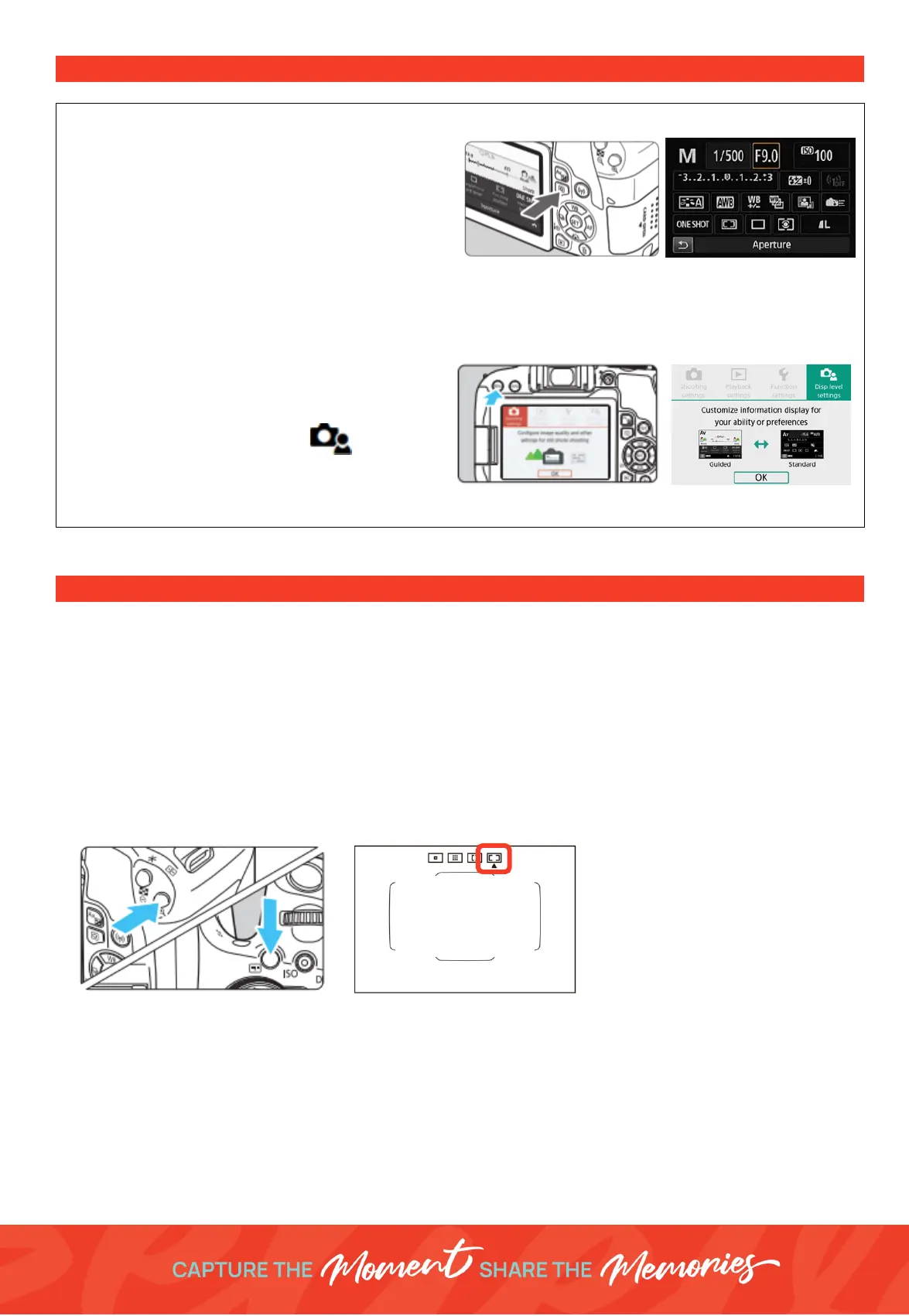
Quick Control LCD Touch Screen
Alternative to using the methods above you can use
theLCD Touch Screen & Quick Control Feature.
Press the
“Q”
Button then use the
Multi- Selector
arrows
to navigate to what you would like to
control or
touch
the section on the screen. Eg
Aperture,Shutter Speed, ISO.
Click
Set
to enter the adjutment and either use the
touch screen
or the
Command Dial
to select your option.
Click
Set
to confirm.
Touch Screen - Standard Display
If the
Black Quick Control
screen on the right above is
not the screen you can see.
Press
Menu
and navigate to tab 4 [ ] DISPLAY
LEVEL and change the shooting menu and Menu
display to
Standard
instead of
Guided
.
FOCUSING THE FOCUS AREA
Due to the conditions we photograph in whilst on location in the shopping centres the best focus area mode is
Automatic selection AF.
This mode is where the camera automatically detects subjects and selects the focus
point(s).
Follow the steps below to select the correct (Auto Focus) AF-area mode.
1.
Press the
AF area selection
button
2.
Touch icon on the display screen to select
Auto Selection AF
.

Related product manuals