
 Need help?
Do you have a question about the Canon 800D and is the answer not in the manual?
Ensure Manual Mode (M) is selected on the mode dial for adjustments.
Adjust shutter speed by rotating the 'Command Dial' for faster or slower settings.
Adjust aperture by holding the 'AV +/- button' and rotating the 'Command Dial'.
Press 'ISO' button, use multi-selector or touch screen to change ISO sensitivity.
Alternative method using the LCD Touch Screen & Quick Control Feature for adjustments.
Guide to changing display from 'Guided' to 'Standard' for clarity.
Utilize Automatic selection AF for subject detection and focus point selection.
Press AF area button, then touch display to select Auto Selection AF.
Procedure to set custom white balance using a white sheet and SD card.
This document serves as a camera cheat sheet for the Canon 800D, providing a comprehensive guide to its functions, usage, and essential settings for optimal photography. It's designed to help users quickly understand and operate the camera, particularly in a retail or event photography context, as suggested by references to "shopping centres" and "customers."
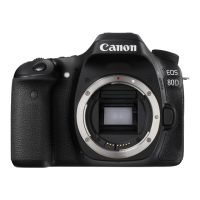
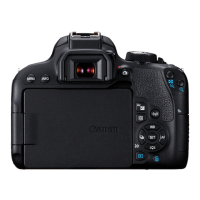
The Canon 800D is a digital single-lens reflex (DSLR) camera, known for its versatility and user-friendly interface. This guide focuses on key settings and operations that are crucial for consistent and high-quality image capture. The camera features a mode dial, shutter release, command dial, ISO button, multi-selector, and an AV [+/-] aperture adjustment button, alongside a menu button and a quick control (Q) button. It also boasts a touch-screen LCD, which significantly enhances usability for many functions.
Mode Dial: The mode dial is a fundamental control for setting the camera's overall operational mode. For the purposes outlined in this guide, the Manual Mode (M) should always be selected. This mode grants the user full control over exposure settings, which is essential for achieving specific photographic results and adapting to varying lighting conditions.
Shutter Speed: Shutter speed controls the duration for which the camera's sensor is exposed to light. Adjustments are made by rotating the 'Command Dial'. Rotating it to the right results in a faster shutter speed, useful for freezing motion, while rotating it to the left results in a slower shutter speed, ideal for capturing motion blur or working in low light. The default setting recommended in this guide is 1/125, which is a good starting point for general photography.
Aperture: Aperture controls the size of the lens opening, which affects both the amount of light entering the camera and the depth of field (the area in focus). Adjustments are made by pressing and holding down the 'AV +/- button' and simultaneously rotating the 'Command Dial'. Rotating the dial to the left results in a larger f/number (smaller aperture opening), increasing the depth of field, while rotating it to the right results in a smaller f/number (larger aperture opening), decreasing the depth of field. The recommended default setting for aperture is between f7.1 and f9, suggesting a preference for greater depth of field, which is often desirable in commercial or event photography to ensure more of the scene is in focus.
ISO Sensitivity: ISO sensitivity determines how sensitive the camera's sensor is to light. A higher ISO allows for shooting in darker conditions but can introduce more digital noise (grain) into the image. To adjust ISO, the "ISO" button is pressed, and then the multi-selector is used to highlight the desired ISO on the LCD display. Alternatively, users can slide their finger on the touch screen LCD to select the option and then press SET. The default setting recommended is ISO 200, which provides a good balance between light sensitivity and image quality in well-lit environments.
Focusing – The Focus Area: Accurate focusing is paramount for sharp images. This guide emphasizes the use of Automatic selection AF as the best focus area mode, particularly in dynamic environments like shopping centers. In this mode, the camera automatically detects subjects and selects the appropriate focus point(s). To select this mode, the user first presses the AF area selection button, then touches the icon on the display screen to choose Auto Selection AF. This simplifies the focusing process, allowing the photographer to concentrate on composition rather than manually selecting focus points.
Quick Control – LCD Touch Screen: The Canon 800D's touch screen significantly streamlines camera operation. Many settings that can be adjusted using physical buttons and dials can also be controlled via the touch screen. To access the Quick Control screen, the "Q" Button is pressed. From there, the multi-selector arrows can be used to navigate, or the user can directly touch the desired section on the screen (e.g., Aperture, Shutter Speed, ISO). After selecting a setting, "Set" is clicked to enter the adjustment, which can then be made using either the touch screen or the Command Dial, followed by another "Set" to confirm.
Touch Screen - Standard Display: If the Quick Control screen does not appear as expected, the display settings might need adjustment. Users can press "Menu," navigate to tab 4 [ ] DISPLAY LEVEL, and change the shooting menu and Menu display to "Standard" instead of "Guided." This ensures that the familiar Quick Control interface is accessible.
Preset Manual White Balance Procedure: White balance is crucial for ensuring that colors in an image are accurately represented, especially under different lighting conditions. This guide provides a detailed procedure for setting a custom white balance, which is vital for consistent color rendition in varied on-location lighting setups.
The Canon 800D, as highlighted in this guide, is designed for intuitive use, even for complex settings. The combination of physical controls and a responsive touch screen allows for quick adjustments on the fly. The emphasis on Manual Mode, custom white balance, and automatic focus selection suggests a workflow geared towards professional or semi-professional use where control and consistency are key. The ability to quickly switch between different display modes (Standard vs. Guided) further enhances its adaptability to user preference and skill level. The detailed steps for custom white balance underscore the camera's capability to deliver precise color accuracy, a critical feature for commercial photography where product representation or brand consistency is important.
While the document does not explicitly detail camera maintenance, the procedures outlined implicitly contribute to good camera hygiene and performance. For instance, the instruction to insert and remove an SD card and reinsert a tethered cable suggests a regular workflow that involves handling these components. Proper handling of memory cards and cables helps prevent damage to the camera's ports and ensures reliable data transfer. The focus on accurate settings and consistent results through custom white balance also implies a level of care in ensuring the camera is always optimally configured for its task, which can be considered a form of operational maintenance. Regular checking of results (e.g., after setting custom white balance) is a good practice to ensure the camera is functioning as expected and to catch any issues early. The guide's structure, breaking down complex operations into simple, actionable steps, also serves as a tool for maintaining operational proficiency, ensuring users can consistently achieve desired outcomes.
 General
| Camera Type | Digital SLR |
|---|---|
| Model | EOS 800D |
| Sensor Resolution | 24.2 megapixels |
| Sensor Type | CMOS |
| Sensor Size | 22.3 x 14.9 mm |
| Image Processor | DIGIC 7 |
| ISO Range | 100-25600 (expandable to 51200) |
| Autofocus Points | 45-point all cross-type |
| Continuous Shooting Speed | Up to 6 fps |
| Screen Size | 3.0 inches |
| Screen Type | Vari-angle Touchscreen LCD |
| LCD Screen | Yes |
| Viewfinder | Optical (Pentamirror) |
| Built-in Flash | Yes |
| Lens Mount | Canon EF/EF-S |
| Storage Media | SD/SDHC/SDXC (UHS-I compatible) |
| Connectivity | Wi-Fi, NFC, Bluetooth |
| Battery | LP-E17 |
| Battery Life | Approx. 600 shots (viewfinder), Approx. 270 shots (Live View) |
| Video Resolution | Full HD 1080p |
| Dimensions | 131.0 x 99.9 x 76.2 mm |
| Weight | Approx. 532 g (including battery and card) |




 To Next Page