EasyManua.ls Logo

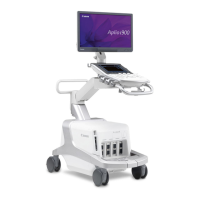
Canon Aplio i800 - User Manual

Canon Aplio i800
13 pages
Print Icon
To Next Page IconTo Next Page
Loading...
No. 2B771-447EN*F
CAUTION:
In the USA, federal law restricts this device to sale
and use by or on the order of a physician.
IMPORTANT!
Read and understand this manual before operating
the equipment. After reading, keep this manual in
an easily accessible place.
CANON MEDICAL SYSTEMS CORPORATION 2020-2021
ALL RIGHTS RESERVED
Issued : 2021-10
OPERATION MANUAL
FOR
DIAGNOSTIC ULTRASOUND SYSTEM
/ /
MODELS TUS-AI900/TUS-AI800/TUS-AI700
[FUNDAMENTALS]
(2B771-447EN*F)
For cleaning and disinfection, only the following maintenance items are extracted.
20.3 Preventive Maintenance Performed by the User
Question and Answer IconNeed help?

Do you have a question about the Canon Aplio i800 and is the answer not in the manual?

Summary

Preventive Maintenance Performed by the User

Cleaning the system

Details procedures for cleaning various components of the diagnostic ultrasound system, including transducers, monitor, and connectors.

Cleaning the transducer

Clean, disinfect, and sterilize the transducer as per the provided operation manual.

Cleaning the transducer holder and gel holder

Wipe transducer and gel holders with a dry cloth, or a soft cloth with mild detergent if stained.

Cleaning the reference signal cable

Clean reference signal cable regularly, removing organic materials using specified solutions and drying carefully.

Cleaning the ECG limb clips (clip-type electrodes)

Clean ECG limb clips regularly, removing organic materials with specified solutions and drying carefully.

Cleaning the PCG sensor and the pulse sensor

Clean PCG and pulse sensors regularly, removing organic materials with specified solutions and drying carefully.

Cleaning the monitor

Clean monitor cover with mild detergent; LCD screen with soft cotton cloth or lens paper; use water/detergent for tough stains.

Cleaning the surface of the touch panel

Clean touch panel surface with a lens cleaning cloth or a soft cloth moistened with water/mild detergent.

Cleaning the system, main panel, and transducer connector

Wipe system with mild detergent, clean panel switches with cotton buds, and dry/damp wipe transducer connector.

To clean the trackball

Disassemble trackball, clean ball and case interior with soft cloth/gauze, reassemble carefully, and check operation.

Cleaning the air filter

Check and clean air filter to prevent overheating. Remove filter, vacuum dust away from system, and remount.

Disinfecting the system

Describes procedures and precautions for disinfecting the system, including required gloves and methods.

Disinfection procedures

Follow procedures for disinfection, wear protective gloves, clean before disinfecting, and dry fully afterwards.

Chemicals acceptable for use

Lists acceptable chemicals for system disinfection, including quaternary ammonium compounds, ethanol, and isopropyl alcohol.

Summary

Preventive Maintenance Performed by the User

Cleaning the system

Details procedures for cleaning various components of the diagnostic ultrasound system, including transducers, monitor, and connectors.

Cleaning the transducer

Clean, disinfect, and sterilize the transducer as per the provided operation manual.

Cleaning the transducer holder and gel holder

Wipe transducer and gel holders with a dry cloth, or a soft cloth with mild detergent if stained.

Cleaning the reference signal cable

Clean reference signal cable regularly, removing organic materials using specified solutions and drying carefully.

Cleaning the ECG limb clips (clip-type electrodes)

Clean ECG limb clips regularly, removing organic materials with specified solutions and drying carefully.

Cleaning the PCG sensor and the pulse sensor

Clean PCG and pulse sensors regularly, removing organic materials with specified solutions and drying carefully.

Cleaning the monitor

Clean monitor cover with mild detergent; LCD screen with soft cotton cloth or lens paper; use water/detergent for tough stains.

Cleaning the surface of the touch panel

Clean touch panel surface with a lens cleaning cloth or a soft cloth moistened with water/mild detergent.

Cleaning the system, main panel, and transducer connector

Wipe system with mild detergent, clean panel switches with cotton buds, and dry/damp wipe transducer connector.

To clean the trackball

Disassemble trackball, clean ball and case interior with soft cloth/gauze, reassemble carefully, and check operation.

Cleaning the air filter

Check and clean air filter to prevent overheating. Remove filter, vacuum dust away from system, and remount.

Disinfecting the system

Describes procedures and precautions for disinfecting the system, including required gloves and methods.

Disinfection procedures

Follow procedures for disinfection, wear protective gloves, clean before disinfecting, and dry fully afterwards.

Chemicals acceptable for use

Lists acceptable chemicals for system disinfection, including quaternary ammonium compounds, ethanol, and isopropyl alcohol.

Overview

This document outlines the operational and maintenance procedures for the Canon Medical Systems Corporation's Aplio i900, Aplio i800, and Aplio i700 diagnostic ultrasound systems (Models TUS-A1900/TUS-AI800/TUS-AI700). It focuses on fundamental aspects, particularly cleaning and disinfection protocols, to ensure safe and effective use.

The primary function of these devices is diagnostic ultrasound imaging. They are designed for use in medical settings, with federal law in the USA restricting their sale and use to or on the order of a physician. The manual emphasizes the importance of reading and understanding its contents before operating the equipment, and advises keeping it in an easily accessible place for future reference.

Usage features are implicitly covered through the detailed maintenance instructions. Proper handling of the system and its components, such as transducers, cables, and sensors, is crucial for accurate diagnostic results and the longevity of the equipment. For instance, the manual highlights that wet reference signal cables or ECG limb clips can lead to incorrect ECG tracing displays, and immersing connectors in liquids can cause system failure. Similarly, the PCG and pulse sensors are not waterproof, necessitating careful handling during cleaning.

Maintenance features are extensively detailed, focusing on both cleaning and disinfection. The manual provides specific instructions for various parts of the system:

Cleaning the System:

Before any cleaning, it is critical to disconnect the system power plug from the outlet to prevent electric shock. Users are warned against spilling or spraying liquids onto the system or peripheral units, as this can cause electric shock. Only specified chemicals and methods should be used for cleaning to avoid deterioration or discoloration of the system's surface. Solvents like paint thinner, benzine, alcohol, or abrasive cleansers are explicitly prohibited.

  • Transducer: Transducers require cleaning, disinfection, and sterilization according to their specific operation manuals.
  • Transducer Holder and Gel Holder: These can be wiped with a soft, dry cloth to remove stains. For stubborn stains, a soft cloth moistened with mild detergent can be used.
  • Reference Signal Cable: Regular cleaning is recommended. Organic materials like blood or other body fluids should be wiped off with a soft cloth moistened with purified water, mild detergent diluted with purified water, or ethanol for disinfection (76.9 to 81.4 vol% at 15°C). The cables should then be wiped dry with a clean, soft cloth without using heat. Users must confirm that the cables show no signs of damage, deformation, or peeling. Crucially, these cables should not be allowed to get wet with water or chemical solution, and the connector should never be immersed in liquids.
  • ECG Limb Clips (Clip-type Electrodes): Regular cleaning is essential. Organic materials should be wiped off with a soft cloth moistened with purified water, mild detergent diluted with warm water (39°C or less), cationic detergent diluted with warm water (39°C or less), or ethanol for disinfection (76.9 to 81.4 vol% at 15°C). After cleaning, the clips should be wiped dry with a clean, soft cloth without using heat, ensuring no electrolyte cream or chemical solution remains. Damage, deformation, or peeling should be checked. Boiling the clips is prohibited.
  • PCG Sensor and Pulse Sensor: These sensors should be cleaned regularly by wiping off organic materials with a soft cloth moistened with purified water, mild detergent diluted with purified water, or ethanol for disinfection (76.9 to 81.4 vol% at 15°C). They should then be wiped dry with a clean, soft cloth without using heat. Immersion in water or chemical solution is strictly prohibited, and damage, deformation, or peeling should be confirmed.
  • Monitor: The LCD screen should not be hit or subjected to excessive force during cleaning, nor should stiff or hard cloths be used. Liquid droplets should not remain on the screen. The monitor cover can be cleaned with a soft cloth moistened with mild detergent. The LCD screen itself should be cleaned with a soft cotton cloth or lens cleaning paper. For difficult stains, a soft cloth slightly moistened with water or mild detergent can be used, followed by drying with a soft, dry cloth.
  • Touch Panel: The touch panel surface can be cleaned with a commercially available lens cleaning cloth (non-woven rayon cloth). If necessary, a soft cloth moistened with water or mild detergent and tightly wrung out can be used.
  • System, Main Panel, and Transducer Connector: The system can be wiped with a soft cloth moistened with mild detergent. Cotton buds can be used to clean around switches or keys on the main panel. The transducer connector should be wiped with a soft, dry cloth, or a soft cloth moistened with water for stubborn stains.
  • Trackball: Detailed instructions are provided for disassembling, cleaning, and reassembling the trackball. This involves turning the trackball ring to unlock and remove it, separating the ball from the ring, and removing the inner ring (dustproofing). All foreign matter should be removed from the ball and the interior of the case using a soft cloth or gauze, avoiding sharp or hard materials. Microfiber cloth is recommended for lens cover sections. After cleaning, the ball and inner ring must be correctly reinserted, and the ring locked. Post-installation, the trackball's operation should be checked for smoothness, absence of noise, and secure fit, and its functionality confirmed after powering on the system.
  • Air Filter: The air filter should be checked and cleaned to prevent overheating and maintain system performance. The casters should be locked, and the air filter removed. Dust should be removed using a vacuum cleaner away from the system. The air filter cannot be washed with water and should not be removed while the system is booting up.

Disinfecting the System:

Disinfection procedures must be performed by a disinfection professional, adhering to strict precautions.

  • Safety First: Before disinfection, the system power cable must be disconnected. After disinfection, the room must be fully ventilated before turning the system ON to prevent fire or explosion from flammable or explosive gases. Spilling or spraying liquids onto the system or peripheral units is prohibited.
  • Infection Control: Sterile protective gloves must be worn, and new gloves used for each disinfection.
  • Approved Methods: Only methods and chemicals specified in the manual should be used to avoid improper disinfection or damage to the system's surface.
  • Drying: After chemical disinfection, the system's surface must be fully dried.
  • Disinfectant Efficacy: Canon Medical Systems does not guarantee the efficacy of disinfectants; users should consult the chemical manufacturer for information. The effectiveness of the chemical should be determined based on criteria like effective period, number of uses, discoloration, and test kit results.
  • Procedure: The system should be turned OFF and unplugged. Protective gloves must be worn. Cleaning must precede disinfection. A soft cloth moistened with a liquid chemical disinfectant should be lightly squeezed and used to wipe the surface, taking care not to let detergent enter the unit. After chemical disinfection, the system should be wiped with sterile or deionized water to remove residual disinfectant, and then dried with a soft sterile cloth or gauze without using heat. Residual disinfectant must be confirmed absent.
  • Post-Disinfection Check: Disinfected parts should be checked for damage or deformation. The room must be fully ventilated before powering on the system.
  • Long-term Effects: Repeated chemical disinfection may gradually alter the system's surface. Any functional abnormality after disinfection requires stopping use and contacting Canon Medical Systems service.

Acceptable Chemicals:

A comprehensive list of acceptable chemicals for various system parts is provided, including quaternary ammonium compounds, sodium hypochlorite, chlorine tablets, polyhexamethylene biguanide, isopropyl alcohol, ethanol, peracetic acid, alkyldiaminoethylglycine hydrochloride, benzalkonium chloride, benzethonium chloride, and chlorhexidine gluconate. Specific warnings include not using hypochlorite for the reference signal cable and noting that some chemicals are not available in the USA or cannot be used on certain parts (e.g., footswitch joint section). For peripheral devices, their respective documentation should be consulted.

Canon Aplio i800 Specifications

General IconGeneral
BrandCanon
ModelAplio i800
CategoryMedical Equipment
LanguageEnglish

Related product manuals