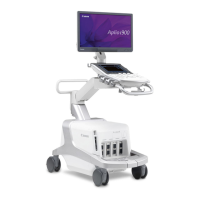
This document outlines the disinfection and maintenance procedures for the Canon Medical Systems Aplio-i series ultrasound systems. It provides essential information for users to ensure the safe and reliable operation of the device, focusing on preventive maintenance and proper disinfection techniques.
Function Description
The Aplio-i series systems are advanced ultrasound diagnostic devices designed for various medical imaging applications. While the specific functions of the ultrasound system itself are not detailed in this guide, the document focuses on the operational aspects related to its upkeep, ensuring the system remains hygienic and functional for patient examinations. The system is designed to be used in a clinical environment, and as such, requires regular cleaning and disinfection to prevent the spread of infection.
Usage Features
The primary usage features highlighted in this document revolve around the interaction with the system for maintenance and disinfection purposes. Users are guided on how to handle various components during these processes:
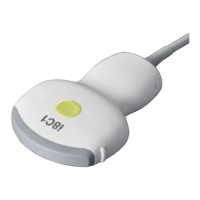
- Transducer Handling: The guide emphasizes the importance of cleaning, disinfecting, and sterilizing the transducer according to its specific operation manual. This indicates that transducers are critical, patient-contact components requiring stringent hygiene protocols.
- System Power Control: For safety during maintenance and disinfection, users are instructed to turn off the system power and disconnect the power cable from the outlet. This is a fundamental safety measure to prevent electric shock.
- Trackball Operation: The document provides detailed instructions on how to remove, clean, and reassemble the trackball, a key input device for navigating the system interface. This ensures smooth and accurate control during examinations.
- Monitor Interaction: Users are advised on the proper cleaning of the LCD monitor screen and cover, highlighting the need for gentle handling to prevent damage.
- Interface Cleaning: Instructions are given for cleaning the touch panel, main panel switches/keys, and transducer connectors, all of which are frequently touched surfaces during system operation.
- Air Filter Management: The guide details the process of removing, cleaning, and remounting the air filter, which is crucial for preventing system overheating and maintaining performance.
Maintenance Features
The Aplio-i series systems incorporate several features and recommendations to facilitate effective maintenance, both by the user and by service professionals:
- Preventive Maintenance Schedule: The document outlines the importance of daily checks, periodic inspections, and the replacement of consumable parts as part of preventive maintenance. It notes that some tasks require special techniques, tools, or involve specific risks, necessitating professional service.
- Service Contracts: Canon Medical Systems offers preventive maintenance services on a pay-for-service basis and encourages users to sign maintenance contracts for periodic inspection and cleaning by service personnel. This ensures long-term reliability and optimal system operation.
- System Inspection Notifications: The system is designed to display a message in the information display area when a set period of operation (defaulting to 600 hours) has elapsed, recommending an inspection by a service engineer. This proactive notification helps prevent potential issues before they escalate.
- User-Performed Cleaning Procedures: Detailed, step-by-step instructions are provided for users to clean various parts of the system, including:
- Transducer: Referring to the transducer's specific manual for cleaning, disinfection, and sterilization.
- Transducer Holder and Gel Holder: Wiping with a soft, dry cloth or a soft cloth moistened with mild detergent for stubborn stains.
- Reference Signal Cable: Wiping with a soft cloth moistened with mild detergent, followed by a dry cloth, and ensuring clips and connectors remain dry.
- Monitor: Cleaning the monitor cover with a soft cloth and mild detergent, and the LCD screen with a soft cotton cloth or lens cleaning paper, or a slightly moistened cloth for difficult stains.
- Touch Panel: Using a commercially available lens cleaning cloth or a soft cloth moistened with water or neutral detergent.
- System, Main Panel, and Transducer Connector: Wiping with a soft cloth moistened with mild detergent, using cotton buds for switches/keys, and a soft, dry or slightly moistened cloth for the transducer connector.
- Trackball: A comprehensive procedure for disassembly, cleaning of the ball, inner ring, and lens cover sections, and reassembly, emphasizing careful handling.
- Air Filter: Instructions for removal, dust removal using a vacuum cleaner, and remounting to prevent overheating.
- Disinfection Protocols: The guide provides a dedicated section on disinfecting the system, including:
- Permitted Chemicals: A list of approved chemical disinfectants (e.g., quaternary ammonium compounds, sodium hypochlorite, isopropyl alcohol, ethanol) with a directive to refer to the manufacturer's documentation for handling.
- Disinfectable Areas: Clarification that the entire system can be disinfected, with specific exceptions like the LCD monitor screen, casters, footswitch, peripheral devices, and cables, which should be cleaned with neutral detergent.
- Disinfection Procedures: A sequence of steps for disinfection, including power-off, cable disconnection, wearing protective gloves, pre-cleaning, wiping with a moistened cloth, drying, and room ventilation after disinfection.
- Safety Precautions: Throughout the maintenance and disinfection sections, numerous warnings and cautions are provided to ensure user safety and prevent damage to the system, such as:
- Never performing service while a patient is being examined.
- Disconnecting power before cleaning or disinfecting.
- Avoiding spills or sprays of liquids onto the system.
- Not using solvents or abrasive cleansers.
- Wearing sterile protective gloves during disinfection.
- Using only specified disinfection methods and chemicals.
- Ensuring the system is fully dry after chemical disinfection.
- Ventilating the room after disinfection.
- Not booting the system without the air filter.
- Being careful when removing the trackball ring to prevent malfunction.
- Not using sharp or hard materials to clean the trackball interior.
- Abnormality Reporting: Users are instructed to stop using the system and contact a Canon Medical Systems service representative if any abnormality is found during inspection or after disinfection.
In summary, the Aplio-i series systems are designed with user-friendly maintenance in mind, providing clear guidelines for routine cleaning and disinfection, while also emphasizing the importance of professional service for more complex tasks and system longevity. The document serves as a crucial resource for maintaining the operational integrity and hygienic standards of the ultrasound system in a medical setting.

 Need help?
 General

 To Next Page