EasyManua.ls Logo

Canon DIGITAL IXUS 500 - User Manual

Canon DIGITAL IXUS 500
363 pages
Print Icon
To Next Page IconTo Next Page
Loading...
o
o
o
o
~.1
~0)7-7}i/~1Jj,5~J\~:J::;I;::Ji~9QWII;:,
&:,gaf5lml(})
CD-ROM tJ\5
~5
-(
J(
c
'..J"7
r--"
J:
P
~-1:;.A
!'-)v
VT <tt.t5lt
\0
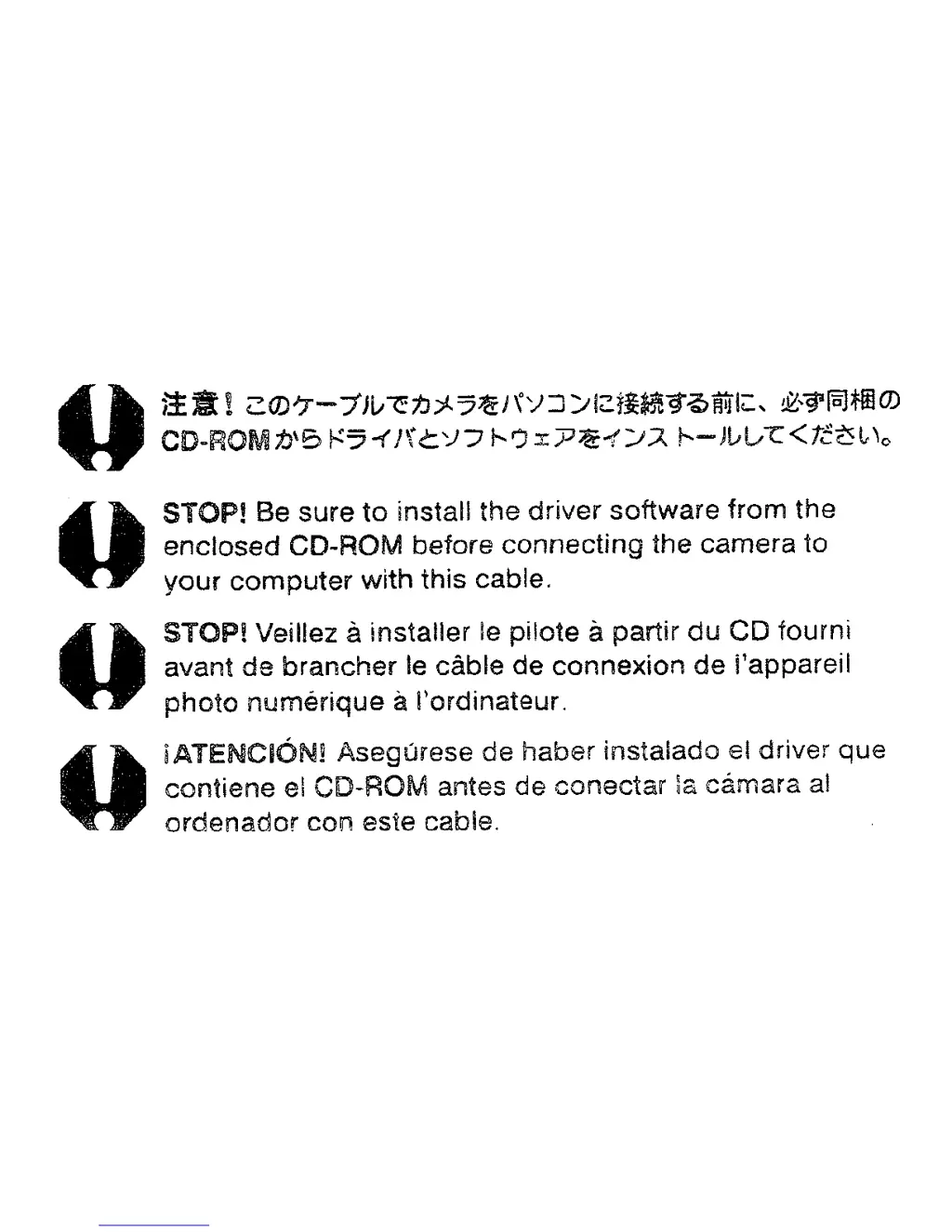
STOP! Be sure
to
install
the
driver
software
from
the
enclosed
CD-ROM before
connecting
the
camera to
your
computer
with this cable.
STOPl
Veillez ainstaller Ie
pilote
a
partir
du
CD fourni
avant
de
brancher
Ie
cable
de
connexion
de
i'appareil
photo
numerique
aI'ordinateur.
iATENCIONi
Asegurese de
haber
instalado el driver
que
contiene el CD-ROM antes
de
conectar
la camara al
ordenador
con esie cable.

Table of Contents

Other manuals for Canon DIGITAL IXUS 500

Questions and Answers

Summary

Read This First

Please Read

Important initial instructions and warnings before operating the camera.

Preparing the Camera

Charging the Battery Pack

Procedure for charging the camera's battery pack for the first time.

Installing the Battery Pack

Step-by-step instructions for correctly inserting the battery pack.

Installing the CF Card

Instructions for inserting the CompactFlash card into the camera's card slot.

Basic Camera Operations

Shutter Button and Menus

Operation of shutter button and accessing settings via FUNC/MENU buttons.

Shooting Modes and Techniques

Shooting in Auto Mode

Basic shooting procedure where the camera automatically sets all parameters.

Erasing and Formatting

Erasing Single Images

Procedure for deleting individual unwanted images.

Formatting CF Cards

How to initialize a CF card, erasing all data.

Computer Connectivity

Computer System Requirements

Minimum system requirements for Windows and Macintosh.

Downloading Images by Direct Transfer

Method to download images using camera operations via Direct Transfer.

Troubleshooting

Start by Checking This

Initial troubleshooting steps and system requirements check.

Summary

Read This First

Please Read

Important initial instructions and warnings before operating the camera.

Preparing the Camera

Charging the Battery Pack

Procedure for charging the camera's battery pack for the first time.

Installing the Battery Pack

Step-by-step instructions for correctly inserting the battery pack.

Installing the CF Card

Instructions for inserting the CompactFlash card into the camera's card slot.

Basic Camera Operations

Shutter Button and Menus

Operation of shutter button and accessing settings via FUNC/MENU buttons.

Shooting Modes and Techniques

Shooting in Auto Mode

Basic shooting procedure where the camera automatically sets all parameters.

Erasing and Formatting

Erasing Single Images

Procedure for deleting individual unwanted images.

Formatting CF Cards

How to initialize a CF card, erasing all data.

Computer Connectivity

Computer System Requirements

Minimum system requirements for Windows and Macintosh.

Downloading Images by Direct Transfer

Method to download images using camera operations via Direct Transfer.

Troubleshooting

Start by Checking This

Initial troubleshooting steps and system requirements check.

Canon DIGITAL IXUS 500 Specifications

General IconGeneral
Image Sensor1/1.8-inch CCD
Effective Pixels5.0 Megapixels
Optical Zoom3x
Aperturef/2.8-f/4.9
ISO SensitivityAuto, 50, 100, 200, 400
Digital Zoom3.6x
Shutter Speed15 - 1/2000 sec
Storage MediaCompactFlash (Type I)
Dimensions87 x 57 x 28 mm (3.4 x 2.2 x 1.1 in)
Video Recording320 x 240 at 15 fps
Image ProcessorDIGIC

Related product manuals