EasyManua.ls Logo

Canon EF 50mm f/2.5 Compact Macro - User Manual

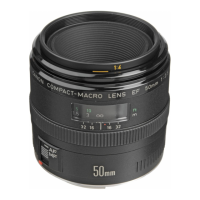
Canon EF 50mm f/2.5 Compact Macro
2 pages
Print Icon
To Next Page IconTo Next Page
Loading...
EF100mm f/2.8
Thank you for purchasing a Canon product.
The EF50mm f/2.5 Compact macro is a macro lens that can be used for
standard shooting and for close-up shooting up to 1/2 × (0.5×). This is a
standard macro lens for EOS cameras. Lifesize magnification (1×) is also
possible by attaching the Life Size Converter EF sold separately.
The Canon EF100mm f/2.8 Macro is a medium telephoto macro lens that
provides life-size close-up capability.
Safety Precautions
1. Do not look at the sun or a bright light source through the lens
or camera. Doing so could result in loss of vision. Looking at the
sun directly through the lens is especially hazardous.
2. Whether it is attached to the camera or not, do not leave the
lens under the sun without the lens cap attached. This is to
prevent the lens from concentrating the sun’s rays, which could
cause a fire.
Handling Cautions
If the lens is taken from a cold environment into a warm one,
condensation may develop on the lens surface and internal parts.
To prevent condensation in this case, first put the lens into an airtight
plastic bag before taking it from a cold to warm environment. Then take
out the lens after it has warmed gradually. Do the same when taking
the lens from a warm environment into a cold one.
1. Mounting and Detaching the Lens
See your camera’s instructions for details on mounting and
detaching the lens.
After detaching the lens, place the lens with the rear end up to prevent
the lens surface and contacts from getting scratched.
If the contacts get soiled, scratched, or have fingerprints on them,
corrosion or faulty connections can result. The camera and lens may
not operate properly.
If the contacts get soiled or have fingerprints on them, clean them with
a soft cloth.
If you remove the lens, cover it with the dust cap. To attach it properly,
align the lens mount index and the
index of the dust cap, and turn
clockwise. To remove it, reverse the order.
2. Setting the Focus Mode
To shoot in autofocus (AF) mode, set the focus mode switch to AF
.
To shoot in manual focus (MF) mode, set the focus mode switch to MF,
and focus by turning the focusing ring.
Do not touch the rotating parts of the lens while AF is active.
3. Switching the Focusing Distance Range
(EF100mm f/2.8 Macro only)
FULL: Allows a focusing distance range of 0.31 m (Min. focusing
distance) to
for standard shooting
.
LIMIT: Allows a focusing distance range of 0.31 m (life-size) to 0.57 m
(0.25×) for close-up shots.
4. Close-up Photography (Macro Photography)
Close-up photos are possible up to 0.5× maximum magnification with the
EF50mm f/2.5 Compact macro, and up to 1× (life-size) magnification with
the EF100mm f/2.8 Macro. The focusing distance is the distance from the
subject to the film plane.
When focusing, you can give priority to framing or to magnification.
[Framing Priority]
While looking through the viewfinder and framing the subject, focus with
the AF or MF mode.
[Magnification Priority]
(1)
Set the lens’ focus mode switch to MF.
(2)
Set the magnification.
While referring to the distance scale on the lens, turn the focusing ring
to the desired magnification.
(3)
Focus the subject.
While looking through the viewfinder, move the camera forward or
back to find the point of focus.
(4)
Touch up the focus.
Turn the focusing ring for fine focusing.
Since macro shots have a very shallow depth of field, focus
carefully to obtain proper sharpness.
To prevent camera shake, using a Remote Switch and tripod is
recommended (both sold separately).
To check the depth of field, press the camera’s depth-of-field
preview button.
Nomenclature
Magnification scale (normal operation)
Distance scale
Depth-of-Field scale
Magnification scale with Life Size Converter
EF attached (EF50mm f/2.5 only)
Distance index
Focusing ring
Focus mode switch
Lens mount index
Contacts
Focusing distance range selector switch
(EF100mm f/2.8 Macro only)
Macro Lenses
EF50mm f/2.5 Compact macro EF100mm f/2.8 Macro
Instructions

COPY
Question and Answer IconNeed help?

Do you have a question about the Canon EF 50mm f/2.5 Compact Macro and is the answer not in the manual?

Summary

Nomenclature

Instructions

Safety Precautions

Warns against looking at the sun and leaving the lens exposed to direct sunlight to prevent fire.

Handling Cautions

Advises on preventing condensation when moving between environments and cleaning contacts.

Mounting and Detaching the Lens

Provides instructions on how to attach and remove the lens from the camera, including care for contacts.

Setting the Focus Mode

Explains how to switch between autofocus (AF) and manual focus (MF) modes.

Switching the Focusing Distance Range

Details how to use the FULL and LIMIT settings for focusing distance range on the EF100mm f/2.8 Macro.

Close-up Photography (Macro Photography)

Guides on achieving close-up shots, framing priority, magnification priority, and focusing techniques.

Setting the Exposure

Depth-of-Field Scale

Infrared Index

Filters

Specifications

Overview

The Canon Macro Lenses manual describes two lenses: the EF50mm f/2.5 Compact macro and the EF100mm f/2.8 Macro.

Function Description:

The EF50mm f/2.5 Compact macro is a versatile macro lens suitable for both standard shooting and close-up photography, offering up to 1/2x (0.5x) magnification. When paired with the separately sold Life Size Converter EF, it can achieve life-size (1x) magnification. The EF100mm f/2.8 Macro is a medium telephoto macro lens designed for life-size close-up capability (1x). Both lenses are compatible with EOS cameras.

Important Technical Specifications:

EF50mm f/2.5 Compact macro:

  • Focal Length/Aperture: 50mm, f/2.5
  • Lens Construction: 8 groups, 9 elements
  • Angle of View: Diagonal-46°, Vertical-27°, Horizontal-40°
  • Focusing Distance Ranges: 0.23 m to ∞ (0.58 ft to ∞)
  • Max. Magnification: 0.5x (1x with Life Size Converter EF attached)
  • Filter Diameter: 52 mm
  • Max. Diameter and Length: 67.6 x 63 mm (2.7 x 2.5 inch)
  • Weight: 280 g (9.8 oz)

EF100mm f/2.8 Macro:

  • Focal Length/Aperture: 100mm, f/2.8
  • Lens Construction: 9 groups, 10 elements
  • Angle of View: Diagonal-24°, Vertical-14°, Horizontal-20°
  • Focusing Distance Ranges:
    • FULL: 0.31 m to ∞ (0.79 ft to ∞)
    • LIMIT: 0.31 m to 0.57 m (0.8 ft to 0.14 ft) or 0.57 m to ∞ (1.45 ft to ∞)
  • Max. Magnification: 1x
  • Filter Diameter: 52 mm
  • Max. Diameter and Length: 75 x 105.3 mm (3 x 4.1 inch)
  • Weight: 650 g (1.42 lb)

General Specifications:

  • Lens length is measured from the mount surface to the front end of the lens.
  • Aperture settings are specified on the camera.
  • All data is measured according to Canon standards.
  • Product specifications and appearance are subject to change without notice.
  • Case and hood are not provided with some models.
  • Filters are sold separately.

Usage Features:

Focus Mode:

  • Autofocus (AF): Set the focus mode switch to AF.
  • Manual Focus (MF): Set the focus mode switch to MF and focus by turning the focusing ring. Avoid touching rotating parts of the lens while AF is active.

Focusing Distance Range (EF100mm f/2.8 Macro only):

  • FULL: Allows a focusing distance range from 0.31 m (Min. focusing distance) to ∞ for standard shooting.
  • LIMIT: Allows a focusing distance range from 0.31 m (life-size) to 0.57 m (0.25x) for close-up shots.

Close-up Photography (Macro Photography):

  • Close-up photos are possible up to 0.5x maximum magnification with the EF50mm f/2.5 Compact macro, and up to 1x (life-size) magnification with the EF100mm f/2.8 Macro. The focusing distance is measured from the subject to the film plane.
  • Framing Priority: Focus using AF or MF mode while looking through the viewfinder and framing the subject.
  • Magnification Priority:
    1. Set the lens' focus mode switch to MF.
    2. Set the desired magnification by referring to the distance scale on the lens and turning the focusing ring.
    3. Focus the subject by moving the camera forward or back while looking through the viewfinder.
    4. Touch up the focus by turning the focusing ring for fine adjustments.
  • Due to shallow depth of field in macro shots, careful focusing is essential for sharpness.
  • A Remote Switch and tripod are recommended to prevent camera shake.
  • The camera's depth-of-field preview button can be used to check depth of field.

Setting the Exposure:

  • When using TTL metering, no exposure compensation is necessary. AE (autoexposure) is possible at all focusing distances.
  • When using a handheld exposure meter, refer to the provided exposure factor tables for EF50mm f/2.5 Compact macro (with and without Life Size Converter EF) and EF100mm f/2.8 Macro.
  • For close-up shots, the correct exposure largely depends on the subject; taking several shots at different exposures is recommended.
  • Aperture-priority AE (Av) or Manual (M) modes are recommended for close-up shots to easily adjust depth of field and exposure.

Depth-of-Field Scale:

  • Indicates the distance in front of and behind the plane of focus that appears sharp. The scale lines below the distance scale show the depth of field. The numbers on the scale are F values (for EF50mm f/2.5 Compact macro). This scale is an approximate indicator.

Infrared Index (EF50mm f/2.5 Compact macro only):

  • Corrects the focus setting when using monochrome infrared film. Focus on the subject in MF, then adjust the distance setting by moving the focusing ring to the corresponding infrared index mark.
  • Some EOS cameras may not support infrared film; refer to your camera's instructions.

Filters:

  • Filters can be attached to the filter mounting thread on the front of the lens.
  • Only one filter may be attached.
  • Use a polarizing Canon filter (52 mm).

Maintenance Features:

Mounting and Detaching the Lens:

  • Refer to your camera's instructions for details.
  • After detaching, place the lens with the rear end up to prevent scratching of the lens surface and contacts.
  • If contacts are soiled, scratched, or have fingerprints, corrosion or faulty connections may result, affecting camera and lens operation. Clean soiled contacts with a soft cloth.
  • When removing the lens, cover it with the dust cap. Align the lens mount index and the O index of the dust cap, then turn clockwise to attach. Reverse to remove.

Handling Cautions:

  • Safety: Never look at the sun or a bright light source through the lens or camera, as this can cause loss of vision. Looking directly at the sun through the lens is especially hazardous. Do not leave the lens under the sun without the lens cap attached, as concentrated sun rays can cause a fire.
  • Condensation: If the lens is moved from a cold to a warm environment (or vice versa), condensation may form on the lens surface and internal parts. To prevent this, place the lens in an airtight plastic bag before moving it, then allow it to gradually warm up (or cool down) before removing it from the bag.

Canon EF 50mm f/2.5 Compact Macro Specifications

General IconGeneral
BrandCanon
ModelEF 50mm f/2.5 Compact Macro
CategoryCamera Lens
LanguageEnglish

Related product manuals