
 Need help?
Do you have a question about the Canon EF24-105MM and is the answer not in the manual?
Details on optical performance, image stabilization, focusing, and build quality.
Explanation of symbols used for warnings and supplementary notes.
Warnings against looking at the sun and lens cap safety.
Guidance on preventing condensation when changing temperatures.
Diagram and labels identifying key lens parts.
Instructions for attaching and removing the lens from the camera.
How to set focus modes and operate the zoom ring.
How to activate and use the image stabilizer function.
Details on limitations, effective use cases, and power consumption.
Explanation of infinity distance mark and infrared index.
Instructions for attaching and using the lens hood.
Information on attaching filters and compatibility with filter holders.
Guidance on using extension tubes and close-up lenses.
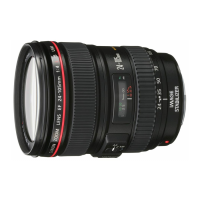
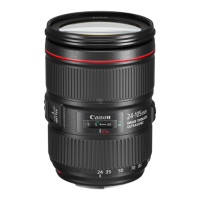
This document describes the Canon EF24-105mm f/4L IS USM lens, a high-performance standard zoom lens designed for EOS cameras. It features an Image Stabilizer and covers a wide range of focal lengths from wide-angle to mid-telephoto, making it suitable for various shooting conditions, especially hand-held photography at slower shutter speeds.
The Canon EF24-105mm f/4L IS USM lens is equipped with an Image Stabilizer (IS) and an Ultrasonic Motor (USM). The IS provides an equivalent effect of a shutter speed three stops faster, which is particularly effective in dimly lit scenes, indoors, or in locations where flash photography is forbidden, such as art galleries or theater stages. It also helps in situations where the photographer's footing is uncertain. The USM ensures fast and quiet focusing.
The lens supports both autofocus (AF) and manual focus (MF) modes. In AF mode, the focus mode switch should be set to AF. For manual focusing, the switch should be set to MF, and focusing is achieved by turning the focusing ring. Full-time manual focus is also available in ONE SHOT AF mode by pressing the shutter button halfway and turning the focusing ring.
Zooming is performed by turning the lens's zoom ring. It is recommended to finish zooming before focusing, as changing the zoom ring after focusing can affect the focus.
The lens is capable of close-up photography (macro photography), with a minimum focusing distance of 0.45 m (1.5 ft) at all focal lengths. For focusing at this minimum distance, the focus mode switch should be set to MF, and the photographer should adjust their body position to achieve focus.
The Image Stabilizer should be set to ON when in use. If not using the IS function, it should be set to OFF. When the shutter button is pressed halfway, the Image Stabilizer starts operating. The image in the viewfinder should stabilize before pressing the shutter button fully to take the picture.
The lens length is measured from the mount surface to the front end of the lens. An additional 21.5 mm is added when including the lens cap and dust cap. The listed size and weight are for the lens only, unless otherwise indicated. Aperture settings are specified on the camera. This lens cannot be used with EF1.4X II/EF2X II extenders. All data is measured according to Canon standards, and product specifications and appearance are subject to change without notice.
Mounting and Detaching: To mount the lens, align the lens mount index with the index on the camera body and turn clockwise until it clicks into place. To detach, reverse the order. The lens mount features a rubber ring for enhanced water- and dust-resistance. This ring may cause slight abrasions around the camera's lens mount, but this is normal. If the rubber ring becomes worn, it can be replaced at a Canon Service Center.
Image Stabilizer Considerations: The Image Stabilizer cannot compensate for blur caused by subject movement. When taking long exposures using the Bulb setting, the STABILIZER switch should be set to OFF to prevent errors. The IS may not be fully effective when panning the camera or shooting from a bumpy surface. Using an IS lens consumes more power than a non-IS lens, potentially reducing the number of shots that can be taken. The image stabilizer operates for about two seconds even after the finger is off the shutter button; do not remove the lens during this time to prevent malfunction. When using a tripod, turn off the Image Stabilizer to save battery power. The stabilizer is equally effective for hand-held photography and photography with a monopod. The IS function also works with Extension Tube EF12 II or EF25 II. If the camera's Custom Function is set to change the assigned button for AF, the Image Stabilizer will operate when the newly assigned AF button is pressed. For EOS-1V/HS, 3, 30/33/Elan7/7E, 30V/33V/Elan7N/7NE, Elan II/Elan II E/50/50 E, 300/Rebel2000, IX, and D30 cameras, the Image Stabilizer will not work during self-timer operation.
Infinity Distance Mark: The infinity distance mark compensates for shifts in the infinity focus point due to temperature changes. The infinity position at normal temperature is when the vertical line of the L mark aligns with the distance indicator on the distance scale. For accurate manual focusing at infinity, look through the viewfinder while rotating the focusing ring.
Infrared Index: The infrared index corrects the focus setting when using monochrome infrared film. Manually focus on the subject, then adjust the distance setting by moving the focusing ring to the corresponding infrared index mark. Some EOS cameras may not support infrared film; refer to your camera's instructions. The infrared index position is based on a wavelength of 800 nm. Always observe the film manufacturer's instructions and use a red filter when taking pictures with infrared film.
Hood (EW-83H): The EW-83H hood helps block unwanted light and protects the lens from rain, snow, and dust. To attach, align the hood's attachment position mark with the red dot on the front of the lens, then turn clockwise until the lens's red dot aligns with the hood's stop position mark. The hood can be reverse-mounted for storage. Ensure the hood is properly attached to avoid blocking parts of the picture. When attaching or detaching, grasp the base of the hood to turn it, not the rim, to prevent deformation.
Filters (Sold Separately): Only one filter may be attached to the filter mounting thread on the front of the lens. For polarizing filters, use Canon's PL-C 77mm II polarizing filter. To adjust the polarizing filter, first remove the lens hood. The lens cap cannot be attached when the PL-C 77mm II polarizing filter is attached.
Gelatin Filter Holder (Sold Separately): The Gelatin Filter Holder allows the use of various filters to create effects. This lens is incompatible with Gelatin Filter Holder III but compatible with Gelatin Filter Holder IV (though the lens hood cannot be used simultaneously).
Extension Tubes (Sold Separately): Using Extension Tube EF 12 II or EF 25 II changes the camera-to-subject distance and image magnification. When an Extension Tube is attached, focus manually.
Close-up Lenses (Sold Separately): Attaching a 500 or 500D (77mm) Close-up Lens enables close-up photography. When using a Close-up Lens, focus manually.
Handling Cautions: If the lens is moved from a cold to a warm environment, condensation may form on the lens surface and internal parts. To prevent this, place the lens in an airtight plastic bag before moving it, and allow it to warm up gradually before removing it. The same procedure applies when moving from a warm to a cold environment.
Cleaning and Storage: After detaching the lens, place it with the rear end up to prevent scratching the lens surface and electrical contacts. If the contacts become soiled, scratched, or have fingerprints, corrosion or faulty connections can result, potentially causing the camera and lens to malfunction. Clean soiled contacts with a soft cloth. When the lens is removed, cover it with the dust cap. To attach the dust cap properly, align the lens mount index and the index of the dust cap, then turn clockwise. To remove it, reverse the order.
Safety Precautions: Never look at the sun or a bright light source through the lens or camera, as this can cause loss of vision. Looking directly at the sun through the lens is particularly hazardous. Do not leave the lens exposed to direct sunlight without the lens cap attached, whether it is on the camera or not. This prevents the lens from concentrating the sun's rays, which could cause a fire.
FCC Compliance: This device complies with Part 15 of the FCC Rules. Operation is subject to two conditions: (1) the device may not cause harmful interference, and (2) it must accept any interference received, including undesired operation. Do not make unauthorized changes or modifications to the equipment, as this could require stopping operation. The equipment has been tested and found to comply with Class B digital device limits, designed to provide reasonable protection against harmful interference in a residential installation. If interference occurs, try reorienting the receiving antenna, increasing separation between equipment and receiver, or consulting a dealer or experienced radio/TV technician. This digital apparatus also complies with Class B limits for radio noise emissions as set out in the interference-causing equipment standard "Digital Apparatus", ICES-003 of Industry Canada.
 General
| Brand | Canon |
|---|---|
| Model | EF24-105MM |
| Category | Camera Lens |
| Language | English |




 To Next Page