
 Need help?
Do you have a question about the Canon EF28 and is the answer not in the manual?
Highlights the key capabilities and technologies of the Canon EF28-135mm lens, such as image stabilization and zoom range.
Provides essential advice for preventing condensation and damage when changing environments, emphasizing gradual temperature adjustment.
Explains symbols and notation used for warnings and supplementary notes within the manual to ensure clarity.
Warns against looking at the sun or bright light sources through the lens to prevent vision damage.
Advises keeping the lens cap attached to prevent sun-induced fires when the lens is unattended.
Explains how to attach and store the EW-78B II lens hood for optimal light control and protection against elements.
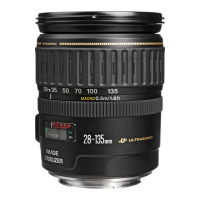
This document provides instructions for the Canon EF28-135mm f/3.5-5.6 IS USM lens, a high-performance lens designed for EOS cameras that incorporates an Image Stabilizer function. The "IS" stands for Image Stabilizer, and "USM" stands for Ultrasonic Motor.
The Canon EF28-135mm f/3.5-5.6 IS USM lens is designed to provide high-quality imaging across a versatile zoom range, from 28mm wide-angle to 135mm telephoto. Its primary function is to capture images with EOS cameras, offering both autofocus and manual focus capabilities.
A key feature of this lens is its Image Stabilizer, which helps to reduce blur caused by camera shake. This stabilizer provides an equivalent effect of a shutter speed two stops faster, making it particularly useful in challenging shooting conditions. The Ultrasonic Motor (USM) ensures fast and quiet autofocus operation, which is beneficial for both still photography and video recording. The lens also supports manual focusing even after the subject has been brought into focus in autofocus mode (specifically ONE SHOT AF), offering greater control to the photographer. It is capable of great close-ups at a minimum focusing distance of 0.5 meters (1.6 feet) across all focal lengths.
To mount the lens, align the lens mount index with the corresponding index on the camera body and turn clockwise until it locks into place. When detaching, reverse the process. It is crucial to prevent the lens surface and contacts from getting scratched or soiled, as this can lead to corrosion or faulty connections, affecting camera and lens operation. If contacts become soiled, clean them with a soft cloth. When the lens is not attached to the camera, cover it with the dust cap to protect the rear elements and contacts.
To zoom, turn the lens's zoom ring. It is important to complete zooming before focusing, as changing the zoom ring after focusing can alter the focus point.
The lens offers both autofocus (AF) and manual focus (MF) modes. To use autofocus, set the focus mode switch to "AF." For manual focus, set the switch to "MF" and adjust the focus by turning the focusing ring. The focusing ring is always active, regardless of the selected focus mode. A convenient feature is full-time manual focus, which allows for manual adjustment after autofocusing in ONE SHOT AF mode by pressing the shutter button halfway and then turning the focusing ring.
The Image Stabilizer can be used in both AF and MF modes. To activate it, set the STABILIZER switch to "ON." If the function is not needed, set the switch to "OFF." The Image Stabilizer begins operating when the shutter button is pressed halfway. It is recommended to ensure the image in the viewfinder is stable before fully pressing the shutter button to take the picture. If the camera's Custom Function is set to change the assigned button for AF operation, the Image Stabilizer will activate when that newly assigned AF button is pressed.
The Image Stabilizer is particularly effective for hand-held shots in various situations:
However, there are specific conditions where the Image Stabilizer may not be fully effective or should be turned off:
The stabilizer is equally effective for hand-held photography and when using a monopod. It also functions when the lens is used with extension tubes EF12 II or EF25 II. While some cameras may exhibit image shake after releasing the shutter, this typically does not affect the final image quality.
This mark helps compensate for shifts in the infinity focus point due to temperature changes. For accurate focusing on subjects at infinity in MF mode, align the vertical line of the "L" mark with the distance indicator on the distance scale while looking through the viewfinder and rotating the focusing ring.
The infrared index corrects the focus setting when using monochrome infrared film. To use this, first focus on the subject in MF mode, then adjust the distance setting by moving the focusing ring to the corresponding infrared index mark. Note that some EOS cameras may not support infrared film, so consult your camera's instructions. The infrared index position is based on an 800 nm wavelength. Always follow the film manufacturer's instructions and use a red filter when taking pictures with infrared film.
The EW-78B II lens hood (sold separately) helps block unwanted light and protects the lens from rain, snow, and dust. To attach it, align the hood's attachment position mark with the red dot on the front of the lens, then turn it in the direction of the arrow until the lens's red dot aligns with the hood's stop position mark. The hood can be reverse-mounted for storage. Ensure the hood is attached properly to avoid blocking parts of the picture. When attaching or detaching, grasp the base of the hood, not the rim, to prevent deformation.
Filters (sold separately) can be attached to the filter mounting thread on the front of the lens. Only one filter should be attached at a time. A polarizing Canon filter (72mm) is recommended. To adjust a polarizing filter, first remove the lens hood.
Extension tubes EF12 II or EF25 II can be attached for magnified shots, altering the shooting distance and magnification. MF mode is recommended for accurate focusing when using extension tubes.
Attaching a close-up lens 500D (72mm) enables close-up photography, with magnification ranging from 0.31 to 0.06 times. The Close-up Lens 250D cannot be attached as there is no compatible size for this lens. As with extension tubes, MF mode is recommended for accurate focusing with close-up lenses.
To prevent condensation, which can develop on the lens surface and internal parts when moving the lens from a cold to a warm environment (or vice-versa), place the lens in an airtight plastic bag before the transition. Allow the lens to gradually warm up (or cool down) inside the bag before removing it.
If the lens contacts become soiled, scratched, or have fingerprints, clean them with a soft cloth to prevent corrosion or faulty connections that could impair camera and lens operation.
Always attach the lens cap when the lens is not in use, especially when exposed to direct sunlight, to prevent the lens from concentrating the sun's rays and potentially causing a fire. When detaching the lens, place it with the rear end up to protect the lens surface and contacts from scratches.
 General
| Focal Length | 28mm |
|---|---|
| Maximum Aperture | f/2.8 |
| Lens Mount | Canon EF |
| Minimum Aperture | f/22 |
| Optical Design | 5 elements in 5 groups |
| Number of Diaphragm Blades | 5 |
| Filter Size | 52mm |
| Angle of View | 75° |
| Minimum Focusing Distance | 0.3m |
| Weight | 185g |
| Format Compatibility | Full-frame |




 To Next Page