220
QuickReference(English/
中
文
)
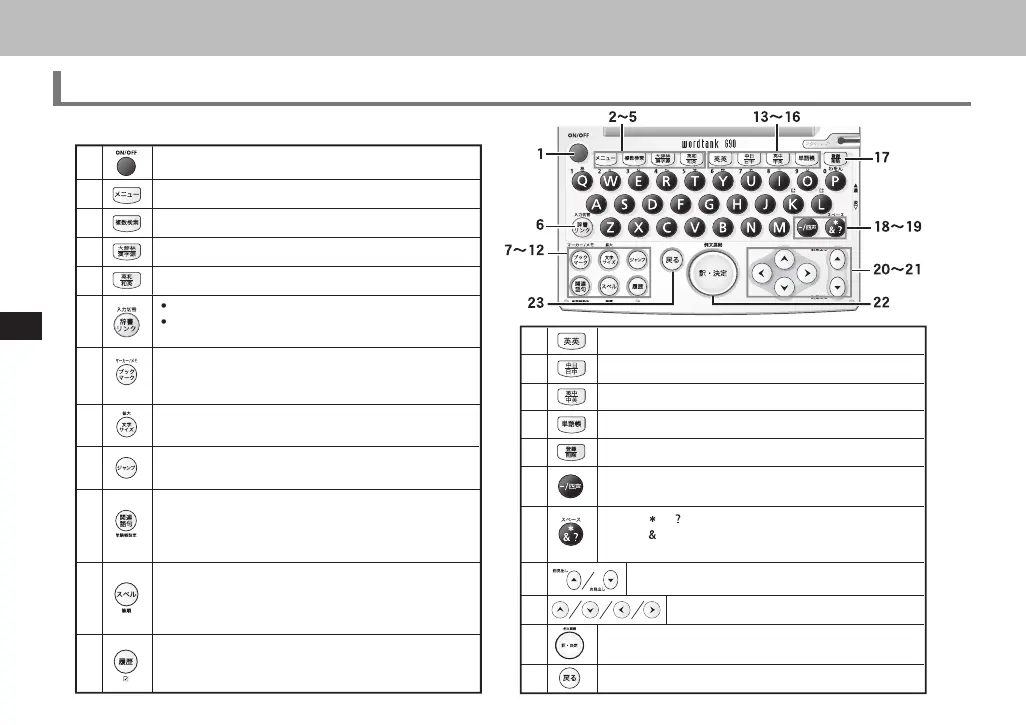
Key Functions
QuickReference
20
21
22
23
Cursor key (screen/line scroll)
• Enter/Translate
• Example sentence key
Return key
Previous/Next entry headword key
1
On/Off Key
2
Menu Key
3
4
En
-Jpn/Jpn-En
Ke
Select Dictionar
Link
Shift input method in sin
le entr
search /Memo edi
screen
etc
• Bookmark words/phrases in main text screen.
• Underline selected items in Wordmemo.
• Create/edit Memo
• Alter display font size
• Zoom one character
Select word/phrases in search result screen and jump to
another dictionary.
• Refer to common expressions, compound words, fixed
expressions, phrasal verbs and idioms.
• Pull down Memo option menu.
5
6
7
8
9
10
11
Daijirin/Kanjigen Key
Multiple Search Key
12
En
-En
ke
14
13
Chn-Jpn/Jpn-Chn key
15
Eng-Chn/Chn-Eng key
16
Wordmemo key
17
Register/Delete key
18
• Select 4 tones in pinyin input
• Input hyphen(-)
19
• Input or in wild card search.
• Input to link words in example search.
• Insert space in Memo.
• Run Spell Checker in the spell input of Eng-Jpn, Eng-
Eng, OXFORD Thesaurus, Eng-Chn dictionaries.
• Demonstrate stroke order of headwords in Kanjigen
and Chn-Jpn, Chn-Chn dictionaries.
• Display the previous History of searched words in the
current dictionary.
• Check a tick box in Wordmemo.
CSH06H206-P218-226 06.8.17, 4:40 PMPage 220 AdobePageMaker6.5J/PPC



 To Next Page
 Loading...