EasyManua.ls Logo

Canon ELPH 2 - Page 47

Canon ELPH 2
53 pages
Print Icon
To Next Page IconTo Next Page
To Previous Page IconTo Previous Page
Loading...
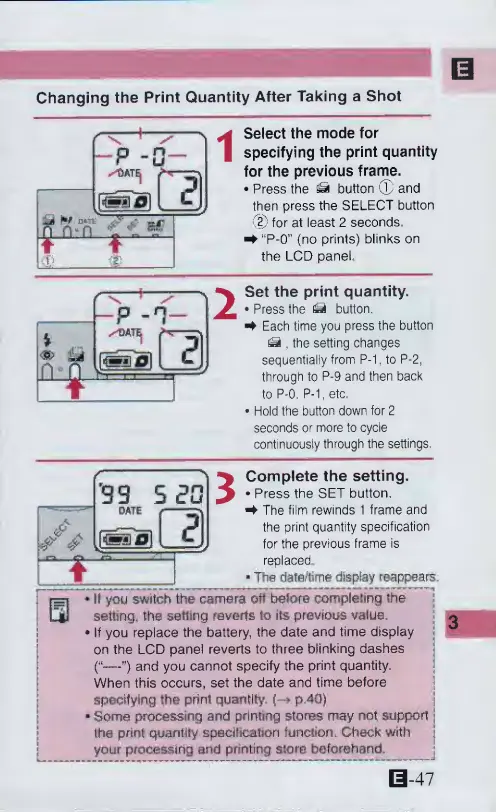
Changing
the
Print
Quantity
After
Taking
a
Shot
11
f\
1
/
'
-p
-a-
^&ATEj
.cl
jit
**r
u*
*Ti
n
run
T
t
Select
the
mode
for
specifying
the
print
quantity
for
the
previous
frame.
Press
the
^
button
©
and
then
press
the
SELECT
button
(2)
for
at
least
2
seconds
^
“P-0”
(no
prints)
blinks
on
the
LCD
panel
Set
the
print
quantity.
Press
the
button,
4
Each
time
you
press
the
button
,
the
setting
changes
sequentially
from
P-1,
to
P-2,
through
to
P-9
and
then
back
to
P-0.
P-1,
etc.
Hold
the
button
down
for
2
seconds
or
more
to
cycle
continuously
through
the
settings,
|/>
'99
5
2G
3
Complete
the
setting.
Press
the
SET
button.
The
film
rewinds
1
frame
and
the
print
quantity
specification
for
the
previous
frame
is
replaced
*
The
date/time
display
reappears,
II
you
switch
the
camera
off
before
completing
the
setting,
the
setting
reverts
to
its
previous
value.
»If
you
replace
the
battery,
the
date
and
time
display
on
the
LCD
panel
reverts
to
three
blinking
dashes
(“—”)
and
you
cannot
specify
the
print
quantity,
When
this
occurs,
set
the
date
and
time
before
specifying
the
print
quantity,
(—
p.4Q)
*
Some
processing
and
printing
stores
may
not
support
the
print
quantity
specification
function.
Check
with
your
processing
and
printing
store
beforehand.
0-47

Other manuals for Canon ELPH 2

Related product manuals